• Home
  • About 404TS
  • Contact

404 Tech Support

Where IT Help is Found

  • Articles
    • Code
    • Entertainment
    • Going Green
    • Hardware, Gadgets, and Products
    • Management
    • Network
    • News
    • Operating Systems
    • Security and Privacy
    • Software
    • System Administration
    • Talking Points
    • Tech Solutions
    • Web
    • Webmaster
  • Reviews
  • Media
    • Infographics
    • Videos
  • Tech Events
  • Tools
    • How do I find my IP address?
    • Browser and plugin tests
  • Get a Technical Consultation
You are here: Home / Articles / Hardware, Gadgets, and Products / Use HP Web Jetadmin To Simplify Printer Management

Use HP Web Jetadmin To Simplify Printer Management

2010-08-20 by Jason

In my organization, our networked laser printers are mostly made by HP and we have a large number of them so anything to make managing them and their consumables would be a godsend. One of the things to manage them, HP’s Web Jetadmin, has been out there for quite a while but I finally got around to check it out. At this point, anything that can save time and make up for the under-staffing is very welcome.

hp web jetadmin features

HP Web Jetadmin touts that it will save time, increase productivity, protect your investments, and reduce costs. HP printers offer a web interface to see things like toner levels, tray levels, page count, and change printer and network configurations and is what we’ve been using for as long as I can remember. Web Jetadmin can allow you to access all of those things from a single interface and can also interact to varying degrees with different manufacturer’s networked printers. It will also work with some PC attached printers.

The first step to take after installing the software is to runt through the discover devices process. This goes out across the network as you specify to find the different networked or PC connected devices that Web Jetadmin can understand. With this functionality, Web Jetadmin can minimally double as an asset manager program.

Once the scan is run, you should hopefully have a populated list of the printers you can interact with through Web Jetadmin.

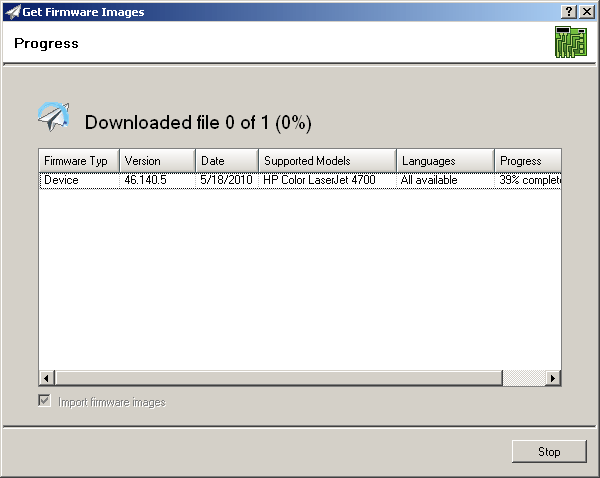
One particularly nice capability of Web Jetadmin is how it simplifies the process of updating a printer’s firmware. Without, the process can be tedious and unreliable. Web Jetadmin simplifies the matter into downloading the firmware from a catalog within the software (no more combing the HP support site) and then you import the device or jetdirect firmware updates into the repository. Once the files are in your repository, you can easily select a compatible printer from your discovered devices and initiate the firmware update.
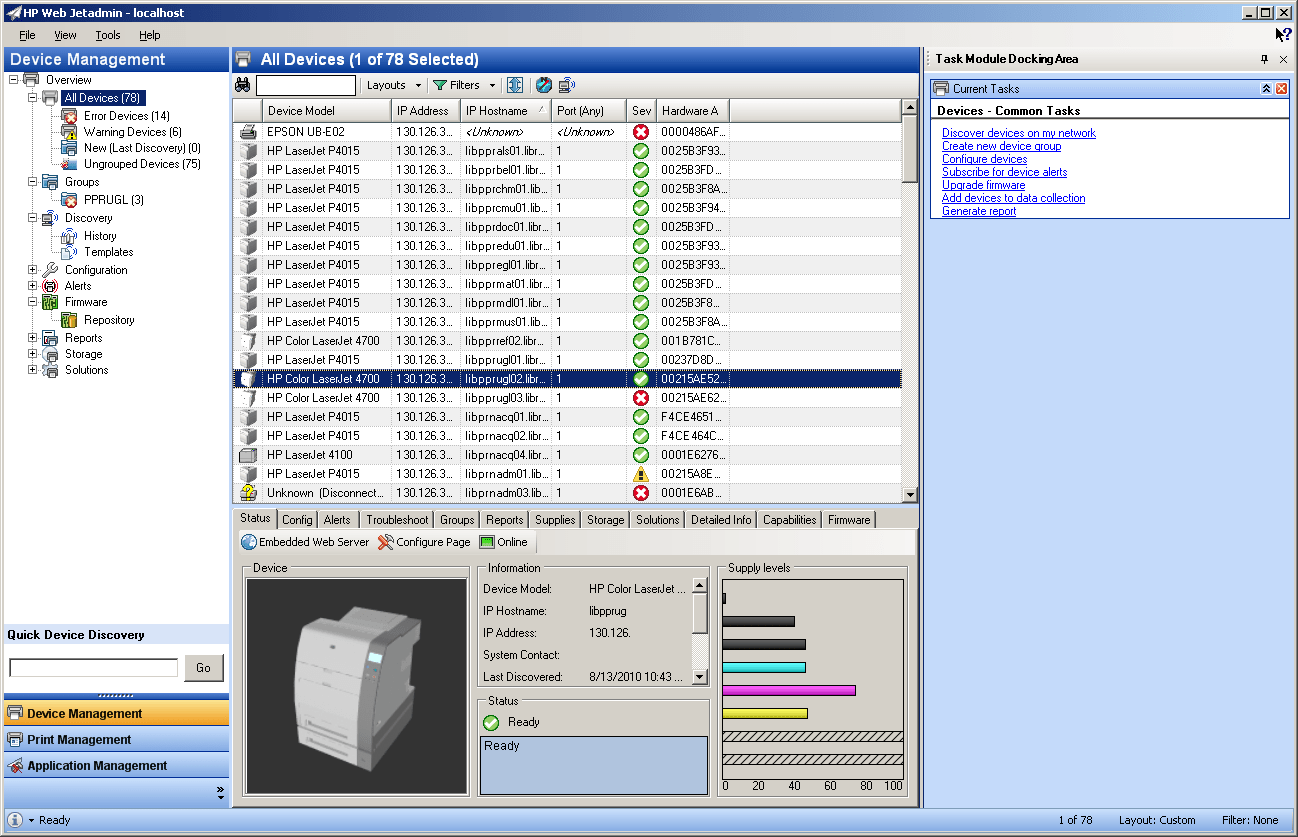
The Web Jetadmin provides device management, print management (for your print server), and application management. For me, I spend most of my time inside the device management portion administering printers and checking their status/errors. The ability to check the toner and page levels easily might have me sharing this towards the help desk or individuals in a unit that order supplies.
One cool implementation of the HP Web Jetadmin stems from another service HP provides through their Printer Assessment Services. I have heard this was free for non-profit and education organizations that HP will come in, setup Web Jetadmin to monitor your printers for 30 days and then come back and help you set up a plan to optimize your printer environment to find what scales with your organization correctly. This can help supply ammo for any necessary reductions as well as reduce your carbon footprint resulting from printing.

The information you can pull from non-HP printers is limited and varies per brand and model but it seems to be improving with each subsequent version. Right now it’s still pretty easy to just pop into a single printer’s web interface to figure out if there’s a problem but when working with batches Web Jetadmin should make it easier and it seems like it will also simplify the training process of showing how to check a printer remotely.

Filed Under: Hardware, Gadgets, and Products, System Administration

Trending

  • The results of Mobile Pwn2Own 2014
    In Security and Privacy
  • Simple Tip: Use Vouchers for Certifications
    In Tech Solutions
  • From Parts to PC – A Guide to Building a Computer in 25 Easy Steps
    In Hardware, Gadgets, and Products, Tech Solutions

Latest Media Posts

Find Out Where To Download SNES ROMs

Find Out Where To Download SNES ROMs

Multifunctional Video Conversion Tools – Wondershare Video Converter

Multifunctional Video Conversion Tools – Wondershare Video Converter

  • Popular
  • Latest
  • Today Week Month All
  • Access to the resource [servershare] has been disallowed Access to the resource [servershare] has been disallowed
  • Read the Event Logs on Windows Server Core Read the Event Logs on Windows Server Core
  • Increase IIS Private Memory Limit to improve WSUS availability Increase IIS Private Memory Limit to improve WSUS availability
  • How to ‘Unblock’ multiple files at a time with PowerShell How to 'Unblock' multiple files at a time with PowerShell
  • Setup your DFS namespace with DNS for compatibility in a mixed environment Setup your DFS namespace with DNS for compatibility in a mixed environment
  • How Virtual Reality Supports Mental Health Therapy How Virtual Reality Supports Mental Health Therapy
  • Key Strategies of Successful Coin Listing on Exchange Key Strategies of Successful Coin Listing on Exchange
  • Keeping Your Mac Healthy: A Comprehensive Guide to Maintenance and Troubleshooting Keeping Your Mac Healthy: A Comprehensive Guide to Maintenance and Troubleshooting
  • Making Distributed Software Development Work: Strategies and Best Practices for Managing Remote Teams Making Distributed Software Development Work: Strategies and Best Practices for Managing Remote Teams
  • customer contactless payment for drink with mobile phon at cafe counter bar,seller coffee shop accept payment by mobile.new normal lifestyle concept The Latest Innovations In Payment Technology
Ajax spinner

Elevator Pitch

404 Tech Support documents solutions to IT problems, shares worthwhile software and websites, and reviews hardware, consumer electronics, and technology-related books.

Subscribe to 404TS articles by email.

Recent Posts

  • How Virtual Reality Supports Mental Health Therapy
  • Key Strategies of Successful Coin Listing on Exchange
  • Keeping Your Mac Healthy: A Comprehensive Guide to Maintenance and Troubleshooting

Search

FTC Disclaimer

404TechSupport is an Amazon.com affiliate; when you click on an Amazon link from 404TS, the site gets a cut of the proceeds from whatever you buy. This site also uses Skimlinks for smart monetization of other affiliate links.
Use of this site requires displaying and viewing ads as they are presented.

Copyright © 2025 · Magazine Pro Theme on Genesis Framework · WordPress · Log in