One trend in technology lately has been to embrace a minimalistic user interface. This has entailed using a lot more icons and a lot less text. I can agree that this approach isn’t all bad. You are able to fit more on a screen and with smaller devices you are able to make the buttons bigger for an easier touch interface. In many instances, the context can explain what an icon means or what the expected action of clicking on a button will be. When applications or web services are updated to this new trend, it is quite noticeable. If an app is launched with that sort of interface, it gets assumed in the initial learning curve, though it can make that learning curve steeper.
One side effect of the trend, however, is how much more difficult it makes support. With less text, a picture is open to interpretation. I have a few examples in this article but I’m sure you already have a few that come to mind. A lot of this has to do with SEO, Search Engine Optimization, but it’s more about end users finding what they are looking for. With no fixed text, the keywords that sites use could differ. Terminology is partially the issue but the user interface is leading the problem by not offering an authoritative term for everybody to agree on.
Gmail triggered a number of complaints when it updated to match the Google+ style. Part of that theme update included exchanging buttons with text to buttons with icons. I understand the problem with text comes down to translation. A symbol is universal while text can require translation into tons of different languages for these global companies. One language’s word might also be super long while another is short, so the look could change with each language, an inconsistent experience.
For Gmail, it changed from words to icons, so it inherited a lot of terms. It also shows the words as you hover over the icons. You have ‘archive’, ‘report spam’, and ‘delete’ when you select a message. As time goes by or people see things differently, those icons could be known as “inbox” or “down box” and “exclamation button”. The trash can, folders, and tags are also skeuomorph throwbacks to their physical counterparts. It gets worse as the icons aren’t consistent. The Android Gmail app had a filing cabinet icon for archiving (I think it was the better icon of the two) but it is now the same “down arrow box” icon now with 4.2.

Indicating loading seems to be something everybody wants to do differently. If it only lasts for a second, that might be fine. However, if an application hangs at the loading screen, you might use a search engine to try and find a solution. With the disappearance of words, the standard user might not pick up that it is “loading.”
Windows 8 introduces two new icons for loading. If somebody had an application like the Windows 8 Store hung at a blank screen with this icon, you might find searches for “screen stays at flying squares” or “windows 8 hung at moving boxes” or “sliding dots”.

The other loading icon is fun to see how the circles flow with gravity but is still open to interpretation. “Ring”, “circle”, “dots”, “snake”, I’ve actually heard it called each of these when showing Windows 8 to people at my organization.

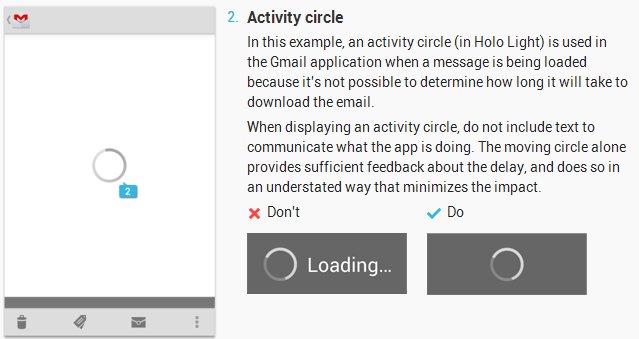
The Android Developer Guide gets into some of these UI suggestions. For loading screens, they want the “activity circle” to be used by itself with no words accompanying it, insisting that the icon provides enough information.
But, I guess you can take that suggestion with a grain of salt since Google Play when loading doesn’t even obey their own guidelines and provides the word “Loading…” next to it.

(Image credit: Reddit)
I don’t want to belabor the point so I’ll hold my examples to these. Feel free to share some others or your own thoughts in the comments. Am I not giving people enough credit? Do icons have more benefits than just language/translation issues? How do we solve the problem of people being able to use a common term so the best support article comes to the top of search results?