• Home
  • About 404TS
  • Contact

404 Tech Support

Where IT Help is Found

  • Articles
    • Code
    • Entertainment
    • Going Green
    • Hardware, Gadgets, and Products
    • Management
    • Network
    • News
    • Operating Systems
    • Security and Privacy
    • Software
    • System Administration
    • Talking Points
    • Tech Solutions
    • Web
    • Webmaster
  • Reviews
  • Media
    • Infographics
    • Videos
  • Tech Events
  • Tools
    • How do I find my IP address?
    • Browser and plugin tests
  • Get a Technical Consultation
You are here: Home / Articles / Entertainment / Amazon Spreads Kindle To Your Web Browser With Kindle Cloud Reader

Amazon Spreads Kindle To Your Web Browser With Kindle Cloud Reader

2011-08-10 by Jason

This morning Amazon announced its new Kindle Cloud Reader. This allows you, like the Kindle or Kindle apps for other devices, to access your Kindle library from your web browser and read away. The website works with Chrome on Mac, PC, Linux, and Chromebook and Safari on the Mac, PC, and iPad.

“We have written the application from the ground up in HTML5, so that customers can also access their content offline directly from their browser. The flexibility of HTML5 allows us to build one application that automatically adapts to the platform you’re using – from Chrome to iOS. To make it easy and seamless to discover new books, we’ve added an integrated, touch optimized store directly into Cloud Reader, allowing customers one click access to a vast selection of books.”

Once you sign in, it takes you to your accounts Library with instant access to any of the books you have previously bought. You can sort and customize the view of your library to find the books you’re interested in. If you don’t already have anything of interest, you can use the Kindle Store button to hop directly into shopping the Kindle Book Store on Amazon.
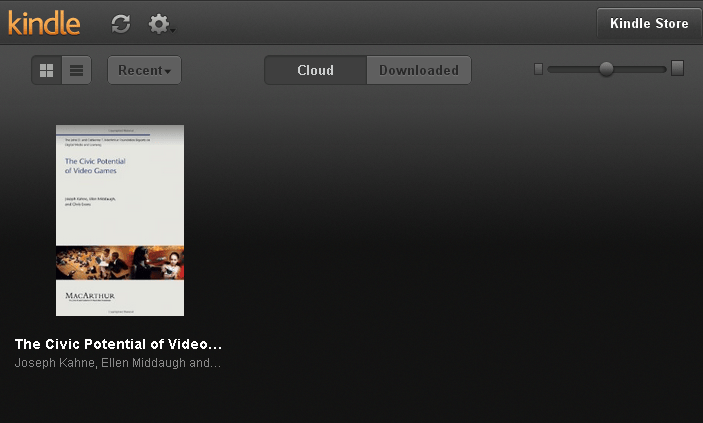
Reading is pretty straight forward and similar to the Kindle App for the PC or Android. You can optimize the font size so it’s easy for you to read.

Features of Kindle Cloud Reader include:

  • An immersive view of your entire Kindle library, with instant access to all of your books
  • Start reading over 950,000 Kindle books instantly within your browser
  • An embedded Kindle Store optimized for your web browser makes it seamless to discover new books and start reading them instantly
  • New Kindle Store for iPad is built from the ground up for iPad’s touch interface
  • Your current book is automatically made available for offline use, and you can choose to save a book for reading offline at any time
  • Receive automatic software updates without the need to download new software
  • Select any book to start reading, customize the page layout to your desired font size, text color, background color, and more
  • View all of the notes, highlights, and bookmarks that you’ve made on other Kindle apps or on Kindle
  • Sync your last page read across your Kindle and free Kindle apps so you can always pick up where you left off

To use the offline capability of the Kindle Cloud Reader, you’ll need to enable offline functionality by installing the Kindle Cloud Reader app in your browser. You’ll get asked this when you first sign into your account.
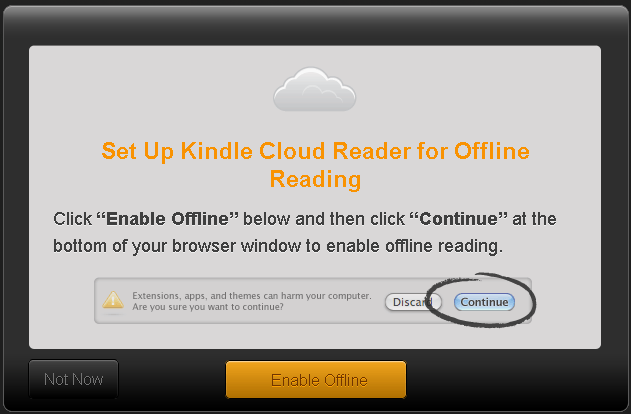
After you click Enable Offline, you’ll be prompted to download and install the app, saying ‘Continue’ to the download and ‘Yes’ to Install the app, you’ll end up with this little guy on your new tab window.

You can find the Kindle Cloud Reader at the easy to remember read.amazon.com.

Kindle Cloud Reader will be available on additional web browsers, including Internet Explorer, Firefox, the BlackBerry PlayBook browser, and other mobile browsers, in the coming months.

Filed Under: Entertainment, Media

Trending

  • Hard drive recovery
    In Tech Solutions
  • Pwn2Own 2014 begins; Results
    In Security and Privacy
  • “I’m told my IP/e-mail/website is blacklisted, now what?”
    In Tech Solutions

Latest Media Posts

Find Out Where To Download SNES ROMs

Find Out Where To Download SNES ROMs

Multifunctional Video Conversion Tools – Wondershare Video Converter

Multifunctional Video Conversion Tools – Wondershare Video Converter

  • Popular
  • Latest
  • Today Week Month All
  • Access to the resource [servershare] has been disallowed Access to the resource [servershare] has been disallowed
  • Read the Event Logs on Windows Server Core Read the Event Logs on Windows Server Core
  • Increase IIS Private Memory Limit to improve WSUS availability Increase IIS Private Memory Limit to improve WSUS availability
  • How to ‘Unblock’ multiple files at a time with PowerShell How to 'Unblock' multiple files at a time with PowerShell
  • Setup your DFS namespace with DNS for compatibility in a mixed environment Setup your DFS namespace with DNS for compatibility in a mixed environment
  • How Virtual Reality Supports Mental Health Therapy How Virtual Reality Supports Mental Health Therapy
  • Key Strategies of Successful Coin Listing on Exchange Key Strategies of Successful Coin Listing on Exchange
  • Keeping Your Mac Healthy: A Comprehensive Guide to Maintenance and Troubleshooting Keeping Your Mac Healthy: A Comprehensive Guide to Maintenance and Troubleshooting
  • Making Distributed Software Development Work: Strategies and Best Practices for Managing Remote Teams Making Distributed Software Development Work: Strategies and Best Practices for Managing Remote Teams
  • customer contactless payment for drink with mobile phon at cafe counter bar,seller coffee shop accept payment by mobile.new normal lifestyle concept The Latest Innovations In Payment Technology
Ajax spinner

Elevator Pitch

404 Tech Support documents solutions to IT problems, shares worthwhile software and websites, and reviews hardware, consumer electronics, and technology-related books.

Subscribe to 404TS articles by email.

Recent Posts

  • How Virtual Reality Supports Mental Health Therapy
  • Key Strategies of Successful Coin Listing on Exchange
  • Keeping Your Mac Healthy: A Comprehensive Guide to Maintenance and Troubleshooting

Search

FTC Disclaimer

404TechSupport is an Amazon.com affiliate; when you click on an Amazon link from 404TS, the site gets a cut of the proceeds from whatever you buy. This site also uses Skimlinks for smart monetization of other affiliate links.
Use of this site requires displaying and viewing ads as they are presented.

Copyright © 2025 · Magazine Pro Theme on Genesis Framework · WordPress · Log in