• Home
  • About 404TS
  • Contact

404 Tech Support

Where IT Help is Found

  • Articles
    • Code
    • Entertainment
    • Going Green
    • Hardware, Gadgets, and Products
    • Management
    • Network
    • News
    • Operating Systems
    • Security and Privacy
    • Software
    • System Administration
    • Talking Points
    • Tech Solutions
    • Web
    • Webmaster
  • Reviews
  • Media
    • Infographics
    • Videos
  • Tech Events
  • Tools
    • How do I find my IP address?
    • Browser and plugin tests
  • Get a Technical Consultation
You are here: Home / Articles / Tech Solutions / Windows Live Essentials 2011

Windows Live Essentials 2011

2011-02-17 by Jason

The other evening, I found myself needing Windows Movie Maker and was surprised to find that it was not bundled with Windows 7 and it had been with earlier operating systems. With a quick search, I tracked it down to being contained within the Windows Live Essentials 2011 bundle.

Windows Live Essentials 2011 is a free package from Microsoft for Windows Vista and Windows 7 PCs with a separate version for Windows XP. It includes a number of applications that you might be interested in. I don’t want to clutter up my computer with software I’m not going to use, so when running through the installer I’m going to click Custom and this can show us what programs are included.
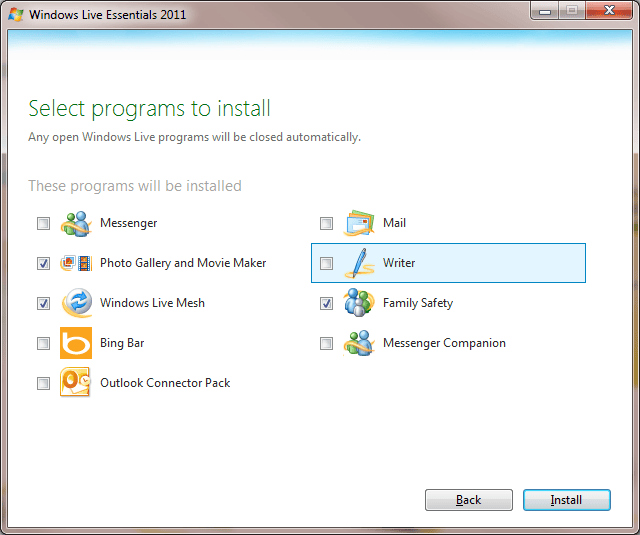
Messenger – Stay in touch with the people you care about most from your PC, phone, or the web. Share photos and videos as you chat, and see the latest updates from your friends.

Photo Gallery – Get great tools for organizing, touching up, and sharing your photos and videos. Create stunning panoramas, movies, and slide shows, and publish them online.

Movie Maker – Turn your photos and videos into polished movies that are easy to share. Add special effects, transitions, sound, and captions to help tell your story in style.

Windows Live Mesh – Keep photos and documents in sync between your computers, and on SkyDrive. Connect remotely to all of the files and programs on your PCs.

Bing Bar – Get search results from Bing without leaving the website you’re on.

Outlook Connector Pack – Includes Microsoft Outlook Hotmail Connector and Outlook Social Connector Provider for Messenger.

Mail – Manage multiple email accounts, calendars, and your contacts, even when you’re offline.

Writer – Blog like a pro, adding photos, videos, maps, and more.

Family Safety – Parental controls to help parents keep their children safe online.

Messenger Companion – See and comment on links your friends have shared as you visit websites in Internet Explorer.

Not bad for a free bundle of software. The Photo Gallery App, you might even recognize from TV commercials – the annoying one with the mom editing a Family Photo – has the Photo Fuse feature and a few others that might boost its usability. If you’re looking to flesh out your new Windows 7 with a little more functionality, check out what Windows Live Essentials 2011 gives you for free before you spend any money.

Filed Under: Tech Solutions

Trending

  • Data Execution Prevention Keeps Stopping The Print Spooler
    In Hardware, Gadgets, and Products, Tech Solutions
  • Resolve Internet Explorer Slowly Opening New Tabs
    In Software, Tech Solutions
  • How to: Sort an Excel spreadsheet while keeping the rows intact
    In Tech Solutions

Latest Media Posts

Find Out Where To Download SNES ROMs

Find Out Where To Download SNES ROMs

Multifunctional Video Conversion Tools – Wondershare Video Converter

Multifunctional Video Conversion Tools – Wondershare Video Converter

  • Popular
  • Latest
  • Today Week Month All
  • Access to the resource [servershare] has been disallowed Access to the resource [servershare] has been disallowed
  • Read the Event Logs on Windows Server Core Read the Event Logs on Windows Server Core
  • Increase IIS Private Memory Limit to improve WSUS availability Increase IIS Private Memory Limit to improve WSUS availability
  • How to ‘Unblock’ multiple files at a time with PowerShell How to 'Unblock' multiple files at a time with PowerShell
  • Setup your DFS namespace with DNS for compatibility in a mixed environment Setup your DFS namespace with DNS for compatibility in a mixed environment
  • How Virtual Reality Supports Mental Health Therapy How Virtual Reality Supports Mental Health Therapy
  • Key Strategies of Successful Coin Listing on Exchange Key Strategies of Successful Coin Listing on Exchange
  • Keeping Your Mac Healthy: A Comprehensive Guide to Maintenance and Troubleshooting Keeping Your Mac Healthy: A Comprehensive Guide to Maintenance and Troubleshooting
  • Making Distributed Software Development Work: Strategies and Best Practices for Managing Remote Teams Making Distributed Software Development Work: Strategies and Best Practices for Managing Remote Teams
  • customer contactless payment for drink with mobile phon at cafe counter bar,seller coffee shop accept payment by mobile.new normal lifestyle concept The Latest Innovations In Payment Technology
Ajax spinner

Elevator Pitch

404 Tech Support documents solutions to IT problems, shares worthwhile software and websites, and reviews hardware, consumer electronics, and technology-related books.

Subscribe to 404TS articles by email.

Recent Posts

  • How Virtual Reality Supports Mental Health Therapy
  • Key Strategies of Successful Coin Listing on Exchange
  • Keeping Your Mac Healthy: A Comprehensive Guide to Maintenance and Troubleshooting

Search

FTC Disclaimer

404TechSupport is an Amazon.com affiliate; when you click on an Amazon link from 404TS, the site gets a cut of the proceeds from whatever you buy. This site also uses Skimlinks for smart monetization of other affiliate links.
Use of this site requires displaying and viewing ads as they are presented.

Copyright © 2025 · Magazine Pro Theme on Genesis Framework · WordPress · Log in