• Home
  • About 404TS
  • Contact

404 Tech Support

Where IT Help is Found

  • Articles
    • Code
    • Entertainment
    • Going Green
    • Hardware, Gadgets, and Products
    • Management
    • Network
    • News
    • Operating Systems
    • Security and Privacy
    • Software
    • System Administration
    • Talking Points
    • Tech Solutions
    • Web
    • Webmaster
  • Reviews
  • Media
    • Infographics
    • Videos
  • Tech Events
  • Tools
    • How do I find my IP address?
    • Browser and plugin tests
  • Get a Technical Consultation
You are here: Home / Articles / Software / Previewing the Paint.NET 4.0 beta

Previewing the Paint.NET 4.0 beta

2014-04-25 by Jason

I’m a big fan of the image editor Paint.NET. It has been running at version 3.5.x for over a year but  a beta version of 4.0 has been in the works lately. Just this week, a new build of the beta was released. I’ve worked with the previous builds and decided to check this one out and provide a quick preview of some of the upcoming changes.

The best news about PDN 4.0 is that it doesn’t change that much. For somebody like myself who uses the software multiple times a day, being able to quickly navigate around makes the software that much better. Paint.NET is often listed as a Photoshop alternative. Paint.NET can do most of the image editing that a person needs to do, for free, without burying the basics.

pdn4_main

Images are moved to begin left-to-right immediately after the tools, instead of being right-justified. They can also be rearranged by dragging and dropping. The animation is smooth and helpful to the UI experience.

In the top-right of the window, you will see quick buttons to turn off or on the Tools, History, Layers, or Colors windows. Next to those four toggles is a settings button. The new settings even improve the usability and speed of Paint.NET. You can set your default tool, in my case, I prefer the Rectangle Select. You can also set some default behaviors of the different tools. I immediately used the settings to change the shapes to be a solid fill, instead of just a border. You can also adjust brush size, fonts, and other default behaviors of the tools.

pdn4_settings

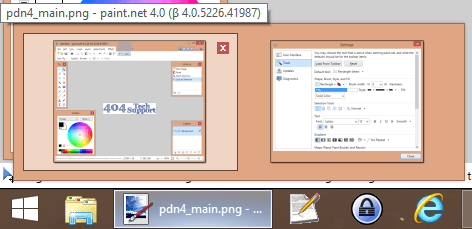
Paint.NET 4.0 also brings support to tab previews. Similar to how Internet Explorer allows you to select which tab to go to straight from hovering over it in the Windows taskbar, Paint.NET will show you a thumbnail if you are working on multiple images.
pdn4_hover

The new version seems to be smooth and bring a lot of polish to an already solid application. The final version should be approaching release soon, as more bugs get squashed with each beta release.

If you would like to try the 4.0 beta yourself, you can download it from getpaint.net.

Filed Under: Software

Trending

  • NMAP – Your open ports
    In Security and Privacy, Software
  • Simple Tip: Use Vouchers for Certifications
    In Tech Solutions
  • Adobe Flash Player Update Just Released to Patch Zero-Day Vulnerability; Flash Player 11 News
    In Security and Privacy, Software

Latest Media Posts

Find Out Where To Download SNES ROMs

Find Out Where To Download SNES ROMs

Multifunctional Video Conversion Tools – Wondershare Video Converter

Multifunctional Video Conversion Tools – Wondershare Video Converter

  • Popular
  • Latest
  • Today Week Month All
  • Access to the resource [servershare] has been disallowed Access to the resource [servershare] has been disallowed
  • Read the Event Logs on Windows Server Core Read the Event Logs on Windows Server Core
  • Increase IIS Private Memory Limit to improve WSUS availability Increase IIS Private Memory Limit to improve WSUS availability
  • How to ‘Unblock’ multiple files at a time with PowerShell How to 'Unblock' multiple files at a time with PowerShell
  • Setup your DFS namespace with DNS for compatibility in a mixed environment Setup your DFS namespace with DNS for compatibility in a mixed environment
  • How Virtual Reality Supports Mental Health Therapy How Virtual Reality Supports Mental Health Therapy
  • Key Strategies of Successful Coin Listing on Exchange Key Strategies of Successful Coin Listing on Exchange
  • Keeping Your Mac Healthy: A Comprehensive Guide to Maintenance and Troubleshooting Keeping Your Mac Healthy: A Comprehensive Guide to Maintenance and Troubleshooting
  • Making Distributed Software Development Work: Strategies and Best Practices for Managing Remote Teams Making Distributed Software Development Work: Strategies and Best Practices for Managing Remote Teams
  • customer contactless payment for drink with mobile phon at cafe counter bar,seller coffee shop accept payment by mobile.new normal lifestyle concept The Latest Innovations In Payment Technology
Ajax spinner

Elevator Pitch

404 Tech Support documents solutions to IT problems, shares worthwhile software and websites, and reviews hardware, consumer electronics, and technology-related books.

Subscribe to 404TS articles by email.

Recent Posts

  • How Virtual Reality Supports Mental Health Therapy
  • Key Strategies of Successful Coin Listing on Exchange
  • Keeping Your Mac Healthy: A Comprehensive Guide to Maintenance and Troubleshooting

Search

FTC Disclaimer

404TechSupport is an Amazon.com affiliate; when you click on an Amazon link from 404TS, the site gets a cut of the proceeds from whatever you buy. This site also uses Skimlinks for smart monetization of other affiliate links.
Use of this site requires displaying and viewing ads as they are presented.

Copyright © 2025 · Magazine Pro Theme on Genesis Framework · WordPress · Log in