• Home
  • About 404TS
  • Contact

404 Tech Support

Where IT Help is Found

  • Articles
    • Code
    • Entertainment
    • Going Green
    • Hardware, Gadgets, and Products
    • Management
    • Network
    • News
    • Operating Systems
    • Security and Privacy
    • Software
    • System Administration
    • Talking Points
    • Tech Solutions
    • Web
    • Webmaster
  • Reviews
  • Media
    • Infographics
    • Videos
  • Tech Events
  • Tools
    • How do I find my IP address?
    • Browser and plugin tests
  • Get a Technical Consultation
You are here: Home / Articles / Software / A Week of Google Code, Day 1: touchfreeze

A Week of Google Code, Day 1: touchfreeze

2009-06-01 by Jason

While looking around for a particular utility, I ended up on Google Code just dredging through all the projects they have online. As I went through, I kept opening tabs to more and more applications that sounded interesting. I found enough applications worth sharing that I decided to post one per day this week and highlight some hidden treasures of Google Code.

Day #1: touchfreeze

As a college student, I used to perform freelance computer support for a wide variety of individuals at their homes and businesses. One problem that I heard frequently came from people with laptops. Their complaint was that with their laptop, they would be happily typing along when all of a sudden the cursor would jump down a few lines, highlight everything, and overwrite the text with what they were typing. After noting that there was nothing wrong with the hardware, I watched a person type and saw that their palm or thumb would touch the laptop’s touchpad with the motion of their typing. This was enough to cause the touchpad to think it was clicking somewhere and move the cursor. The word processor behavior then highlighted all the text in between and overwrote it with the next characters typed.

This is where touchfreeze comes into play. Touchfreeze, as a 251 KB download and a 2.3 MB process once installed, monitors your computer for typing. If you are typing it disables the ability to click with the touchpad and the left or right-click buttons. When you stop typing, after about a second, you’re able to click the mouse/touchpad again. It’s a pretty simple process, but you’d be surprised at how frequently I hear about this problem.

Touchfreeze has a system tray presence to allow you to close it out or specify if it should startup with Windows. Simply download and install.
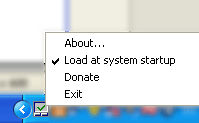
touchfreeze

Check out the Google Code page for touchfreeze: http://code.google.com/p/touchfreeze/

Filed Under: Software, Tech Solutions

Trending

  • How Important Is Your Signature On Receipts For Credit Card Purchases?
    In Media, Security and Privacy
  • Prevent the latest exploit in Adobe Acrobat, Disable JavaScript
    In Code, Security and Privacy, Software, Tech Solutions
  • Google Goggles Updated – Barcodes, Ads, and Sudokus
    In Hardware, Gadgets, and Products

Latest Media Posts

Find Out Where To Download SNES ROMs

Find Out Where To Download SNES ROMs

Multifunctional Video Conversion Tools – Wondershare Video Converter

Multifunctional Video Conversion Tools – Wondershare Video Converter

  • Popular
  • Latest
  • Today Week Month All
  • Access to the resource [servershare] has been disallowed Access to the resource [servershare] has been disallowed
  • Read the Event Logs on Windows Server Core Read the Event Logs on Windows Server Core
  • Increase IIS Private Memory Limit to improve WSUS availability Increase IIS Private Memory Limit to improve WSUS availability
  • How to ‘Unblock’ multiple files at a time with PowerShell How to 'Unblock' multiple files at a time with PowerShell
  • Setup your DFS namespace with DNS for compatibility in a mixed environment Setup your DFS namespace with DNS for compatibility in a mixed environment
  • How Virtual Reality Supports Mental Health Therapy How Virtual Reality Supports Mental Health Therapy
  • Key Strategies of Successful Coin Listing on Exchange Key Strategies of Successful Coin Listing on Exchange
  • Keeping Your Mac Healthy: A Comprehensive Guide to Maintenance and Troubleshooting Keeping Your Mac Healthy: A Comprehensive Guide to Maintenance and Troubleshooting
  • Making Distributed Software Development Work: Strategies and Best Practices for Managing Remote Teams Making Distributed Software Development Work: Strategies and Best Practices for Managing Remote Teams
  • customer contactless payment for drink with mobile phon at cafe counter bar,seller coffee shop accept payment by mobile.new normal lifestyle concept The Latest Innovations In Payment Technology
Ajax spinner

Elevator Pitch

404 Tech Support documents solutions to IT problems, shares worthwhile software and websites, and reviews hardware, consumer electronics, and technology-related books.

Subscribe to 404TS articles by email.

Recent Posts

  • How Virtual Reality Supports Mental Health Therapy
  • Key Strategies of Successful Coin Listing on Exchange
  • Keeping Your Mac Healthy: A Comprehensive Guide to Maintenance and Troubleshooting

Search

FTC Disclaimer

404TechSupport is an Amazon.com affiliate; when you click on an Amazon link from 404TS, the site gets a cut of the proceeds from whatever you buy. This site also uses Skimlinks for smart monetization of other affiliate links.
Use of this site requires displaying and viewing ads as they are presented.

Copyright © 2025 · Magazine Pro Theme on Genesis Framework · WordPress · Log in