• Home
  • About 404TS
  • Contact

404 Tech Support

Where IT Help is Found

  • Articles
    • Code
    • Entertainment
    • Going Green
    • Hardware, Gadgets, and Products
    • Management
    • Network
    • News
    • Operating Systems
    • Security and Privacy
    • Software
    • System Administration
    • Talking Points
    • Tech Solutions
    • Web
    • Webmaster
  • Reviews
  • Media
    • Infographics
    • Videos
  • Tech Events
  • Tools
    • How do I find my IP address?
    • Browser and plugin tests
  • Get a Technical Consultation
You are here: Home / Articles / Tech Solutions / Comcast Constant Guard gives HP computers blue screen errors with keycrypt64.sys BSoD

Comcast Constant Guard gives HP computers blue screen errors with keycrypt64.sys BSoD

2013-02-18 by Jason

Comcast Constant Guard is a “free” security suite provided to Comcast XFINITY customers. It includes Norton by Symantec anti-virus, Identity Guard, Secure Backup & Share, and the Xfinity Toolbar. The protection is provided for iPhone/iPad, PC, and Mac. With a recent update, Comcast managed to break a number of customer’s computers with Blue Screen of Death errors after a driver conflict. The victims seem to mostly be HP laptops that have quick launch keys on the keyboard.

The relevant information in the error appears to be:

INTERRUPT_EXCEPTION_NOT_HANDLED
Technical Information: STOP: 0x0000003D
KeyCrypt64.sys

In typical “cable company”-level support, Comcast does not appear to provide any information on their site or with Constant Guard despite the significant portion of their customers potentially affected by this error. Fortunately, buried deep in a forum thread, a few solutions to move forward exist.

If you are receiving the Blue Screen of Death for the KeyCrypt64.Sys driver, you want to uninstall Comcast Constant Guard. Because of the error, it might take some effort to accomplish this.
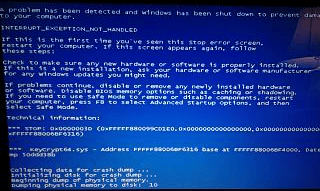
keycrypt64 bsod

Easy fix:

Reboot your computer after the BSoD (Blue Screen of Death) and repeatedly hit the F8 key between the BIOS and the Windows splash screen. This should load the Windows startup options. If you can choose Last Known Good Configuration, select that option and let the system reboot. Once it reboots and you can log into the computer, head to the Control Panel and uninstall Comcast Constant Guard.

More complicated fix:

1. Boot your computer up using the Windows Install CD that will let you repair your installation.

2. Choose repair, select your hard drive instance, and finally select command prompt.

3. From the command prompt, run RENAME c:windowssystem32drivershpqkbfiltr.sys c:windowssystem32drivershpqkbfiltr.tmp

4. This disables your touchpad and keyboard so plug-in a USB keyboard and mouse.

5. Reboot the computer to windows normally.

6. As soon as you can get logged into Windows, head to the Control Panel, Programs and Features, and uninstall Comcast Constant Guard.

7. Reboot and repeat steps 1 and 2 and then use the command RENAME c:windowssystem32drivershpqkbfiltr.tmp c:windowssystem32drivershpqkbfiltr.sys

8. Reboot the computer and unplug the USB keyboard and mouse.

If you are having difficulty removing Comcast Constant Guard, you can try downloading and running its Clean Uninstaller.

Source: Comcast Help and Support Forums

Filed Under: Tech Solutions

Trending

  • Watch This CNBC Special Tonight: Code Wars – America’s Cyber Threat
    In Entertainment, Security and Privacy
  • Excel with Excel using these tricks
    In Infographics
  • How to Take Down a Copyright-Infringing, Scammy Site
    In Media, Security and Privacy, Tech Solutions, Webmaster

Latest Media Posts

Find Out Where To Download SNES ROMs

Find Out Where To Download SNES ROMs

Multifunctional Video Conversion Tools – Wondershare Video Converter

Multifunctional Video Conversion Tools – Wondershare Video Converter

  • Popular
  • Latest
  • Today Week Month All
  • Access to the resource [servershare] has been disallowed Access to the resource [servershare] has been disallowed
  • Read the Event Logs on Windows Server Core Read the Event Logs on Windows Server Core
  • Increase IIS Private Memory Limit to improve WSUS availability Increase IIS Private Memory Limit to improve WSUS availability
  • How to ‘Unblock’ multiple files at a time with PowerShell How to 'Unblock' multiple files at a time with PowerShell
  • Setup your DFS namespace with DNS for compatibility in a mixed environment Setup your DFS namespace with DNS for compatibility in a mixed environment
  • How Virtual Reality Supports Mental Health Therapy How Virtual Reality Supports Mental Health Therapy
  • Key Strategies of Successful Coin Listing on Exchange Key Strategies of Successful Coin Listing on Exchange
  • Keeping Your Mac Healthy: A Comprehensive Guide to Maintenance and Troubleshooting Keeping Your Mac Healthy: A Comprehensive Guide to Maintenance and Troubleshooting
  • Making Distributed Software Development Work: Strategies and Best Practices for Managing Remote Teams Making Distributed Software Development Work: Strategies and Best Practices for Managing Remote Teams
  • customer contactless payment for drink with mobile phon at cafe counter bar,seller coffee shop accept payment by mobile.new normal lifestyle concept The Latest Innovations In Payment Technology
Ajax spinner

Elevator Pitch

404 Tech Support documents solutions to IT problems, shares worthwhile software and websites, and reviews hardware, consumer electronics, and technology-related books.

Subscribe to 404TS articles by email.

Recent Posts

  • How Virtual Reality Supports Mental Health Therapy
  • Key Strategies of Successful Coin Listing on Exchange
  • Keeping Your Mac Healthy: A Comprehensive Guide to Maintenance and Troubleshooting

Search

FTC Disclaimer

404TechSupport is an Amazon.com affiliate; when you click on an Amazon link from 404TS, the site gets a cut of the proceeds from whatever you buy. This site also uses Skimlinks for smart monetization of other affiliate links.
Use of this site requires displaying and viewing ads as they are presented.

Copyright © 2025 · Magazine Pro Theme on Genesis Framework · WordPress · Log in