• Home
  • About 404TS
  • Contact

404 Tech Support

Where IT Help is Found

  • Articles
    • Code
    • Entertainment
    • Going Green
    • Hardware, Gadgets, and Products
    • Management
    • Network
    • News
    • Operating Systems
    • Security and Privacy
    • Software
    • System Administration
    • Talking Points
    • Tech Solutions
    • Web
    • Webmaster
  • Reviews
  • Media
    • Infographics
    • Videos
  • Tech Events
  • Tools
    • How do I find my IP address?
    • Browser and plugin tests
  • Get a Technical Consultation
You are here: Home / Articles / Code / Using wildcards and like statements in WMI queries and scripts

Using wildcards and like statements in WMI queries and scripts

2012-07-09 by Jason

Continuing to take advantage of using WMI to get data from workstations, another project recently came up to get an inventory of printers installed across my organization. It ended up being a pretty easy task using WMI through a startup script but the results could be tailored more by being selective about the results. Combined with formatting the output as a csv and later merging the output into a single file, the script in all its simplicity is essentially a single line. A few lines of logic around it smooths out the process to be more efficient than running every startup.

The command comes down to using WMIC.exe to query the Printer class. You can get a lot of attributes about your printer this way. The wheels in my head are already turning to include this in a standard backup script as an excellent source of information without the heavy-handedness of PrintMigrator.

The script in its simple form looks like this:

wmic.exe PRINTER GetName, PortName, DriverName

Adding a little complexity to it like a SQL statement (SELECT-FROM-WHERE), we can add a Where conditional to limit our data to only return what we want. For example, return only printers with the term HP in the DriverName.

wmic.exe PRINTER where "DriverName like '%HP%'" Get Name, PortName, DriverName, Default, ShareName
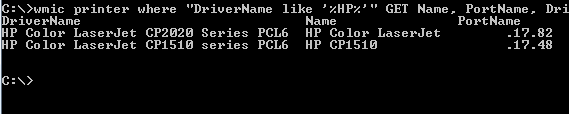
To continue to tailor the data, you can logically combine conditions to get exactly what you want.

wmic printer where "DriverName like '%HP%' OR DriverName like '%Microsoft%'" Get Name, PortName, DriverName

You can also invert the statement to get everything but what matches the query by using a NOT statement. Try this out:

wmic printer where "not DriverName like '%HP%'" Get Name, PortName, DriverName

Using the wildcards in a batch or command script is very similar. The only difference to remember is using two percent signs to escape the wildcard in the script so it gets passed through instead of being executed. You can see the full script that makes use of this below.

@ECHO OFF
 REM Printer query script
 REM Jason Hamilton, June 2012
 REM Check if file exists, if so, skip
 IF EXIST \servershare%COMPUTERNAME%.txt GOTO END
WMIC.exe /output:\servershare%COMPUTERNAME%.txt PRINTER where "DriverName like '%%HP%%'" GET Name, PortName, DriverName /format:csv
:END
 EXIT

If you get a result that states invalid query or just returns ‘node,’ it may just mean that the computer doesn’t have any information that meets your conditions.

Of course, you can use this on other WMIC classes like Services, BIOS, and ComputerSystem to create a query that gets just the information you want.

Filed Under: Code

Trending

  • Jimmy John’s Lesson on Instant Communication and the Problem with Rumors
    In Media, Security and Privacy
  • AVG’s Second Quarter Report Shows Malware Trends Across Multiple Platforms
    In Security and Privacy, Software
  • Weighing printer security risks
    In Security and Privacy

Latest Media Posts

Find Out Where To Download SNES ROMs

Find Out Where To Download SNES ROMs

Multifunctional Video Conversion Tools – Wondershare Video Converter

Multifunctional Video Conversion Tools – Wondershare Video Converter

  • Popular
  • Latest
  • Today Week Month All
  • Access to the resource [servershare] has been disallowed Access to the resource [servershare] has been disallowed
  • Read the Event Logs on Windows Server Core Read the Event Logs on Windows Server Core
  • Increase IIS Private Memory Limit to improve WSUS availability Increase IIS Private Memory Limit to improve WSUS availability
  • How to ‘Unblock’ multiple files at a time with PowerShell How to 'Unblock' multiple files at a time with PowerShell
  • Setup your DFS namespace with DNS for compatibility in a mixed environment Setup your DFS namespace with DNS for compatibility in a mixed environment
  • How Virtual Reality Supports Mental Health Therapy How Virtual Reality Supports Mental Health Therapy
  • Key Strategies of Successful Coin Listing on Exchange Key Strategies of Successful Coin Listing on Exchange
  • Keeping Your Mac Healthy: A Comprehensive Guide to Maintenance and Troubleshooting Keeping Your Mac Healthy: A Comprehensive Guide to Maintenance and Troubleshooting
  • Making Distributed Software Development Work: Strategies and Best Practices for Managing Remote Teams Making Distributed Software Development Work: Strategies and Best Practices for Managing Remote Teams
  • customer contactless payment for drink with mobile phon at cafe counter bar,seller coffee shop accept payment by mobile.new normal lifestyle concept The Latest Innovations In Payment Technology
Ajax spinner

Elevator Pitch

404 Tech Support documents solutions to IT problems, shares worthwhile software and websites, and reviews hardware, consumer electronics, and technology-related books.

Subscribe to 404TS articles by email.

Recent Posts

  • How Virtual Reality Supports Mental Health Therapy
  • Key Strategies of Successful Coin Listing on Exchange
  • Keeping Your Mac Healthy: A Comprehensive Guide to Maintenance and Troubleshooting

Search

FTC Disclaimer

404TechSupport is an Amazon.com affiliate; when you click on an Amazon link from 404TS, the site gets a cut of the proceeds from whatever you buy. This site also uses Skimlinks for smart monetization of other affiliate links.
Use of this site requires displaying and viewing ads as they are presented.

Copyright © 2025 · Magazine Pro Theme on Genesis Framework · WordPress · Log in