• Home
  • About 404TS
  • Contact

404 Tech Support

Where IT Help is Found

  • Articles
    • Code
    • Entertainment
    • Going Green
    • Hardware, Gadgets, and Products
    • Management
    • Network
    • News
    • Operating Systems
    • Security and Privacy
    • Software
    • System Administration
    • Talking Points
    • Tech Solutions
    • Web
    • Webmaster
  • Reviews
  • Media
    • Infographics
    • Videos
  • Tech Events
  • Tools
    • How do I find my IP address?
    • Browser and plugin tests
  • Get a Technical Consultation
You are here: Home / Articles / Tech Solutions / Disable Firefox’s new ‘SpeedDial’ New Tab Page

Disable Firefox’s new ‘SpeedDial’ New Tab Page

2012-06-22 by Jason

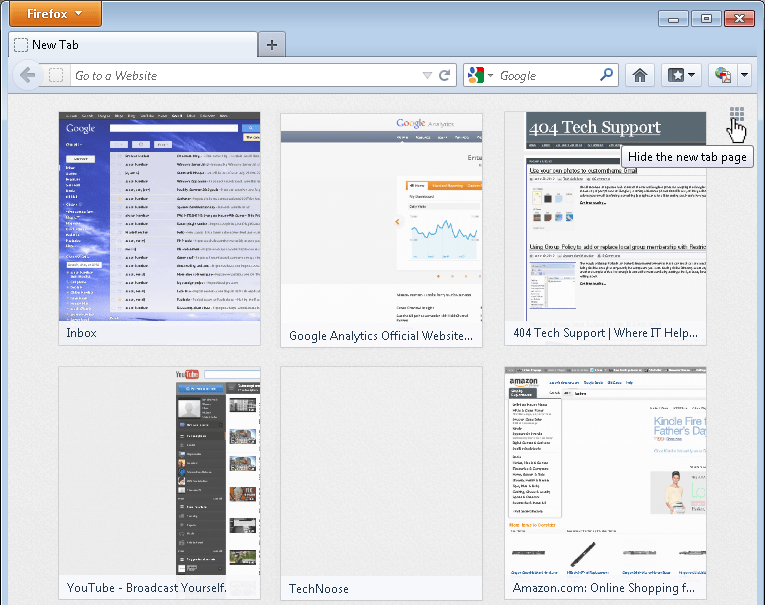
The Firefox ‘New Tab’ page received a new change-over in the Firefox 13.0 release. Its new tab page imitates the “speed dial” page of Opera and Chrome’s new tab page. It shows 9 thumbnails of websites you frequently visit in a 3 x 3 grid. While clearly meant to be a feature of convenience, many feel like it puts their history on display for anybody that just sits down at their computer. So, here’s how to disable the new New Tab page in Firefox 13.0+.

While there might not be a setting under the Options settings window, there is one even more obvious. Open a new tab by clicking the + tab or using Ctrl+T. In the top-right corner of the New Tab page, there is a small button in a 3×3 grid. Hovering over it, it shows “Hide the new tab page” in the title text. This simply turns off the new tab page, no longer showing thumbnails of the sites you visit. Instead of the grid, you’ll only see a blank white page with the button to re-enable the New Tab page in the top-right corner.
Perhaps that button is still too close for comfort, too easy for turn the thumbnails back on. To make the change a little more complete, we can dive into Firefox’s advanced configuration.

Enter ‘about:config’ in the URL bar and click the button where you promise not to break anything.

In the Search filter box, type ‘browser.new’ to bring up a few relevant settings.

When you click that button to disable the New Tab page on the New Tab page, it is toggling the browser.newtabpage.enabled setting to false. To get rid of the button that allows the thumbnail grid to be turned back on, switch the settings browser.newtab.url to about:blank  and keep browser.newtabpage.enabled to true. Now, when you open a new tab, you’ll be greeted with a very fast-loading, blank white page.

Filed Under: Tech Solutions

Trending

  • DirectShow Filter Manager
    In Software, Tech Solutions
  • Ask 404TS: What router should I get to improve wireless coverage?
    In Hardware, Gadgets, and Products
  • A Basic, Non-technical Understanding of Computer Security Issues
    In Media, Security and Privacy

Latest Media Posts

Find Out Where To Download SNES ROMs

Find Out Where To Download SNES ROMs

Multifunctional Video Conversion Tools – Wondershare Video Converter

Multifunctional Video Conversion Tools – Wondershare Video Converter

  • Popular
  • Latest
  • Today Week Month All
  • Access to the resource [servershare] has been disallowed Access to the resource [servershare] has been disallowed
  • Read the Event Logs on Windows Server Core Read the Event Logs on Windows Server Core
  • Increase IIS Private Memory Limit to improve WSUS availability Increase IIS Private Memory Limit to improve WSUS availability
  • How to ‘Unblock’ multiple files at a time with PowerShell How to 'Unblock' multiple files at a time with PowerShell
  • Setup your DFS namespace with DNS for compatibility in a mixed environment Setup your DFS namespace with DNS for compatibility in a mixed environment
  • How Virtual Reality Supports Mental Health Therapy How Virtual Reality Supports Mental Health Therapy
  • Key Strategies of Successful Coin Listing on Exchange Key Strategies of Successful Coin Listing on Exchange
  • Keeping Your Mac Healthy: A Comprehensive Guide to Maintenance and Troubleshooting Keeping Your Mac Healthy: A Comprehensive Guide to Maintenance and Troubleshooting
  • Making Distributed Software Development Work: Strategies and Best Practices for Managing Remote Teams Making Distributed Software Development Work: Strategies and Best Practices for Managing Remote Teams
  • customer contactless payment for drink with mobile phon at cafe counter bar,seller coffee shop accept payment by mobile.new normal lifestyle concept The Latest Innovations In Payment Technology
Ajax spinner

Elevator Pitch

404 Tech Support documents solutions to IT problems, shares worthwhile software and websites, and reviews hardware, consumer electronics, and technology-related books.

Subscribe to 404TS articles by email.

Recent Posts

  • How Virtual Reality Supports Mental Health Therapy
  • Key Strategies of Successful Coin Listing on Exchange
  • Keeping Your Mac Healthy: A Comprehensive Guide to Maintenance and Troubleshooting

Search

FTC Disclaimer

404TechSupport is an Amazon.com affiliate; when you click on an Amazon link from 404TS, the site gets a cut of the proceeds from whatever you buy. This site also uses Skimlinks for smart monetization of other affiliate links.
Use of this site requires displaying and viewing ads as they are presented.

Copyright © 2025 · Magazine Pro Theme on Genesis Framework · WordPress · Log in