• Home
  • About 404TS
  • Contact

404 Tech Support

Where IT Help is Found

  • Articles
    • Code
    • Entertainment
    • Going Green
    • Hardware, Gadgets, and Products
    • Management
    • Network
    • News
    • Operating Systems
    • Security and Privacy
    • Software
    • System Administration
    • Talking Points
    • Tech Solutions
    • Web
    • Webmaster
  • Reviews
  • Media
    • Infographics
    • Videos
  • Tech Events
  • Tools
    • How do I find my IP address?
    • Browser and plugin tests
  • Get a Technical Consultation
You are here: Home / Articles / Security and Privacy / Use Microsoft’s Enhanced Mitigation Experience Toolkit 3.0 for another layer of protection

Use Microsoft’s Enhanced Mitigation Experience Toolkit 3.0 for another layer of protection

2012-07-13 by Jason

Microsoft Enhanced Mitigation Experience Toolkit or EMET is a utility that implements security mitigation technologies to protect software from zero-day vulnerabilities. Protecting that time before antivirus definitions are updated and patches are released is a sweet-spot of mitigating problems. A vulnerability may be out there for a long time before it is even known about to the developers and the security industry. EMET creates more hurdles for a vulnerability to have to bypass in order to successfully compromise a computer.

EMET is designed to work with any software, regardless of when it was written or by whom it was written. This includes software that is developed by Microsoft and software that is developed by other vendors.

A free download from Microsoft, EMET can be easily deployed in its .msi format. It is also easy to use and provides a simple ways to add an extra layer of protection, hardening the applications you need. EMET works on Windows XP SP3, Vista SP1+, and all levels of Windows 7 along with Server 2003 SP1 – Server 2008 (R2). EMET is also an officially supported product from Microsoft.

After running the EMET setup, icons will be placed on the Start Menu for the Toolkit and a User’s guide. You can startup the application and configure your system to protect select or all applications.
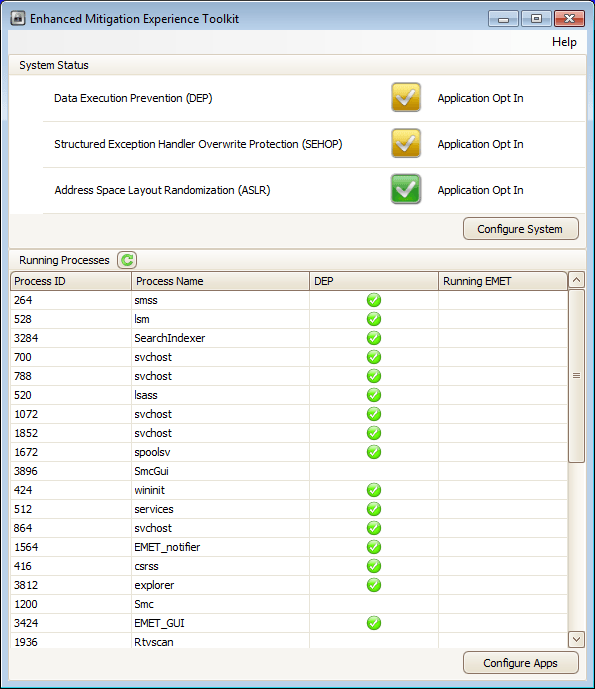
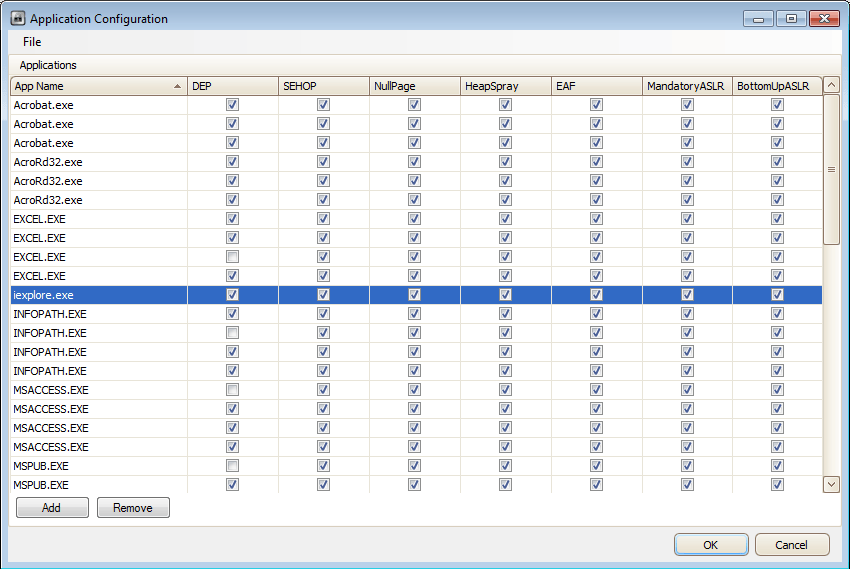
To configure the application, you hit the Configure Apps button and then go to File, Import. You can then select to import the protection profiles that are installed along with the software from C:Program FilesEMETDeploymentProtection Profiles.

You will find:

  • Internet Explorer.xml: Enables mitigations for supported versions of Microsoft Internet Explorer.
  • Office Software.xml: Enables mitigations for supported versions of Microsoft Internet Explorer, applications that are part of the Microsoft Office suite, Adobe Acrobat 8-10 and Adobe Acrobat Reader 8-10.
  • All.xml: Enables mitigations for common home and enterprise applications, including Microsoft Internet Explorer and Microsoft Office.

After you import a protection profile, you might notice duplicates listed. This is just for the different paths to identify a process (such as Office12, Office14, etc.). The columns then allow you to select which protections you wish to implement for each process.
The application runs in the background with a notification from the lock icon residing in the system tray if a problem is seen. It will then close the process that is triggering the mitigation to protect your system.

EMET can be configured remotely with Group Policy templates included with the install at “C:Program FilesEMETDeploymentGroup Policy Files” with an .adml and .admx file.

EMET also provides an SCCM package if you would like to manage the tool through System Center.

The security mitigation technologies that EMET uses carry an application compatibility risk with them. Some applications rely on exactly the behavior that the mitigations block. It is important to thoroughly test EMET on all target computers by using test scenarios before you deploy EMET in a production environment. If you encounter a problem with a specific mitigation, you can individually enable and disable the specific mitigations. For more information, refer to the user’s guide that is installed with EMET.

Despite that warning, with adequate testing, EMET can provide a much more complete security layer for your client computers that defends against some of the growing and more severe risks. Plus, it’s free and an officially supported product from Microsoft.

Read more from Microsoft’s introduction post. Download EMET v3 from Microsoft.com.

Filed Under: Security and Privacy

Trending

  • For Data Privacy Day, Intel sponsors ‘lol…OMG!’ book about online reputation management, cyberbullying
    In Media, Security and Privacy
  • Don’t sell your soul cheap with Facebook Apps
    In Media, Security and Privacy
  • November update KB3097877 causing issues for some Windows 7 computers
    In Operating Systems, Tech Solutions

Latest Media Posts

Find Out Where To Download SNES ROMs

Find Out Where To Download SNES ROMs

Multifunctional Video Conversion Tools – Wondershare Video Converter

Multifunctional Video Conversion Tools – Wondershare Video Converter

  • Popular
  • Latest
  • Today Week Month All
  • Access to the resource [servershare] has been disallowed Access to the resource [servershare] has been disallowed
  • Read the Event Logs on Windows Server Core Read the Event Logs on Windows Server Core
  • Increase IIS Private Memory Limit to improve WSUS availability Increase IIS Private Memory Limit to improve WSUS availability
  • How to ‘Unblock’ multiple files at a time with PowerShell How to 'Unblock' multiple files at a time with PowerShell
  • Setup your DFS namespace with DNS for compatibility in a mixed environment Setup your DFS namespace with DNS for compatibility in a mixed environment
  • How Virtual Reality Supports Mental Health Therapy How Virtual Reality Supports Mental Health Therapy
  • Key Strategies of Successful Coin Listing on Exchange Key Strategies of Successful Coin Listing on Exchange
  • Keeping Your Mac Healthy: A Comprehensive Guide to Maintenance and Troubleshooting Keeping Your Mac Healthy: A Comprehensive Guide to Maintenance and Troubleshooting
  • Making Distributed Software Development Work: Strategies and Best Practices for Managing Remote Teams Making Distributed Software Development Work: Strategies and Best Practices for Managing Remote Teams
  • customer contactless payment for drink with mobile phon at cafe counter bar,seller coffee shop accept payment by mobile.new normal lifestyle concept The Latest Innovations In Payment Technology
Ajax spinner

Elevator Pitch

404 Tech Support documents solutions to IT problems, shares worthwhile software and websites, and reviews hardware, consumer electronics, and technology-related books.

Subscribe to 404TS articles by email.

Recent Posts

  • How Virtual Reality Supports Mental Health Therapy
  • Key Strategies of Successful Coin Listing on Exchange
  • Keeping Your Mac Healthy: A Comprehensive Guide to Maintenance and Troubleshooting

Search

FTC Disclaimer

404TechSupport is an Amazon.com affiliate; when you click on an Amazon link from 404TS, the site gets a cut of the proceeds from whatever you buy. This site also uses Skimlinks for smart monetization of other affiliate links.
Use of this site requires displaying and viewing ads as they are presented.

Copyright © 2025 · Magazine Pro Theme on Genesis Framework · WordPress · Log in