• Home
  • About 404TS
  • Contact

404 Tech Support

Where IT Help is Found

  • Articles
    • Code
    • Entertainment
    • Going Green
    • Hardware, Gadgets, and Products
    • Management
    • Network
    • News
    • Operating Systems
    • Security and Privacy
    • Software
    • System Administration
    • Talking Points
    • Tech Solutions
    • Web
    • Webmaster
  • Reviews
  • Media
    • Infographics
    • Videos
  • Tech Events
  • Tools
    • How do I find my IP address?
    • Browser and plugin tests
  • Get a Technical Consultation
You are here: Home / Articles / Software / Simple Tip: Understand ‘danger’ to quickly bypass Chrome https warnings

Simple Tip: Understand ‘danger’ to quickly bypass Chrome https warnings

2015-08-21 by Jason

If you visit websites with invalid certificates in Google Chrome, you’re presented with a warning screen. These seem somewhat common on home networking equipment like routers or wifi that are not usually worth paying for an SSL certificate. One common warning reads:

“Your connection is not private

Attackers might be trying to steal your information from 192.168.1.1 (for example, passwords, messages, or credit cards). NET::ERR_CERT_AUTHORITY_INVALID”
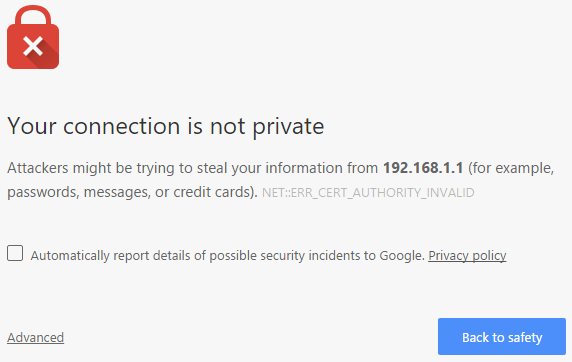
https warning

To bypass the screen, you can click the ‘Advanced’ link to reveal more details and a link to proceed on to the site. A faster way to get through this page than the two clicks is to type ‘danger’. d-a-n-g-e-r. As long as the window has focus, that will allow you to proceed without having to reach for the mouse.

Of course, you might be able to fix the issue by adding a valid cert or taking ‘https’ out of the URL and replacing it with ‘http’. A lot of sites will redirect you to ‘https’ though, so you still get the warning. Now you know a simple tip to get past those instances a little faster.

Filed Under: Software

Trending

  • Pwn2Own gets revamped for 2016
    In Security and Privacy
  • Content Marketing Trends for 2016
    In Infographics
  • Malwarebytes Anti-Malware 2.0 released
    In Security and Privacy, Software

Latest Media Posts

Find Out Where To Download SNES ROMs

Find Out Where To Download SNES ROMs

Multifunctional Video Conversion Tools – Wondershare Video Converter

Multifunctional Video Conversion Tools – Wondershare Video Converter

  • Popular
  • Latest
  • Today Week Month All
  • Access to the resource [servershare] has been disallowed Access to the resource [servershare] has been disallowed
  • Read the Event Logs on Windows Server Core Read the Event Logs on Windows Server Core
  • Increase IIS Private Memory Limit to improve WSUS availability Increase IIS Private Memory Limit to improve WSUS availability
  • How to ‘Unblock’ multiple files at a time with PowerShell How to 'Unblock' multiple files at a time with PowerShell
  • Setup your DFS namespace with DNS for compatibility in a mixed environment Setup your DFS namespace with DNS for compatibility in a mixed environment
  • How Virtual Reality Supports Mental Health Therapy How Virtual Reality Supports Mental Health Therapy
  • Key Strategies of Successful Coin Listing on Exchange Key Strategies of Successful Coin Listing on Exchange
  • Keeping Your Mac Healthy: A Comprehensive Guide to Maintenance and Troubleshooting Keeping Your Mac Healthy: A Comprehensive Guide to Maintenance and Troubleshooting
  • Making Distributed Software Development Work: Strategies and Best Practices for Managing Remote Teams Making Distributed Software Development Work: Strategies and Best Practices for Managing Remote Teams
  • customer contactless payment for drink with mobile phon at cafe counter bar,seller coffee shop accept payment by mobile.new normal lifestyle concept The Latest Innovations In Payment Technology
Ajax spinner

Elevator Pitch

404 Tech Support documents solutions to IT problems, shares worthwhile software and websites, and reviews hardware, consumer electronics, and technology-related books.

Subscribe to 404TS articles by email.

Recent Posts

  • How Virtual Reality Supports Mental Health Therapy
  • Key Strategies of Successful Coin Listing on Exchange
  • Keeping Your Mac Healthy: A Comprehensive Guide to Maintenance and Troubleshooting

Search

FTC Disclaimer

404TechSupport is an Amazon.com affiliate; when you click on an Amazon link from 404TS, the site gets a cut of the proceeds from whatever you buy. This site also uses Skimlinks for smart monetization of other affiliate links.
Use of this site requires displaying and viewing ads as they are presented.

Copyright © 2025 · Magazine Pro Theme on Genesis Framework · WordPress · Log in