• Home
  • About 404TS
  • Contact

404 Tech Support

Where IT Help is Found

  • Articles
    • Code
    • Entertainment
    • Going Green
    • Hardware, Gadgets, and Products
    • Management
    • Network
    • News
    • Operating Systems
    • Security and Privacy
    • Software
    • System Administration
    • Talking Points
    • Tech Solutions
    • Web
    • Webmaster
  • Reviews
  • Media
    • Infographics
    • Videos
  • Tech Events
  • Tools
    • How do I find my IP address?
    • Browser and plugin tests
  • Get a Technical Consultation
You are here: Home / Articles / Webmaster / Using different fonts in WordPress

Using different fonts in WordPress

2013-02-25 by Jason

The Web has a sordid history with fonts. If you have been around the web world for long enough, you probably recall some of the pains from clients wanting to use particularly weird fonts who then get upset when it doesn’t appear correct on a random computer they used. Previously, to show a font in HTML 4, it required having the font installed on the computers visiting your website or using an image. Now, with CSS3 that is no longer the case.

As explained by the W3C use of @font-face:

The @font-face rule allows for linking to fonts that are automatically activated when needed. This allows authors to select a font that closely matches the design goals for a given page rather than limiting the font choice to a set of fonts available on all platforms. A set of font descriptors define the location of a font resource, either locally or externally, along with the style characteristics of an individual face. Multiple @font-face rules can be used to construct font families with a variety of faces. Using CSS font matching rules, a user agent can selectively download only those faces that are needed for a given piece of text.

To make it even easier for WordPress users, there are plugins that make including a large variety of fonts pretty easy with help from Google..

There are a number of plugins available in the WordPress plug-in repository but I ended up going with the WP Google Fonts plugin because it had good reviews and I liked its implementation.

Google Web Fonts acts like a central repository or even a CDN to host a number of fonts. You can just visit Google’s site to search and filter through the list of available fonts until you find the name of the font face you would like to use.
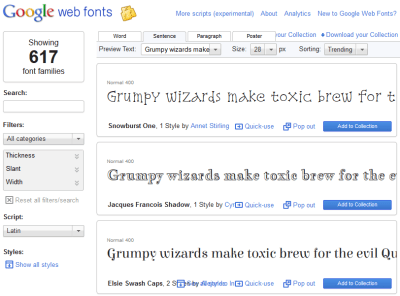
google web fonts screencapture

Once you have the name, with the WP Google Fonts plugin installed in your WordPress site, you can head to the Settings, Google Fonts section of your admin site. You can choose 6 different fonts and with each choice, you can specify the font style and which HTML element you wish to apply the font to, and finally you can optionally add custom CSS  and choose a character set.

wp google fonts settings

Once you make your selections, you can save your choices and refresh a public facing page to see the changes. There is a possibility that your theme might not work with the plugin if it specifies its own font face but I have tried this out on a handful of sites and had no problems. The only caveat I have seen is that the drop-down listing all of Google fonts can be a bit much for an old computer to handle, though it did always recover.

This plugin made a complicated task rather simple and reliable, so if you want to change the font of all of your H1, H2, or paragraph tags, check it out.

Filed Under: Webmaster

Trending

  • Sony Updates PSN/Qriocity Terms of Service and Privacy Policy – Closes Loopholes, Adds Social Sharing
    In Entertainment, News, Security and Privacy
  • Mozilla Firefox 3.6.7 Released
    In Security and Privacy, Software
  • Disclosing software vulnerabilities isn’t against the EULA?
    In Security and Privacy, Talking Points

Latest Media Posts

Find Out Where To Download SNES ROMs

Find Out Where To Download SNES ROMs

Multifunctional Video Conversion Tools – Wondershare Video Converter

Multifunctional Video Conversion Tools – Wondershare Video Converter

  • Popular
  • Latest
  • Today Week Month All
  • Access to the resource [servershare] has been disallowed Access to the resource [servershare] has been disallowed
  • Read the Event Logs on Windows Server Core Read the Event Logs on Windows Server Core
  • Increase IIS Private Memory Limit to improve WSUS availability Increase IIS Private Memory Limit to improve WSUS availability
  • How to ‘Unblock’ multiple files at a time with PowerShell How to 'Unblock' multiple files at a time with PowerShell
  • Setup your DFS namespace with DNS for compatibility in a mixed environment Setup your DFS namespace with DNS for compatibility in a mixed environment
  • How Virtual Reality Supports Mental Health Therapy How Virtual Reality Supports Mental Health Therapy
  • Key Strategies of Successful Coin Listing on Exchange Key Strategies of Successful Coin Listing on Exchange
  • Keeping Your Mac Healthy: A Comprehensive Guide to Maintenance and Troubleshooting Keeping Your Mac Healthy: A Comprehensive Guide to Maintenance and Troubleshooting
  • Making Distributed Software Development Work: Strategies and Best Practices for Managing Remote Teams Making Distributed Software Development Work: Strategies and Best Practices for Managing Remote Teams
  • customer contactless payment for drink with mobile phon at cafe counter bar,seller coffee shop accept payment by mobile.new normal lifestyle concept The Latest Innovations In Payment Technology
Ajax spinner

Elevator Pitch

404 Tech Support documents solutions to IT problems, shares worthwhile software and websites, and reviews hardware, consumer electronics, and technology-related books.

Subscribe to 404TS articles by email.

Recent Posts

  • How Virtual Reality Supports Mental Health Therapy
  • Key Strategies of Successful Coin Listing on Exchange
  • Keeping Your Mac Healthy: A Comprehensive Guide to Maintenance and Troubleshooting

Search

FTC Disclaimer

404TechSupport is an Amazon.com affiliate; when you click on an Amazon link from 404TS, the site gets a cut of the proceeds from whatever you buy. This site also uses Skimlinks for smart monetization of other affiliate links.
Use of this site requires displaying and viewing ads as they are presented.

Copyright © 2025 · Magazine Pro Theme on Genesis Framework · WordPress · Log in