• Home
  • About 404TS
  • Contact

404 Tech Support

Where IT Help is Found

  • Articles
    • Code
    • Entertainment
    • Going Green
    • Hardware, Gadgets, and Products
    • Management
    • Network
    • News
    • Operating Systems
    • Security and Privacy
    • Software
    • System Administration
    • Talking Points
    • Tech Solutions
    • Web
    • Webmaster
  • Reviews
  • Media
    • Infographics
    • Videos
  • Tech Events
  • Tools
    • How do I find my IP address?
    • Browser and plugin tests
  • Get a Technical Consultation
You are here: Home / Articles / Software / Stardock brings back the Start Menu to Windows 8 with Start8

Stardock brings back the Start Menu to Windows 8 with Start8

2012-09-13 by Jason

One of the easy criticisms of Microsoft’s Windows 8 is the missing Start Menu button. There are a few annoyances associated with the changes made in this version of the operating system but the missing Start button seems like the low-hanging fruit when you realize there are people out there that will see this as a steep learning curve. Microsoft has stood firm on the Start button becoming extinct. Fortunately, for those that like the classic Start Menu, Stardock has a program called Start8 that is in beta/free that restores the Start Menu to Windows 8.

The bottom left corner of your screen in Windows 8 by default just has your pinned programs on the task bar.
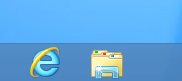
To be fair, if you get into the right range of pixels, you’ll activate the hot corner to show a Start button. Clicking that will bring up the full screen formerly-named Metro Start Menu. But you can get there faster by pressing the Windows key on your keyboard. Again, shortcut keys in Windows 8 seem like the means to using your PC efficiently.

Start8 by Stardock is available in their free/beta section. To download the application, you click the download link and give them your e-mail where they will send you a link to download the 2.5MB installer.

Once installed, you’ll see the Windows 7 style orb back in the lower-left corner. When you click on it, the menu will pop up and it behaves much like you would expect in Windows 7.

When you right-click the orb, you’ll see a few options. For example, Start8 can automatically take you to the Desktop instead of the Metro-style Start menu when you login. You can also disable the hot corners or pick a range of different images for the button instead of the Windows orb. It also gives you quick access to the Run and shutdown menus. If you just want the Start Button to trigger the Windows 8 Metro-style Start menu, you can uncheck the “Use the classic style startmenu” option.

I’m torn. I use a variety of computers in my day-to-day IT work, that I don’t want to get used to the Start8 app just to not have it on the majority of PCs I use. However, I can’t help but see the usefulness of it (for one thing I can shutdown/restart the computer in a lot fewer clicks) and the wide variety of ways Microsoft could have implemented the Start Button to keep a lot of their users happy. I think the hot corners feature will have a problem with adoption since the interface is invisible until you put your mouse in the right location.

Will Start8 remain free? How much could Stardock charge for it? That will be interesting to see how much the classic Start Button/Menu is worth to some people.

Filed Under: Software

Trending

  • How to make a strong password
    In Infographics
  • Using CompTIA’s free IT Security Assessment Wizard
    In Security and Privacy
  • Apple Provides Info On How To Remove Mac Defender Malware; Update Coming
    In Media, Security and Privacy

Latest Media Posts

Find Out Where To Download SNES ROMs

Find Out Where To Download SNES ROMs

Multifunctional Video Conversion Tools – Wondershare Video Converter

Multifunctional Video Conversion Tools – Wondershare Video Converter

  • Popular
  • Latest
  • Today Week Month All
  • Access to the resource [servershare] has been disallowed Access to the resource [servershare] has been disallowed
  • Read the Event Logs on Windows Server Core Read the Event Logs on Windows Server Core
  • Increase IIS Private Memory Limit to improve WSUS availability Increase IIS Private Memory Limit to improve WSUS availability
  • How to ‘Unblock’ multiple files at a time with PowerShell How to 'Unblock' multiple files at a time with PowerShell
  • Setup your DFS namespace with DNS for compatibility in a mixed environment Setup your DFS namespace with DNS for compatibility in a mixed environment
  • How Virtual Reality Supports Mental Health Therapy How Virtual Reality Supports Mental Health Therapy
  • Key Strategies of Successful Coin Listing on Exchange Key Strategies of Successful Coin Listing on Exchange
  • Keeping Your Mac Healthy: A Comprehensive Guide to Maintenance and Troubleshooting Keeping Your Mac Healthy: A Comprehensive Guide to Maintenance and Troubleshooting
  • Making Distributed Software Development Work: Strategies and Best Practices for Managing Remote Teams Making Distributed Software Development Work: Strategies and Best Practices for Managing Remote Teams
  • customer contactless payment for drink with mobile phon at cafe counter bar,seller coffee shop accept payment by mobile.new normal lifestyle concept The Latest Innovations In Payment Technology
Ajax spinner

Elevator Pitch

404 Tech Support documents solutions to IT problems, shares worthwhile software and websites, and reviews hardware, consumer electronics, and technology-related books.

Subscribe to 404TS articles by email.

Recent Posts

  • How Virtual Reality Supports Mental Health Therapy
  • Key Strategies of Successful Coin Listing on Exchange
  • Keeping Your Mac Healthy: A Comprehensive Guide to Maintenance and Troubleshooting

Search

FTC Disclaimer

404TechSupport is an Amazon.com affiliate; when you click on an Amazon link from 404TS, the site gets a cut of the proceeds from whatever you buy. This site also uses Skimlinks for smart monetization of other affiliate links.
Use of this site requires displaying and viewing ads as they are presented.

Copyright © 2025 · Magazine Pro Theme on Genesis Framework · WordPress · Log in