For Earth Day 2010, I delivered a write-up of steps I had taken to green my organization. It was the low-hanging fruit but saved thousands of dollars by turning off over 300 computers when facilities were closed while still allowing remote access through Intel vPro power-on ability and scheduled booting. To complete the shut down process in a flexible way for different facilities, I used a third-party program called Shutter. Unfortunately, I encountered bugs with this program where it would be 1, 2, or 3 hours off at a time and try to start shutting down the computer during working hours. Working with the developer, there was no reason for the early shut down, especially when it was inconsistent and didn’t occur on all identical computers. I eventually had to give a 3 hour buffer and shutdown the computers well after closing time, resulting in reduced cost savings.
A fairly new client of my enterprise IT consulting requested something similar to the solution to shutdown their computers at closing. They were already going around shutting down all the computers manually (they have well under 300 and are only in one building), so the interest was more for time-saving than cost-saving. They also hoped that an enforced shut down would hurry up customer’s dawdling at closing and inform customers that may not have heard the 15 minute warning message over the PA system.
Maturing my approach a little bit, instead of using Shutter, I used Group Policy Preferences – a delightful benefit to my updating their organization to a Server 2008 R2 domain. Through Group Policy Preferences, I created a scheduled task with multiple schedules to match their hours. 10 minutes before they closed, the task was to execute and run a simple script. The script is stored on a server and simply executes the shutdown.exe command to power down the computers with a 10 minute countdown and a message informing them that computers will shut down when the timer reaches zero.
It’s a simple, customizable, and effective way of telling people that the organization is closing for the night and powering off the computers. All is well and good, except there is a timer bug in Group Policy Preferences scheduled tasks as well.
Before you start thinking that the problems are related, let me reiterate that the two instances (Shutter and GPP) are completely different organizations, dozens of miles apart, and with much different hardware.
When I established the Group Policy Preference Scheduled Task a month ago, I was receiving reports that the supposedly cool feature I had implemented wasn’t triggering. I found that switching from a User Configuration to a Computer Configuration improved the consistency of the scheduled task, however, the event logs showed all the computers were shutting down each night, just an hour late.
To have the computers run the script at 10 til 8PM, I had to schedule the task at 6:50PM instead of 7:50PM. After making that change, the script ran exactly as expected and worked as planned.
As you’re well aware of now (especially if you were late to work this morning), yesterday Daylight Savings Time ended and we’re now back in standard time. The bug with Group Policy Preferences, being immune to such mortal things as DST, now accurately uses the hours listed in the schedule. During DST, I had to set the schedule to 6:50PM and in standard time, I have to set the schedule to its correct time of 7:50PM. (Seen below)
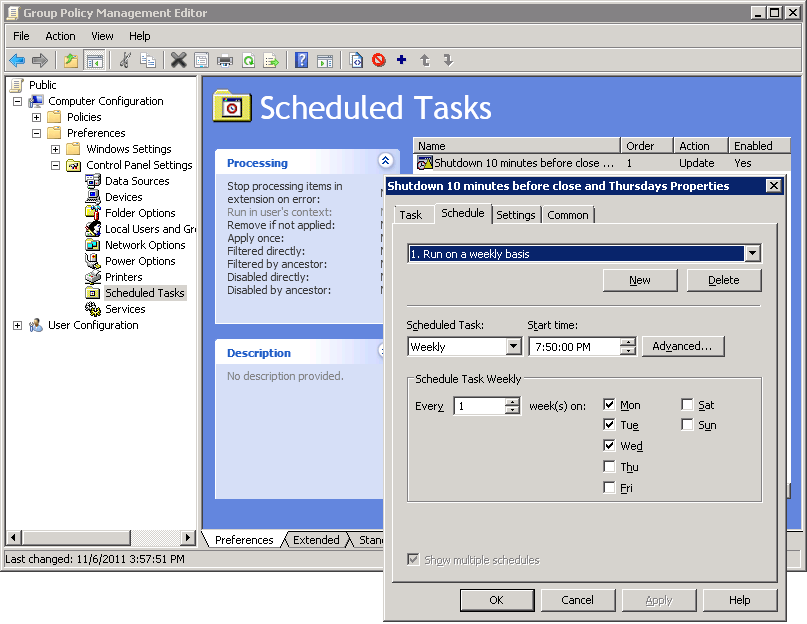
Unfortunately, this bug caused the script to run an hour early yesterday and powered off computers that were currently in use. I adjusted the script back to its accurate time (7:50PM) and an hour later, it ran correctly on those computers that had been booted up again.
I’m not the only one experiencing this error as I’ve seen it reported on Microsoft’s TechNet social board and Microsoft has a work-around posted for Vista and Windows Server 2008. Unfortunately, that doesn’t match my symptoms of seeing this with Windows Server 2008 R2 and Windows XP on the client PCs.
For now, I’ll just have to remember to adjust this scheduled task along with my clocks when daylight savings time occurs.