• Home
  • About 404TS
  • Contact

404 Tech Support

Where IT Help is Found

  • Articles
    • Code
    • Entertainment
    • Going Green
    • Hardware, Gadgets, and Products
    • Management
    • Network
    • News
    • Operating Systems
    • Security and Privacy
    • Software
    • System Administration
    • Talking Points
    • Tech Solutions
    • Web
    • Webmaster
  • Reviews
  • Media
    • Infographics
    • Videos
  • Tech Events
  • Tools
    • How do I find my IP address?
    • Browser and plugin tests
  • Get a Technical Consultation
You are here: Home / Media / Google revamps Presentations in its Google Docs

Google revamps Presentations in its Google Docs

2011-10-18 by Jason

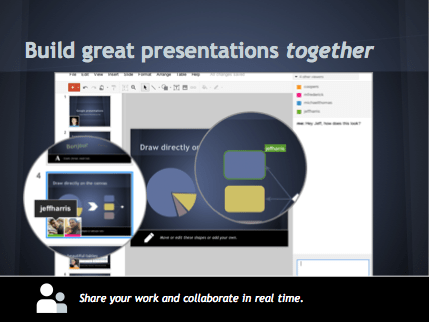
Google announced today that the presentation component of its Google Docs suite is getting an overhaul, like the documents, spreadsheets, and drawing components received long ago. The updated Presentations is getting faster collaboration and more features.

Creating presentations together is easy because you can:

  • See exactly what others are working on with colorful presence markers
  • Edit with your team members simultaneously from different locations
  • Use revision history to see who made changes or to revert to earlier versions
  • Say hello, start a conversation or share new ideas using built-in chat
Along with simplifying group presentations, the new features help Google Docs compete against Microsoft Office PowerPoint. Among the 50+ new features, these popularly demanded features are included:

  • Transitions to move between slides with simple fades or spicier 3D effects
  • Animations to add emphasis or to make your slides more playful
  • New themes to create beautiful presentations with distinct visual styles
  • Drawings to build new designs, layouts, and flowcharts within a presentation
  • Rich tables with merged cells and more options for adding style to your data

While the new presentations is being rolled out, you can jump the line by clicking on the gear icon in your document list and selecting Document settings. Then under the editing tab, check the box to “Create new presentations using the latest version of the presentation editor.”

You’ll need a modern browser to use most of the new features though. That shouldn’t be that hard though, if you have Chrome, IE 8+, or Firefox 4+.

Filed Under: Media

Trending

  • getmac – Easily See a MAC Address Locally And On The Network
    In Network, Tech Solutions
  • Yahoo data quantifies Android usage
    In Infographics
  • Intel unveils 6th Gen Intel Core Processors
    In Hardware, Gadgets, and Products

Latest Media Posts

Find Out Where To Download SNES ROMs

Find Out Where To Download SNES ROMs

Multifunctional Video Conversion Tools – Wondershare Video Converter

Multifunctional Video Conversion Tools – Wondershare Video Converter

  • Popular
  • Latest
  • Today Week Month All
  • Access to the resource [servershare] has been disallowed Access to the resource [servershare] has been disallowed
  • Windows Server 2012: Installing Active Directory Users and Computers and Group Policy Management Console Windows Server 2012: Installing Active Directory Users and Computers and Group Policy Management Console
  • How to ‘Unblock’ multiple files at a time with PowerShell How to 'Unblock' multiple files at a time with PowerShell
  • Read the Event Logs on Windows Server Core Read the Event Logs on Windows Server Core
  • Setup your DFS namespace with DNS for compatibility in a mixed environment Setup your DFS namespace with DNS for compatibility in a mixed environment
  • How Virtual Reality Supports Mental Health Therapy How Virtual Reality Supports Mental Health Therapy
  • Key Strategies of Successful Coin Listing on Exchange Key Strategies of Successful Coin Listing on Exchange
  • Keeping Your Mac Healthy: A Comprehensive Guide to Maintenance and Troubleshooting Keeping Your Mac Healthy: A Comprehensive Guide to Maintenance and Troubleshooting
  • Making Distributed Software Development Work: Strategies and Best Practices for Managing Remote Teams Making Distributed Software Development Work: Strategies and Best Practices for Managing Remote Teams
  • customer contactless payment for drink with mobile phon at cafe counter bar,seller coffee shop accept payment by mobile.new normal lifestyle concept The Latest Innovations In Payment Technology
Ajax spinner

Elevator Pitch

404 Tech Support documents solutions to IT problems, shares worthwhile software and websites, and reviews hardware, consumer electronics, and technology-related books.

Subscribe to 404TS articles by email.

Recent Posts

  • How Virtual Reality Supports Mental Health Therapy
  • Key Strategies of Successful Coin Listing on Exchange
  • Keeping Your Mac Healthy: A Comprehensive Guide to Maintenance and Troubleshooting

Search

FTC Disclaimer

404TechSupport is an Amazon.com affiliate; when you click on an Amazon link from 404TS, the site gets a cut of the proceeds from whatever you buy. This site also uses Skimlinks for smart monetization of other affiliate links.
Use of this site requires displaying and viewing ads as they are presented.

Copyright © 2026 · Magazine Pro Theme on Genesis Framework · WordPress · Log in