• Home
  • About 404TS
  • Contact

404 Tech Support

Where IT Help is Found

  • Articles
    • Code
    • Entertainment
    • Going Green
    • Hardware, Gadgets, and Products
    • Management
    • Network
    • News
    • Operating Systems
    • Security and Privacy
    • Software
    • System Administration
    • Talking Points
    • Tech Solutions
    • Web
    • Webmaster
  • Reviews
  • Media
    • Infographics
    • Videos
  • Tech Events
  • Tools
    • How do I find my IP address?
    • Browser and plugin tests
  • Get a Technical Consultation
You are here: Home / Media / iSender, On-Demand Peer-to-Peer File Sharing

iSender, On-Demand Peer-to-Peer File Sharing

2011-01-05 by Jason

This problem arises all the time for me. A file is one place and I want it to get to another place. Say it’s at home and I’m at work or a few friends want a copy of a file and it’s too large to be sent as an e-mail attachment. Well, for me it’s pretty easy. I open FileZilla and FTP upload the file to my server and then send them a link. This isn’t the greatest solution because it adds up against my monthly bandwidth limit from my hosting company. I also have to take the time to upload the file and then they have to download the file. It’s also more complicated to know whether they downloaded the file so I can delete it from my server and guard against other people hearing about the file and consuming my bandwidth allotment

iSendr addresses every one of those downsides and enables those who don’t have a server at their disposal to easily transfer files directly with others.

iSendr is an on-demand direct file transfer system.  It makes transferring any size file between two people as simple as clicking a link!

This on-demand P2P site allows you to send a file with a one time URL to somebody or send the same file up to five different people. You can also password protect the transfer with a simple checkbox. To begin the transfer, just click the Send Files or Share Files buttons.

As long as you have Adobe Flash installed, you’re all set to send your files. There’s no client that needs to be installed for either the sender or the receiver.

As the sender, you’ll browse to the file(s) you wish to share and iSender will then go through a quick process of preparing the file. If you select multiple files, they’ll be zipped before being sent with a visual preview generated locally for the recipient.

Relevant info from the about page:

iSendr facilitates the direct connection, but all file transfers take place between the two parties.  We do not monitor, capture, or have any interest in your files.

iSender offers security through obfuscation and via a user-set password at the end-point.  Once started, transfers utilize 128-bit AES encryption.  Always be cautious when transmitting highly sensitive data over a connection you do not control.

Once the files are prepped, you’ll be shown a QR code and a shortened URL for convenience or sharing with those who need the file.

After transfer completes, you’ll be given the option to transfer a new file or send the same file again with a different short URL.

The recipient won’t see much more than you’d expect. They visit the site and have the option to save the file. If you’re both connected, the transfer will occur. Once the transfer is complete, there’s an option to save the file to a destination of their choosing. This part seems to go through the Flash downloading function, so it won’t show up in your browser’s
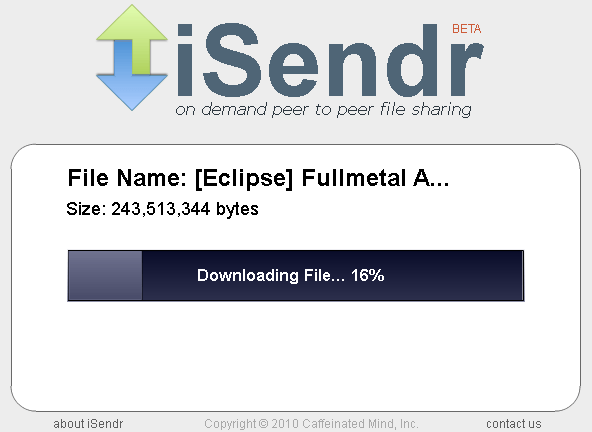
You have to remain on the site during the transfer and you’ll receive a warning message if you try to leave before the transfer completes. You can leave the window open or using iSendr might be best used when you’re in instant contact with the recipient like with IM, text message, or by phone.

iSendr is already a pretty cool tool that could solve some problems encountered regularly by many. It’s currently in beta and under active development, so new features could appear at any time. Check it out!

Filed Under: Media

Trending

  • Linksys launches line of cable modems
    In Hardware, Gadgets, and Products
  • KeySweeper USB wall charger could be keylogging you
    In Security and Privacy
  • Using technology to solve bullying
    In Infographics

Latest Media Posts

Find Out Where To Download SNES ROMs

Find Out Where To Download SNES ROMs

Multifunctional Video Conversion Tools – Wondershare Video Converter

Multifunctional Video Conversion Tools – Wondershare Video Converter

  • Popular
  • Latest
  • Today Week Month All
  • Access to the resource [servershare] has been disallowed Access to the resource [servershare] has been disallowed
  • Read the Event Logs on Windows Server Core Read the Event Logs on Windows Server Core
  • Increase IIS Private Memory Limit to improve WSUS availability Increase IIS Private Memory Limit to improve WSUS availability
  • How to ‘Unblock’ multiple files at a time with PowerShell How to 'Unblock' multiple files at a time with PowerShell
  • Setup your DFS namespace with DNS for compatibility in a mixed environment Setup your DFS namespace with DNS for compatibility in a mixed environment
  • How Virtual Reality Supports Mental Health Therapy How Virtual Reality Supports Mental Health Therapy
  • Key Strategies of Successful Coin Listing on Exchange Key Strategies of Successful Coin Listing on Exchange
  • Keeping Your Mac Healthy: A Comprehensive Guide to Maintenance and Troubleshooting Keeping Your Mac Healthy: A Comprehensive Guide to Maintenance and Troubleshooting
  • Making Distributed Software Development Work: Strategies and Best Practices for Managing Remote Teams Making Distributed Software Development Work: Strategies and Best Practices for Managing Remote Teams
  • customer contactless payment for drink with mobile phon at cafe counter bar,seller coffee shop accept payment by mobile.new normal lifestyle concept The Latest Innovations In Payment Technology
Ajax spinner

Elevator Pitch

404 Tech Support documents solutions to IT problems, shares worthwhile software and websites, and reviews hardware, consumer electronics, and technology-related books.

Subscribe to 404TS articles by email.

Recent Posts

  • How Virtual Reality Supports Mental Health Therapy
  • Key Strategies of Successful Coin Listing on Exchange
  • Keeping Your Mac Healthy: A Comprehensive Guide to Maintenance and Troubleshooting

Search

FTC Disclaimer

404TechSupport is an Amazon.com affiliate; when you click on an Amazon link from 404TS, the site gets a cut of the proceeds from whatever you buy. This site also uses Skimlinks for smart monetization of other affiliate links.
Use of this site requires displaying and viewing ads as they are presented.

Copyright © 2025 · Magazine Pro Theme on Genesis Framework · WordPress · Log in