• Home
  • About 404TS
  • Contact

404 Tech Support

Where IT Help is Found

  • Articles
    • Code
    • Entertainment
    • Going Green
    • Hardware, Gadgets, and Products
    • Management
    • Network
    • News
    • Operating Systems
    • Security and Privacy
    • Software
    • System Administration
    • Talking Points
    • Tech Solutions
    • Web
    • Webmaster
  • Reviews
  • Media
    • Infographics
    • Videos
  • Tech Events
  • Tools
    • How do I find my IP address?
    • Browser and plugin tests
  • Get a Technical Consultation
You are here: Home / Articles / Web / Microsoft Fuse Labs Launches Montage – A Space For Digital, Curated Topics

Microsoft Fuse Labs Launches Montage – A Space For Digital, Curated Topics

2010-12-09 by Jason

Microsoft Fuse Labs beta launched an interesting new service today called Montage. Since I can’t say it any better than they did:

Montage is a flexible web-based service that makes it fun and easy to create and share a visual album of the web on the topics you care about. Montage is a shareable, personal, visual album of the web. You are able to design your personal Montage around a topic by adding content that pulls information from a variety of sources including, RSS feeds, Twitter, Bing News, YouTube, video and Bing Images. Your Montage is constantly evolving as you arrange each area with the content of your choice – which is easy, intuitive and fun; and can be on any topic from, movies, sports, to robots.

The service allows you to create a digital scrapbook page, curating a particular topic, as illustrated by this somewhat creepy YouTube video by Montage.

To start off, you enter a topic you want to create a Montage page on and you’ll receive a sample of suggested layouts with text, image, and video. You can cycle through the options and choose the perfect layout.
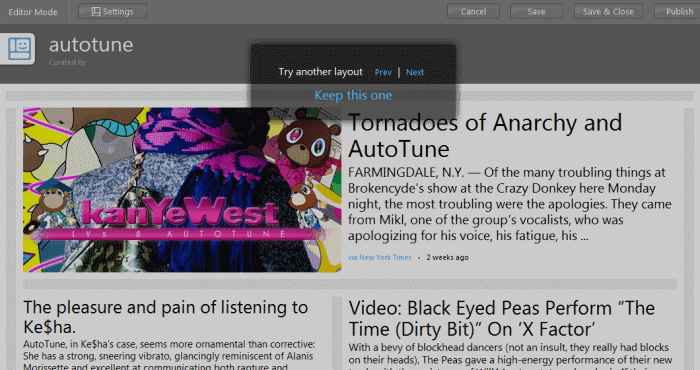
You can tweak a layout by adding additional rows or columns, or changing the content type of the panels. You can also modify the background image
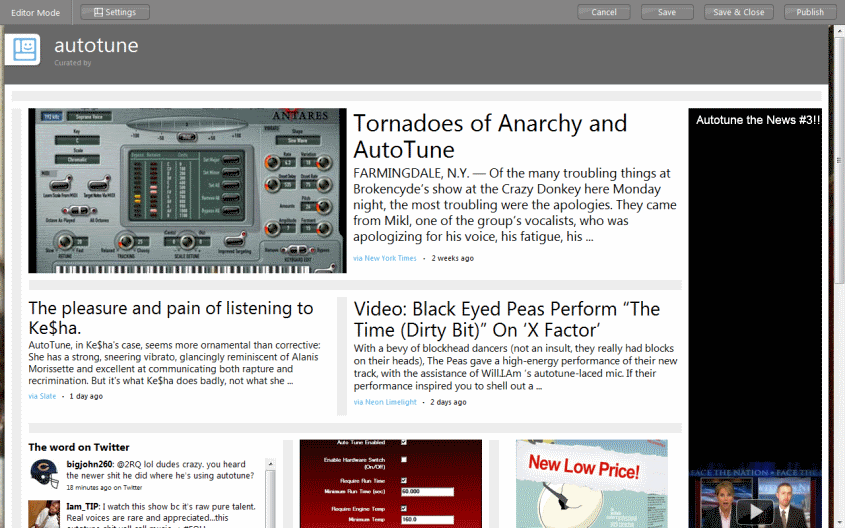
A panel can contain Bing Twitter Maps, Text, Image, News, RSS Feed, Twitter Timeline, Twitter data, or Video from YouTube.

You can save, publish, and share your assembled Montage by signing in with a Twitter, Facebook, or MSN account. You can see the Auto-tune Montage page I made through an example while writing this article here.

There could be some interesting use cases for Montage but it will be interesting to see where the product goes to from here. You can also see other previously made and published Montage pages by visiting the Montage Gallery. Check out Montage for yourself at MyMontage.com.

Filed Under: Web

Trending

  • Google to Shut Down the Goog 411 Service
    In Hardware, Gadgets, and Products, Media
  • A Typical Freelance Job
    In Tech Solutions
  • Symantec Endpoint Protection 14 released, takes advantage of Bluecoat acquisition and advanced machine learning
    In Security and Privacy, Software

Latest Media Posts

Find Out Where To Download SNES ROMs

Find Out Where To Download SNES ROMs

Multifunctional Video Conversion Tools – Wondershare Video Converter

Multifunctional Video Conversion Tools – Wondershare Video Converter

  • Popular
  • Latest
  • Today Week Month All
  • Access to the resource [servershare] has been disallowed Access to the resource [servershare] has been disallowed
  • Windows Server 2012: Installing Active Directory Users and Computers and Group Policy Management Console Windows Server 2012: Installing Active Directory Users and Computers and Group Policy Management Console
  • How to ‘Unblock’ multiple files at a time with PowerShell How to 'Unblock' multiple files at a time with PowerShell
  • Setup your DFS namespace with DNS for compatibility in a mixed environment Setup your DFS namespace with DNS for compatibility in a mixed environment
  • Make Adobe Reader and Adobe Acrobat use “Print as Image” setting by default Make Adobe Reader and Adobe Acrobat use "Print as Image" setting by default
  • How Virtual Reality Supports Mental Health Therapy How Virtual Reality Supports Mental Health Therapy
  • Key Strategies of Successful Coin Listing on Exchange Key Strategies of Successful Coin Listing on Exchange
  • Keeping Your Mac Healthy: A Comprehensive Guide to Maintenance and Troubleshooting Keeping Your Mac Healthy: A Comprehensive Guide to Maintenance and Troubleshooting
  • Making Distributed Software Development Work: Strategies and Best Practices for Managing Remote Teams Making Distributed Software Development Work: Strategies and Best Practices for Managing Remote Teams
  • customer contactless payment for drink with mobile phon at cafe counter bar,seller coffee shop accept payment by mobile.new normal lifestyle concept The Latest Innovations In Payment Technology
Ajax spinner

Elevator Pitch

404 Tech Support documents solutions to IT problems, shares worthwhile software and websites, and reviews hardware, consumer electronics, and technology-related books.

Subscribe to 404TS articles by email.

Recent Posts

  • How Virtual Reality Supports Mental Health Therapy
  • Key Strategies of Successful Coin Listing on Exchange
  • Keeping Your Mac Healthy: A Comprehensive Guide to Maintenance and Troubleshooting

Search

FTC Disclaimer

404TechSupport is an Amazon.com affiliate; when you click on an Amazon link from 404TS, the site gets a cut of the proceeds from whatever you buy. This site also uses Skimlinks for smart monetization of other affiliate links.
Use of this site requires displaying and viewing ads as they are presented.

Copyright © 2026 · Magazine Pro Theme on Genesis Framework · WordPress · Log in