• Home
  • About 404TS
  • Contact

404 Tech Support

Where IT Help is Found

  • Articles
    • Code
    • Entertainment
    • Going Green
    • Hardware, Gadgets, and Products
    • Management
    • Network
    • News
    • Operating Systems
    • Security and Privacy
    • Software
    • System Administration
    • Talking Points
    • Tech Solutions
    • Web
    • Webmaster
  • Reviews
  • Media
    • Infographics
    • Videos
  • Tech Events
  • Tools
    • How do I find my IP address?
    • Browser and plugin tests
  • Get a Technical Consultation
You are here: Home / Articles / Software / Flash Player 19 not uninstalling previous versions

Flash Player 19 not uninstalling previous versions

2015-09-23 by Jason

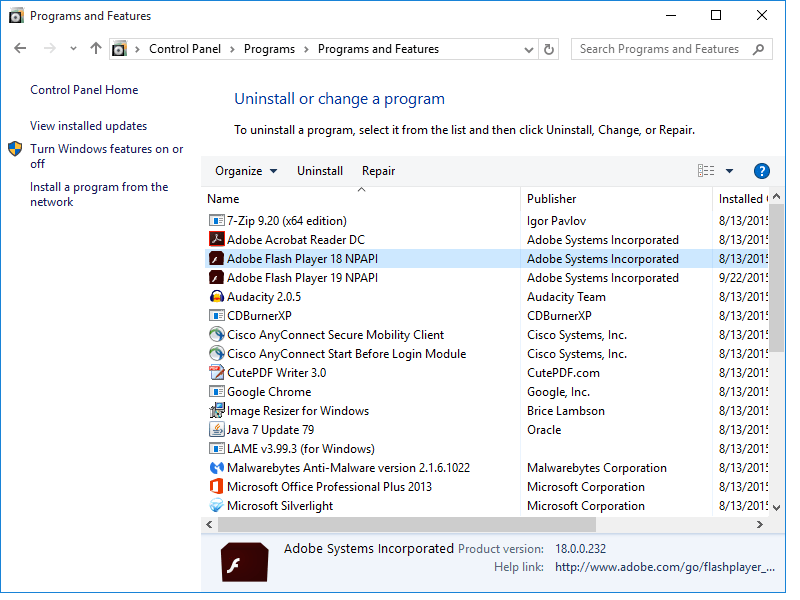
Adobe Flash Player 19.0.0.185 was released on Monday. The program has a bug in it that means the previous version of the Flash Player does not seem to be uninstalled with the installation of the new version on Windows. From the Control Panel, Programs and Features, you can see both versions sitting right next to each other.
flashplayer1819

A thread on Adobe’s forums brought the issue to the company’s attention that version 18 was experiencing this problem. A bug was filed along with the thread in Adobe’s Bugbase. The bug was closed because the problem was resolved in version 18. However, version 19 was released without the bug being address, so I recorded a new bug to track its progress.

Given the nature of Adobe Flash Player, it is actually uninstalling the old versions and replacing it with the new files. It’s just leaving the remnants behind to make it look like it has not been uninstalled. See the plugin version of Flash Player is completely version 19 now. Internet Explorer and Edge will have their version updated as soon as I run Windows Updates on this computer.

fp19files

In order to clean up the duplicates, you can perform an uninstall of Flash Player 18 through Control Panel and it will just remove the entry.

Beyond that, you can track down the uninstall entry for the old version of Flash Player in the Registry.

32-bit Windows: HKLMSoftwareMicrosoftWindowsCurrentVersionUninstall

64-bit Windows: HKLMSoftwareWow6432NodeMicrosoftWindowsCurrentVersionUninstall

Look through the entries to find the Adobe Flash Player 18 NPAPI key. Here, it was {A580818A-6519-4120-AB1C-F4F6FCFAA7D0} while version 19 was two entries below it.

fp18reg

By deleting the {A580818A-6519-4120-AB1C-F4F6FCFAA7D0} key and refreshing the Control Panel, Programs and Features listing, you will see the old version removed.

fp19reg

It will be interesting to see if Adobe’s updated Flash Player to address this bug will be able to clean up the old versions or will just prevent it from happening with the next update. Given the update chain, I believe it should clean up the old entries and since the manual uninstall is succeeding, I would not anticipate the issue increasing problematically.

Filed Under: Software

Trending

  • Office 365 Admin keeps asking for phone number and alternative email
    In Tech Solutions
  • How to fix ScreenConnect no longer reconnecting after reboot
    In Software, Tech Solutions
  • Microsoft addresses Windows 10 Privacy concerns
    In Operating Systems, Security and Privacy

Latest Media Posts

Find Out Where To Download SNES ROMs

Find Out Where To Download SNES ROMs

Multifunctional Video Conversion Tools – Wondershare Video Converter

Multifunctional Video Conversion Tools – Wondershare Video Converter

  • Popular
  • Latest
  • Today Week Month All
  • Access to the resource [servershare] has been disallowed Access to the resource [servershare] has been disallowed
  • Read the Event Logs on Windows Server Core Read the Event Logs on Windows Server Core
  • Increase IIS Private Memory Limit to improve WSUS availability Increase IIS Private Memory Limit to improve WSUS availability
  • How to ‘Unblock’ multiple files at a time with PowerShell How to 'Unblock' multiple files at a time with PowerShell
  • Setup your DFS namespace with DNS for compatibility in a mixed environment Setup your DFS namespace with DNS for compatibility in a mixed environment
  • How Virtual Reality Supports Mental Health Therapy How Virtual Reality Supports Mental Health Therapy
  • Key Strategies of Successful Coin Listing on Exchange Key Strategies of Successful Coin Listing on Exchange
  • Keeping Your Mac Healthy: A Comprehensive Guide to Maintenance and Troubleshooting Keeping Your Mac Healthy: A Comprehensive Guide to Maintenance and Troubleshooting
  • Making Distributed Software Development Work: Strategies and Best Practices for Managing Remote Teams Making Distributed Software Development Work: Strategies and Best Practices for Managing Remote Teams
  • customer contactless payment for drink with mobile phon at cafe counter bar,seller coffee shop accept payment by mobile.new normal lifestyle concept The Latest Innovations In Payment Technology
Ajax spinner

Elevator Pitch

404 Tech Support documents solutions to IT problems, shares worthwhile software and websites, and reviews hardware, consumer electronics, and technology-related books.

Subscribe to 404TS articles by email.

Recent Posts

  • How Virtual Reality Supports Mental Health Therapy
  • Key Strategies of Successful Coin Listing on Exchange
  • Keeping Your Mac Healthy: A Comprehensive Guide to Maintenance and Troubleshooting

Search

FTC Disclaimer

404TechSupport is an Amazon.com affiliate; when you click on an Amazon link from 404TS, the site gets a cut of the proceeds from whatever you buy. This site also uses Skimlinks for smart monetization of other affiliate links.
Use of this site requires displaying and viewing ads as they are presented.

Copyright © 2025 · Magazine Pro Theme on Genesis Framework · WordPress · Log in