I’m at the two month mark of using Windows 8 as my operating system on my home computer. Over the weekend, I had a lot of research to do and articles to read for an assignment. For reading and taking notes through the articles, the built-in Windows 8 PDF Reader just wasn’t cutting it so I went to install Adobe Reader 11. Unfortunately, trying to install Adobe Reader XI resulted in an error.
Previously, I had redirected the My Documents folder and others to folders on my NAS. That functionality worked great and gave my data some redundancy although I would get a minor complaint from Windows every once in a while about limited Library functionality since I didn’t want to enable offline file functionality.
The error message from the Adobe Reader install seemed to be related to my redirected My Documents folder and not the installer’s fault. Even though I could go to my Z drive and My Documents folder without a problem, the installer still threw a fit.

As a quick compromise, I was willing to re-redirect the My Documents folder to a spot on the local hard drive.
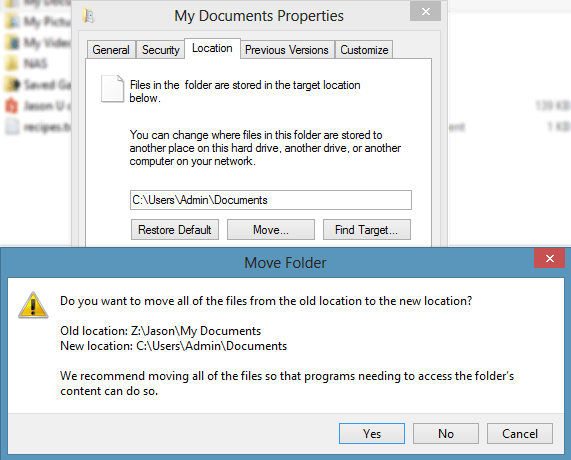
I tried choosing the default location. When I hit the OK button, I was asked if I wanted to move those files from the current location to the new one. I said no because it was just a temporary measure. Unfortunately, I received the error: Folder Redirection Failed. “Failed to build the list of known subdirectories. The system cannot find the file specified.”

Trying plenty of restarts and disconnecting/reconnecting the mapped drive, nothing would let me un-redirect the folder. I’ve encountered the error message about not being able to reach the redirected folder before but getting this Redirection failed message was a first.
Finally, I decided to just take matters into my own hands. I switched the folder location for these collections in the Registry.
Under HK_Current_UserSoftwareMicrosoftWindowsCurrentVersionExplorerUser Shell Folders, you will find the various entries.
I changed the ‘Personal’ entry to a folder on the C drive and then I was able to go through the Adobe Reader 11 install without a problem.

I switched the setting in the Registry back to my NAS and could finally get to start reading those articles I needed to.