Google announced that Chrome is now made for the enterprise with an MSI installer and templates to control settings. This is something that fans of Mozilla Firefox have been clamoring for since version 2.0 and I believe this may give an edge to Google Chrome in the browser wars." />

Home » Software »System Administration » Currently Reading:

Google Goes Enterprise: Deploying Chrome By Group Policy

December 16, 2010 Software, System Administration 3 Comments

Yesterday, Google announced that Chrome is now made for the enterprise with an MSI installer and templates to control settings. This is something that fans of Mozilla Firefox have been clamoring for since version 2.0 and I believe this may give an edge to Google Chrome in the browser wars.

The Google Chrome MSI is offered through the Google Apps for Business site though it’s available to all. There, you can download the .msi file and policy templates to allow you to configure the browser for your organization for Windows, Mac, or Linux. You can read more about what policies are able to be controlled from the respective Google Support page but it looks like the important ones are there like: proxy server information, home page URL, enabling Javascript, disabling password manager, and white-listing/black-listing extensions.

Copy the GoogleChromeStandaloneEnterprise.msi to your deployment server and create a software installation inside a GPO like normal.
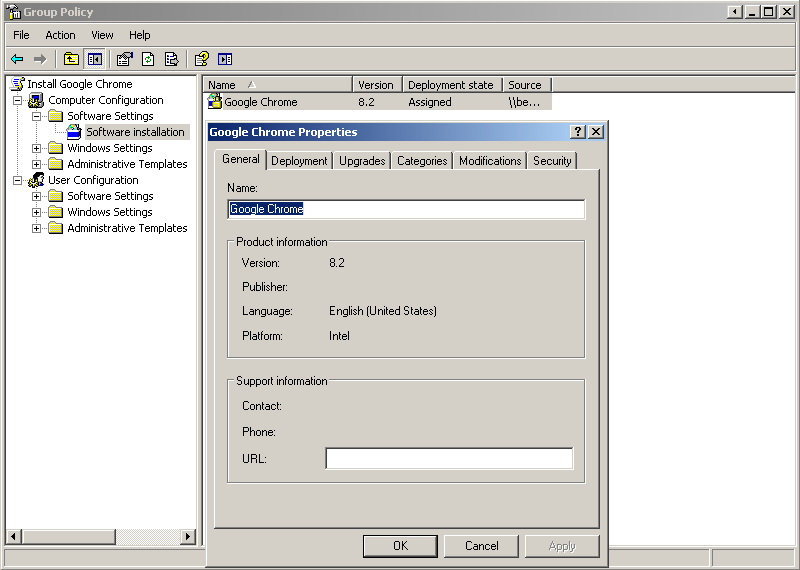
Then, you can use the templates Google provided to get complete control over the browser experience. For example, you could set the home page URL to your organization’s site.

Right-click on Administrative Templates under Computer Configuration on your deployment GPO. Select Add/Remove Templates. Then click the Add… button and browse to the chrome.adm or chrome.admx file to add it. You can then browse under Google, Google Chrome, to find all the settings you can configure.

I’ve successfully deployed Google Chrome to a test machine beside me but I’ll have to do a bit more testing and planning before I’m comfortable pushing it out to my organization. This may very well push out Firefox as a supported application here due to the control this allows and the behind the scenes updating of Chrome. Providing a Google Chrome .msi for Business is a smart move by Google.


Related posts:

  1. Google Releases Search Results Blocklist Chrome Extension, Crowd-Source Ranking Next?
  2. Google Body Browser
  3. Mozilla Firefox and the Back and Forth With Enterprise Allows IE and Chrome A Window of Opportunity
  • tom

    Hi
    I am trying to deploy Chrome via GPO, it seems to take forever when installing though like upwards of 30 minutes.

    Do you have any experience of this, it shouldnt take this long for a normal browser install?

    • http://www.404techsupport.com/ Jason

      I haven’t experienced any problems with my deployment of Chrome. Is the install still completing despite its time-consuming method?

      Have you tried disabling the antivirus on a client PC and seeing if there is a big time difference between installing with and without AV?

  • Mad

    I’ve found a guide that should help in deploying the MSI on your network: http://bdts.com.au/tips/48-msi-packaging/156-deploy-google-chrome.html

Comment on this Article:


Sponsors

Keytech Managed Services
Keytech provide Managed IT services to ensure your valuable data and network are protected and running to an optimal level.

Dedicated Server Hosting
BODHost.com offers a wide range of managed dedicated servers with 100% uptime and 24x7 dedicated support.

Do It Smarter Managed IT Services
Do-It-Smarter Managed IT Services - Managed backup, hosted email, systems management, network audits, managed security & disaster recovery.