reported earlier, the patches for Adobe Acrobat 9.3.2 and Adobe Reader 9.3.2 (Note: There is no such thing as Adobe Acrobat Reader.) are now available for download. When Adobe Reader 9.3.1 came out I wrote an article GPO Deploying Adobe Reader 9.3.1 that documented the process to create an Administration Install Point that allows us to deploy the (then) latest Adobe Reader. Now that 9.3.2 has come out, I figured I'd document the same process for deploying Adobe Acrobat 9.3.2." />

Home » Security »Software »System Administration » Currently Reading:

Using Group Policy to Deploy Adobe Acrobat 9.3.2

April 13, 2010 Security, Software, System Administration 51 Comments

As I reported earlier, the patches for Adobe Acrobat 9.3.2 and Adobe Reader 9.3.2 (Note: There is no such thing as Adobe Acrobat Reader.) are now available for download. When Adobe Reader 9.3.1 came out I wrote an article GPO Deploying Adobe Reader 9.3.1 that documented the process to create an Administration Install Point that allows us to deploy the (then) latest Adobe Reader. Now that 9.3.2 has come out, I figured I’d document the same process for deploying Adobe Acrobat 9.3.2.

Preparation

The process for deploying Adobe Reader 9.3.2 and deploying Adobe Acrobat 9.3.2 is very similar, but the 9.3.1 patch was a Security patch while 9.3.2 is a quarterly update so there are subtle differences. Since 9.3.2 is a Quarterly update and 9.3.1 was a Security update, we’ll have to start from scratch and patch in this sequence (skipping security updates):

Adobe Acrobat: 9.0 -> 9.1 -> 9.1.2 -> 9.2 -> 9.3 -> 9.3.2

Adobe Reader: 9.3 -> 9.3.2

You’ll need to download all of the linked files above. Adobe Reader 9.3 is available as an .msi file and 9.3.2 is in .msp format so we can start from that .msi and patch it. With Adobe Acrobat, we’ll have to start from the 9.0 .msi file and patch it 5 times. (Come on, Adobe! Cumulative updates please!)

The Process

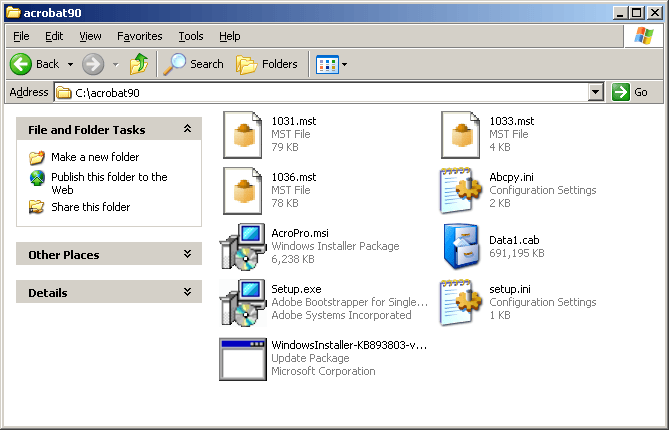
Copy your Acrobat 9.0 installation files to a folder where you can work with them. I’m going to make a directory at c:\acrobat90. It should look like this:

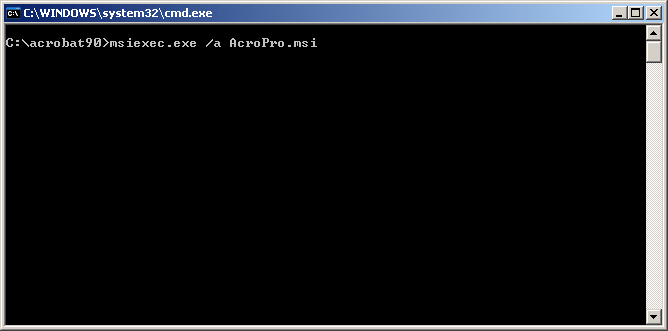
Open a command prompt and navigate to that folder. Then run the command:

msiexec.exe /a AcroPro.msi
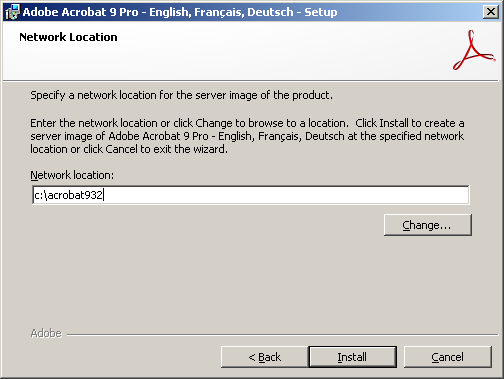
At the Welcome screen, press the Next button so you can choose a Network location. For the location, I would recommend using a new local directory again. I’ll install mine to c:\acrobat932 and then click the Install button.
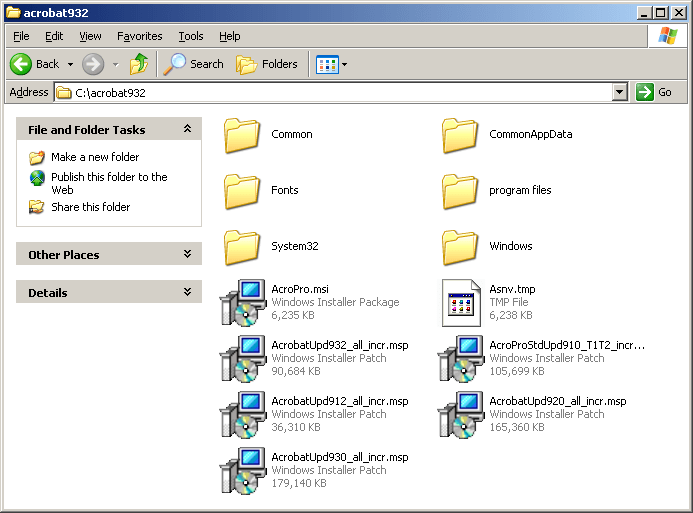
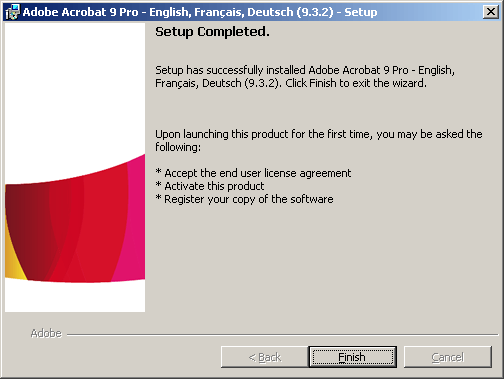
This will run through the installation process and copy the files needed to your new directory. Once the install completes, just press the ‘Finish’ button. Now, copy the .msp files for each of the Acrobat quarterly updates listed above to the directory you just created. Be sure to go into the Properties of any of the .msp files to make sure they’re ‘Unblocked’ or else this security setting will prevent the patching from working correctly. Your directory will look a bit like the following picture.
Now, we’ll need to sequentially patch our Acrobat AIP from 9.0 to 9.3.2. To do that, we’ll need to run the slip-streaming command wait for it to complete and then run the next one. Navigate to your new directory. For me that will be C:\acrobat932. Then run these commands:

msiexec /a AcroPro.msi /p AcroProStdUpd910_T1T2_incr.msp
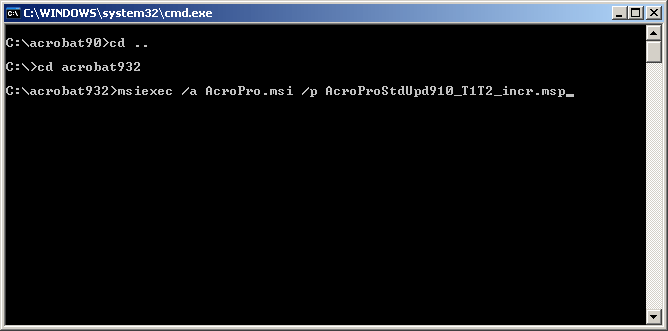
This will run the installer again. Click Next to choose where you install the files and choose the same current location. Then let the installation complete. When it finishes, repeat this same step again for the next patches until we’re current. The commands will be:

msiexec /a AcroPro.msi /p AcrobatUpd912_all_incr.msp

msiexec /a AcroPro.msi /p AcrobatUpd920_all_incr.msp

msiexec /a AcroPro.msi /p AcrobatUpd930_all_incr.msp

msiexec /a AcroPro.msi /p AcrobatUpd932_all_incr.msp

Finally, we’ll have our up to date installer. You can delete all of the .msp files out of the directory and then copy the entire directory to the deployment share on your server. Copy over the setup.ini file from your original installation files to your deployment folder if you are going to create a transform. It’s now ready to be deployed.
The Deployment

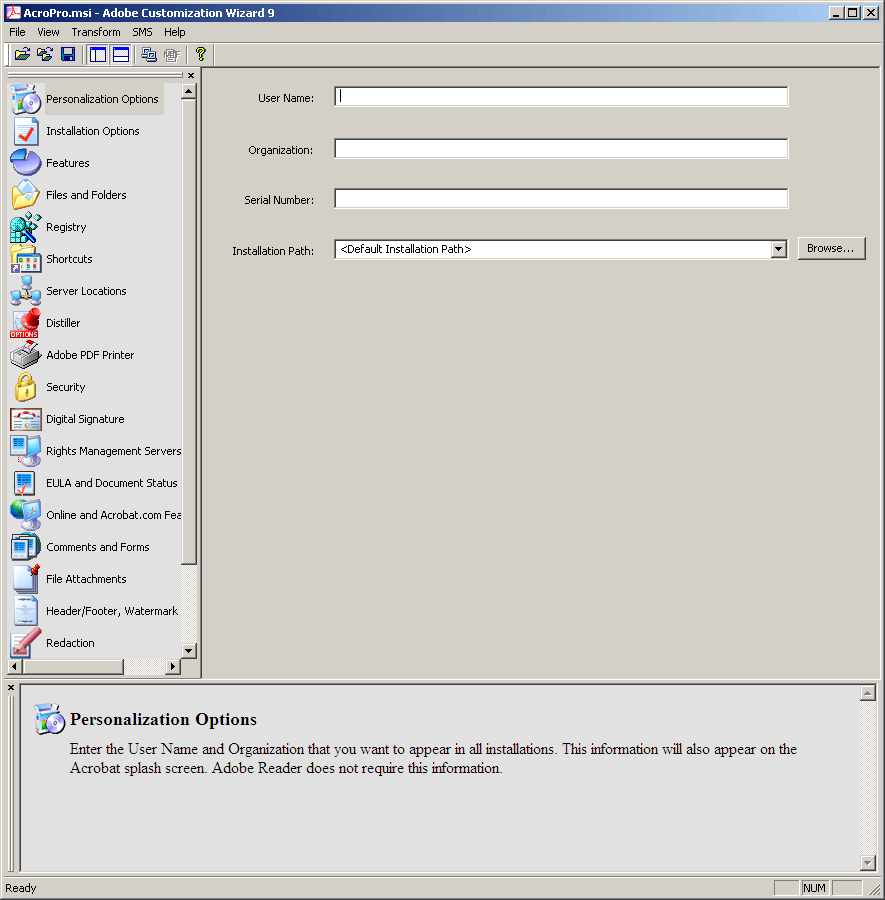
You can use the Adobe Customization Wizard to choose all the options you want with your deployment including serial number, so run through that quickly to generate your .mst file in the same directory with your organization’s preferences.
Thanks to commenter Jan Schulz, if you’re trying to deploy Adobe Reader 9.3.2, you’ll need to do two steps:

  1. Use the Adobe Customization Wizard to create a transform.
  2. Leave ‘Disable all updates’ unchecked under the Online and Acrobat.com Features.
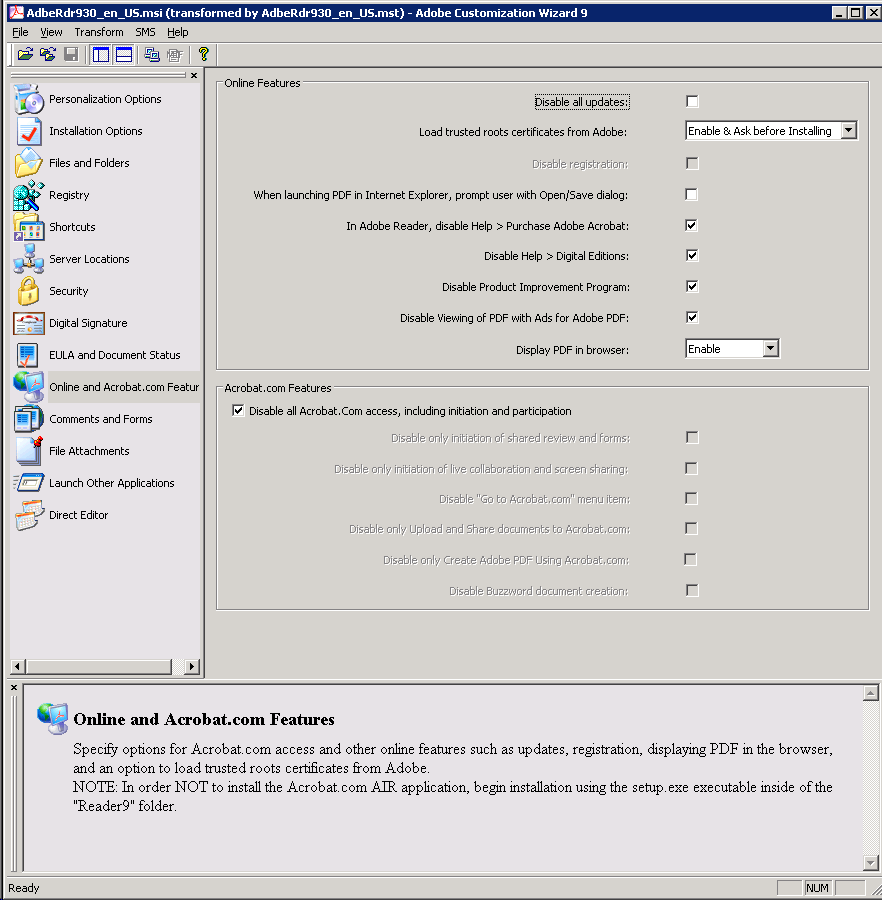
If you do not use a transform or disable updates in the transform, you will receive an error message when trying to install from the .msi or in your deployment that states:

Another version of this product is already installed. The installation of this version cannot continue. To configure or remove the existing version of this product, use Add/Remove Programs on the Control Panel.

In the Adobe Customization, you can also prevent the recently much-talked-about “exploit” that allows a PDF to launch an embedded command or executable.

Once your transform is generated, you can close the Adobe Customization Wizard and open the Group Policy Management console. Create a new group policy or use an old one and edit the GPO. Remove any previous versions of Acrobat from being deployed and add the new .msi package.
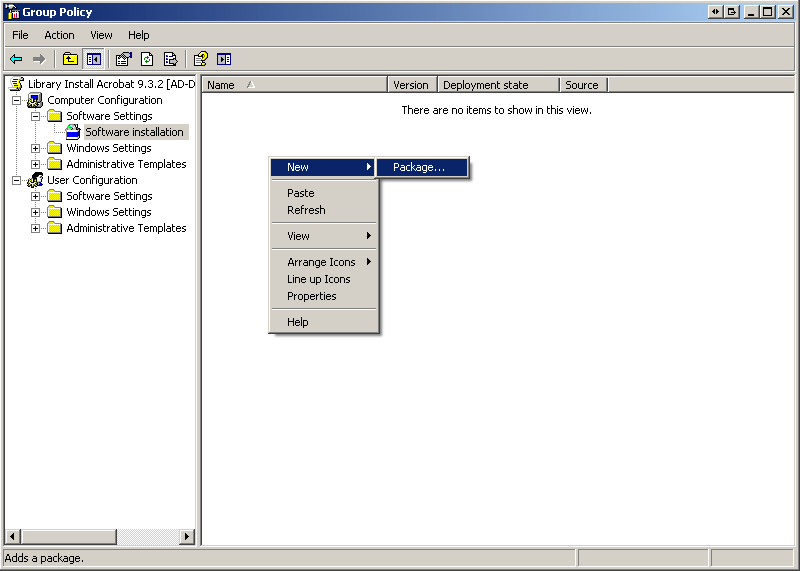
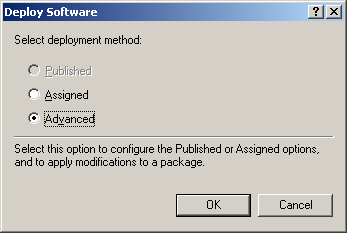
After you browse to our recently patched .msi file, you’ll be given options about the deployment method. Select ‘Advanced’ and hit Ok.

I like to change the Name to the current version so users can tell why their machines are updating under the General tab, check to ‘Uninstall this application when it falls out of the scope of management’ under the deployment tab, and assign the AcroPro.mst that we created with the Adobe Customization Wizard 9 under the Modifications tab.

Now your deployment should be all set to go. Make sure you’re restricting the deployment to the computers that you have licenses for. Test it on a few machines to make sure it works well in your organization. The installation may take 10-20 minutes to complete depending on the network and machine speeds.

The Next Time

You and your organization should now be up to date with the latest version of Adobe Acrobat and Adobe Reader, at least for a few months unless a security update comes out before the next quarterly update scheduled for July 13th. From the Adobe Secure Software Engineering Team blog:

Starting with the next quarterly security update for Adobe Reader, currently scheduled for July 13, 2010, we will update the Download Center to offer an installer for the latest version of Adobe Reader for the English, German, Spanish, Japanese and French language versions for Windows, and the English version for the Mac.

Also be sure to check out Adobe’s new Enterprise Administration of the Acrobat Family of Products page for resources to a lot of related information.

If you have any questions or problems, feel free to ask in the comments.


Related posts:

  1. Adobe Customization Wizard X is Here. You Are Now Free To Deploy Adobe Reader and Acrobat X
  2. Adobe Reader and Acrobat Updates to 9.3.4
  3. Adobe Reader and Acrobat 9.3.2 Patches Available.
  • CM

    Hi,

    I have been following your site and has been successfully deploying Adobe Reader, until 9.3.2. It seems there is some issue with the latest update slipstreaming into 9.3.

    If I run the slipstreamed 9.3.2 installer on a computer installed with 9.3.1, I get the following error: “Another version of this product is already installed. The installation of this version cannot continue. To configure or remove the existing version of this product, use Add/Remove Programs on the Control Panel.”

    If I follow the instructions and uninstall 9.3.1, to get this error message: “Error applying transforms. Verify that the specified transform paths are valid.”

    Do you have any advice for this?

    CM

  • Jan Schulz

    I’ve got the same problem when trying to install manual: “Another version…”

    There seems also a problem with disabling updates and adding such a transform to AD GPO. I couldn’t add such a package without enabling updates (in Adobe Cost. Wizard). Disabling the run registry entries should do the same…

  • http://www.404techsupport.com/ Jason

    Interesting. I see the error message you guys are getting with Adobe Reader 9.3.2 following the AIP procedure, but can confirm that Adobe Acrobat 9.3.2 following the steps above works correctly.

    I’ve tried creating a transform for the Reader installer using the Adobe Customization Wizard and it still results in that error. It looks like Adobe has seen this error before: http://kb2.adobe.com/cps/404/kb404307.html

    I’m out of the office today but I’ll be looking into it on Thursday so I can deploy this out to my own users. Until then, if anybody figures out the solution, please post it in the comments to help everybody out.

    Thanks!

  • Jan Schulz

    I successfully deployed it to my test PC (=it displayed a PDF) by *not* disabling the Update part in Adobe Customization Wizard and then deploying the package by deinstalling the old package (instead of installing over the old one). This option was already selected when adding the package to the GPO and then selecting the “old package”.

    I also deleted the run-registry keys and our users have no admin rights, so hopefully that’s enough to prevent the updater from running.

  • http://www.404techsupport.com/ Jason

    Thanks Jan!

    I tested it out and confirmed that it will work and not give the “Another version of this product is already installed. The installation of this version cannot continue. To configure or remove the existing version of this product, use Add/Remove Programs on the Control Panel.” error if you use the Adobe Customization Wizard and leave Updates enabled.

    It seems very odd that a transform is required since many people could be fine with the default settings.

    I’ll update the article above to highlight your discovery. Thanks for sharing!

  • CM

    Thanks Jan for figuring out the solution:)

  • Hutch

    I created an MST this morning that does the usual stuff plus disables updates, and it seems to work fine via Group Policy.

    The whole thing isn’t documented too clearly in my opinion.

  • http://www.404techsupport.com/ Jason

    @Hutch

    Deploying Acrobat 9.3.2 with my usual setup (updates disabled) worked without a problem but I experienced the same problem many others are reporting with deploying Reader 9.3.2. Were you able to deploy Adobe Reader with updates disabled?

    I hope my article helps amend the lack of documentation.

  • Hutch

    It seems so yes. I’ve only done limited testing so far but I’ve certainly pushed 9.3.2 with updates disabled to a few Windows 7 and XP clients via GPO.

  • Jerry

    I have installed 9.3.2 update using the procedures above and then installed through a GPO. Now when I open a pdf file from the internet and it has a link to another pdf file Adobe Reaer will not allow the connection. When I go to “Edit>Preferences>Trust Manager>Change Settings” everything is greyed out.

    • http://www.404techsupport.com/ Jason

      You’ll need to change the preferences in your Transform then to allow PDFs to be opened via the launch external programs settings in Adobe Customization wizard to match the behavior you want and then redeploy.

  • Jerry

    If you are talking about the settings under File Attachments in the Adobe Customization Wizard it is already set to open PDF and FDF. There is a message at the bottom that says “Adobe requires that PDF and FDF file types are always allowed. These file extensions cannot be modified. Also Prompt User with the ability to set the file type as “Allowed” is checked. I tried slipstreaming 9.3.2 into 9.3.0 at home and got exectly the same symptoms and I was not even using a tranform.

  • Hutch

    Regarding Adobe Reader, in a situation where someone may have an older version of Acrobat Standard or Pro installed, has anyone managed to install Reader 9 via Group Policy and have it set Reader 9 to be the default for viewing PDF’s?

    There seems to be a quirk/flaw in the MSI or the transform which means that in this situation, unless you have “Installer Decides” selected, it errors in Internet Explorer when you open a PDF in the browser.

  • http://www.404techsupport.com/ Jason

    Hutch,
    I think I understand your question to be similar to something I’ve seen before. If you get an error message when trying to open a PDF in your browser that reads like:

    The Adobe Acrobat/Reader that is running cannot be used to view PDF files in a web browser. Adobe Acrobat/Reader version 8 or 9 is required. Please exit and try again.

    I addressed this in this article:
    http://www.404techsupport.com/2010/03/an-xp-internet-security-2010-infection-campaign-update/

    There’s a registry key where you can dictate what application opens the PDF in HKey_Classes_Root. You can set that with a batch script and convert the batch script into a .msi file and then deploy it in the same GPO with your Adobe Reader .msi.

  • Jerry

    Has anybody that has used the above procedure ssen any problems opening a link from a pdf file. When I download and install the 9.3.2 patch from Adobe’s website I have no problems at all. When I use the above procedure to incoroprate the 9.3.2 install I have the problem.

    I have tried this at different locations i.e. work, home, etc. I always have this problem after installing after using the procedure above.

    When I go to Trust Manager > Settings all is grayed out. I have posted on the Adobe forum and it has been read 100s of times but no replys. Does anyone have a clue what could be the problem?

  • Joe

    If you are running 9.3.1 already can you just update to 9.3.2? If so how do you do it? I have tried downloading the 9.3.2 update version and then use “msiexec /update AdbeRdrUpd932.msp”
    but I always get an error message that says “The upgrade patch cannot be installed by the Windows installer
    service because the program to be upgraded may be missing, or the
    upgrade patch may update a different version of the program”

    Any suggestions?

    http://www.adobe.com/support/downloads/product.jsp?product=10&platform=Windows

  • http://www.404techsupport.com/ Jason

    I’ve found the most complete method to be uninstalling the old version and installing the new version to do it entirely through GPO.

    If you have a different service like SCCM, you may be able to use the command you mentioned. As far as I know, it isn’t possible to just deploy the .msp. You may be able to use the Upgrades tab for GPO deployment to have Group Policy update the previously deployed versions but you’d still have to create an updated .msi using the method above.

    Using the upgrade path may reduce time spent uninstalling and reinstalling but it might also complicate things into quite a mess given Adobe’s quarterly and security updates.

  • Joe

    I am using the same method and seems to work fine. However I am still getting the message about the “Another version of this product is already installed. The installation of this version cannot continue. To configure or remove the existing version of this product, use Add/Remove Programs on the Control Panel”

    I used a transform (mst) when 9.3.1 was deployed and I am now using the same transform file and then fire it up via:

    MSIEXEC /i AcroRead.msi ALLUSERS=TRUE TRANSFORMS=acroread.mst

    It doesn’t work. I have also leave unchecked “Disable all the updates” as specified in the article.

    Any idea about what could be the issue?

  • http://www.404techsupport.com/ Jason

    The installer is thinking that the software is already installed for one of many reasons. Most likely there’s a remnant of the installation left in the Registry.

    I like deploying with the Uninstall this software when it falls out of the scope of management so my machines are always cleaned up.

    You might have to use the Windows Installer Cleanup Utility to get rid of the remnants:
    http://support.microsoft.com/kb/290301

  • BuckTired

    Is Adobe ever going to secure this software? between patching this and flash and them always making all the web browsers insecure, most of my time is spent trying to make sure they’re patched correctly as opposed to actually getting work done. Why doesn’t Adobe’s installer a.) find every damn instance of itself on the drive it installs to? b.) patch every instance of itself or download the CORRECT patch and patch itself, why must we constantly be checking and comparing version numbers and updates and the damn updates say, “your patched fool” but yet if you physically see there’s a patch which raises the version number so the updater is lying! I am trying to secure my boxes “OS’s and Versions” while constantly juggling between this garbage nonsense loop the loop install failure/ rinse and repeat patch security update, break system, debug, SCREAM, roll back, re-clone F-ing nonsense game, when I should be getting work done. And it always seems to happen when I am busy with a bunch of other crap trying to get something produced!

    There has to be a special place in hell.

  • BuckTired

    Sorry. Your not the ones to complain to. To make all that tldr; crap short. The bug is Adobe Reader 9 doesn’t update at all. PERIOD.

  • http://www.404techsupport.com/ Jason

    I can relate to a good rant, BuckTired. A lot of the time it feels like I play tech support for Adobe but they don’t pay me.

    Between trying to keep all the Adobe products up-to-date at work and writing articles like this where I can’t find the same information on Adobe’s site, it seems like Adobe owes us something…

    Keep up the hard work, BuckTired.

  • Ken

    Rather than using the customization wizard, it appears you can work around the “Another version of this product is already installed…” issue by replacing the older (9.3.1) installation files with the 9.3.2 files and then simply using the “Redeploy” option on the software package in the GPO. I had success with limited testing at one site so far. Can anyone confirm this is a viable option? Any reason this is not a good solution?

  • MikeyRod

    Hi Guys! Hope this helps the rest of you if you’re setup the same way I am.

    I have been deploying reader via GPO since 9.2. When 9.3 came out I made another software package and had it “upgrade” the existing 9.2 package. For the 9.3.2 update, I downloaded the MSP package (from http://www.adobe.com/downloads/updates/) and placed it in the same distribution directory for 9.3. I then issued the command “msiexec /a AcroRead.msi /p AdbeRdrUpd932_all_incr.msp” and it basically ran though an administrative image install, modifying the existing 9.3 files (AcroRead.msi, etc) to be updated to 9.3.2, so that way when you install from that distribution point, all new installations would be the 9.3.2 version. The final step, I had to go back to AD, right click my existing 9.3 update package, select all tasks, and say “redeploy application”.

    After I restarted a few domain joined computers, they all got reinstalled with the latest version of reader.

    I hope this helps!

  • Ken

    MikeyRod, if I’m understanding you correctly, you did exactly what I did which was to slipstream the 9.3.2 msp into the 9.3.0 msi, then use the redeploy option.

    One of the concerns I had though was the design flaw Jason mention in his post. By not using the Customization Wizard to create the transform file, you don’t change the behavior of reader. So, I addressed that by creating a registry import file based on Adobe’s blog on the subject:
    (http://blogs.adobe.com/adobereader/2010/04/didier_stevens_launch_function.html)

    I’m going to implement via logon script for now until I can create and test a custom adm file to deploy via group policy.

  • http://www.404techsupport.com/ Jason

    Ken,
    If you need an example .adm file to work from, check out the one I use in my Camtasia 6 deployment (http://www.404techsupport.com/2009/10/how-to-deploy-camtasia-studio-6-with-group-policy/) it writes 2 registry keys and should be pretty easy to adapt to what you’re doing.

  • Billy

    I’ve completed all of the instructions above (creating an Administrative Install, slip-streaming the 5 MSP updates & creating a MST file) but cannot get my 9.3.2 Adobe Acrobat Pro package to install successfully on a new PC using a new Group Policy. If I install the the package manually — it installs fine. Am I missing something. Event Viewer displays Fatal error during installation. Any suggestions?

  • http://www.404techsupport.com/ Jason

    If it installs manually correctly, my best guess would be a permissions or server access issue by the SYSTEM account that’s trying to do the install pre-login.

    Is there any further information beyond the Fatal error in the event log? You’ll usually find it with Application Management (about 3-4 events for each software title).

  • Billy

    Geez — figured it out. The person gave me the wrong product key. Changed it and it’s now working ok. :-)
    Thanks for the reply.

  • Jason Pearce

    We recently used Group Policy to deploy Adobe Reader 9.3.1. On a few clients, the installation failed.

    When an administrator attempts to manually install Adobe Reader 9.3.1 onto a client machines that experienced problems, they receive the following error message during the installation process:

    “Error applying transforms. Verify that the specified transform paths are valid.”

    The Application Event Log will show that Adobe Reader 9.3 did not install:

    Source: MsiInstaller
    Event ID: 11708
    Description: Adobe Reader 9.3. — Installation failed

    We have unsuccessfully attempted several suggested solutions…

    http://kb2.adobe.com/cps/404/kb404307.html

    This Adobe Knowledge Base is for Reader 8.x, but we decided to try anyway. When we run the kb404307.exe tool as an administrator, we get this error message:

    “Acrobat Transforms Update did not find valid installed Acrobat products or you do not have sufficient privileges to update registry.”

    http://support.microsoft.com/kb/290301

    We also saw advice to use the Windows Installer Cleanup utility (MSICUU2.exe) from Microsoft. This tool, however, has been discontinued and is no longer available.

    Does anyone have any advice on how to install Adobe Reader 9.3.1 on a machine that is presenting the “Error applying transforms. Verify that the specified transform paths are valid.” error during installation?

  • http://www.404techsupport.com/ Jason

    Are you using the Adobe Customization wizard to customize your transforms? Have you verified that security permissions on your shared .mst are correct for your machines? Was the .mst properly loaded with the Software Package under the Transform tab?

    Fortunately I happen to have a copy of the Windows Installer Cleanup utility lying around. You can use it, despite Microsoft’s lack of support by downloading it from 404 Tech Support here: http://www.404techsupport.com/blog/msicuu2.exe

  • Jason Pearce

    Jason, Thanks a bunch for the Windows Installer Cleanup utility. Using it to uninstall Reader on those few client machines solved everything.

    I did use the Adobe Customization wizard to customize the installation. It was my first time using this tool and Group Policy to push out an installation. I recall disabling the EULA, selecting a silent install, and disabling Javascript via the Registry section.

    I then selected Tranform > Generate Transform.

    I saved the .mst with the .msi in our /domain/netsol/software folder, which has the correct permissions assigned to it.

    I think I did everything correctly, and more than 1,000 clients installed the Reader update just fine. About five, however, had the problem I described above. But now that I have the msicuu2.exe, I think we are okay.

    Thank you for your blog and assistance.

  • Pingback: Microsoft No Longer Supports Windows Installer Cleanup Utility - 404 Tech Support

  • Jonathan Williams

    Thank you for this posting. Your tutorial was invaluable to me in my first package deployment of Adobe Acrobat via GP.

    I’m curious to know now that 9.3.3 has been released (6\29\10) whether a package redeployment is required after slipstreaming the new service pack in or is there a better and less bandwidth intensive method?

  • http://www.404techsupport.com/ Jason

    Jonathan,
    I’ve stuck to uninstalling, reinstalling via GPO deployments. Although it’s time intensive, it has worked reliably for me.

    You could run a script to install the patch using:
    msiexec /update blahblah.msp /qn

    You could wrap the script with conditionals that check to see if a file exists and copy a file somewhere at the end of a successful patching.

    If you have OCS Inventory or SCCM, these tools might be able to assist with this process more efficiently that just Group Policy’s capabilities.

  • http://www.jqsolutions.com John

    I really need some help with this one.

    I’m trying to install Adobe Reader 9.3.3 (created through the patching/slipstreaming the updates) to PC’s that have Adobe Reader 9.3.1 installed. However I’m getting the message that says “Product already installed bla bla bla”.

    I tried installing with a transform file as well but I get the same error message.

    Does this article only work for Adobe Acrobat? Or is there a way to get Adobe Reader 9.3.3 deployed to PC’s running 9.3.1/2 or earliers?

    I’m willing to pay for help since this is so frustrating.

  • http://www.404techsupport.com/ Jason

    John,

    The method definitely works with Adobe Reader, I’m using it at my organization currently. The method is the same for Reader and Acrobat but this article was written for Adobe Reader before which might help: http://www.404techsupport.com/2010/02/gpo-deploying-adobe-reader-9-3-1/

    There is a setting in the Transform to uninstall any previous versions of Reader or Acrobat (as long as they’re more recent than version 6.0) that might get past your problem of them already being installed. It all works smoothly once you’re deploying but the first time has a few speed bumps like this.

    Since this is the freely available Adobe Reader we’re talking about, I can give you my .msi and transform to see if it will work in your environment any better. I’m guessing Adobe wouldn’t want me publicly distributing it but use the Contact Form (under the About tab at the top of the site) to e-mail me and we can work out getting you a copy of my files to try.

  • http://www.jqsolutions.com John

    Ok, thanks for the response. I’d like to get a copy of yours to test.
    This was the only work around for me currently using a vbscript to uninstall previous Adobe Reader, then install 9.3.3 one.

    Set wshShell = CreateObject(“WScript.Shell”)
    WshShell.Run(“MsiExec.exe /X{AC76BA86-7AD7-1033-7B44-A93000000001} /qb”), 1, True
    wshShell.Run(“msiexec /i “”\\server\share\AdbeRdr930_en_US.msi”" ALLUSERS=1 /norestart /qb”), 1, True

  • green

    Zdravim,
    tez pouzivame instalaci a aktualizace readeru pres GPO. Vse funguje vpohode pouze aktualizace readeru instalovane na windows7 se nedari. Pise to ze ma problem s odinstalovanim stare verze a podobne.
    emate zkusenost s win7?
    Dekuji

  • green

    HI i’m using instaling and updating adobe reader via GPO. Everything works fine(vista, XP) but no with windows7. There is any problem with uninstaling older version. Do you know how to fix it?
    thanks

  • http://www.404techsupport.com/ Jason

    Sorry, I don’t but somebody else might. Can you post the error message that’s showing up in the Win7 computer’s event logs?

  • green

    first

    Adobe Reader 9.3.3 – listed in the guidelines is to Install Adobe Reader Upgrade Adobe Reader 9.3.2 – listed in the principles Install Adobe Reader. These applications will necessitate the removal of Adobe Reader 9.3.2

    second
    Unable to remove Adobe Reader 9.3.2 – referred to in principles Install Adobe Reader. An error occurred:%% 1274.

    third
    Adobe Reader 9.3.3 listed in the principles Install Adobe Reader is configured to upgrade to Adobe Reader 9.3.2 listed in the principles Install Adobe Reader. Removing Adobe Reader 9.3.2 – United principles set out in Adobe Reader Install failed, error occurred:%% 1274. Upgrade will be aborted.

    I try manage and install symantec Enterprise vault too and same result.
    thanks

  • Hans

    Very nice article. I do have a question though, should all of the RTP files be left in the directory? It makes my Adobe Acrobat installation 700MB large, which is a h*ll of a lot in my opinion :-O.

    /Hans

  • http://www.404techsupport.com/ Jason

    I’m not sure what you mean by the RTP files, but the files created through the Admin Install Point creation process need to be kept around. Once patched though, the .msp won’t need to be kept in the deployment folder.

    My Adobe Reader 9.3.3 AIP is 109 MB in size. Acrobat is at 1.55GB.

  • T

    Just ran through this guide again for the 9.3.3 updates and ran into a snag (MSI error -2147287035). Found the solution though, the local \SYSTEM\ account on the box you’re running the patch on need to have rw privs on the files/folders involved. For some reason those had been removed and it was giving me fits. Hope this helps someone else.

  • WIND

    waitin for a good professional answer to “hans” question about the .rtp files which r located in the “c:\%installation dir%\update\” folder.

    ps: fine informative article jason. wtg n thx

  • David

    Jason.
    I have added the latest update which is 9.4.2.
    Created a MST via CW. I ticked the “disable update” to see what happens.
    Seems to work for me. No errors during install, and the updater is disabled.
    Now im just trying to figure out how to to change the metrics from Inches to centimeters. Thanks, David.

  • Ken

    Wondering Jason or anyone has experience with Local Update Publisher (http://www.localupdatepublisher.com/) for deploying 3rd party patches. This is an open source project that uses a WSUS API to publish updates to WSUS. It would be nice to know if others are having success with it and what some of the gotchas might be.

  • Matt

    After applying a patch when the GP is redeployed, our users get a full reinstall of Acrobat which takes a longer amount of time than if only the smaller patch were being applied. Is there a way around this so every time we patch and redeploy Acrobat (even the smallest patch), our users don’t have to wait through an entire reinstall?

    Thanks in advace for any help. – Matt

  • Moffatt

    Once I am done installing all of the updates the folder “%ProgramFilesDir%\Adobe\Acrobat 9.0\Update” contains about 422 MB of .RTP files. Can I delete these files or are they required for Acrobat to run?

    If they are only needed for uninstall, future updates, or repair install, then I will delete them. I am making a ThinApp so none of those things will apply.

  • anthony

    thanks for your info, I would like to know after install all the patch, how do i convert all this back to setup.exe and run from this with the .msi customize make? Please advice thanks

Comment on this Article:


Sponsors

Keytech Managed Services
Keytech provide Managed IT services to ensure your valuable data and network are protected and running to an optimal level.

Dedicated Server Hosting
BODHost.com offers a wide range of managed dedicated servers with 100% uptime and 24x7 dedicated support.

Do It Smarter Managed IT Services
Do-It-Smarter Managed IT Services - Managed backup, hosted email, systems management, network audits, managed security & disaster recovery.