It appears there is a malvertisement (malware being delivered through website ads) attack campaign in full force and after today I’d guess it’s on the up-swing. After having a number of people in separate physical locations report the exact same malware installed on their machine, things start looking bad. I’m never one for jumping to trends and hopping to conclusions, but I know what makes for a bad day. XP Internet Security 2010 is a Fake AntiVirus that will get installed on your machine and start reporting infections and trying to get you to buy it. (It’s a scam! Don’t give them any money!) The worst thing, however, is that the malware tools currently aren’t detecting it or able to remove the infection.
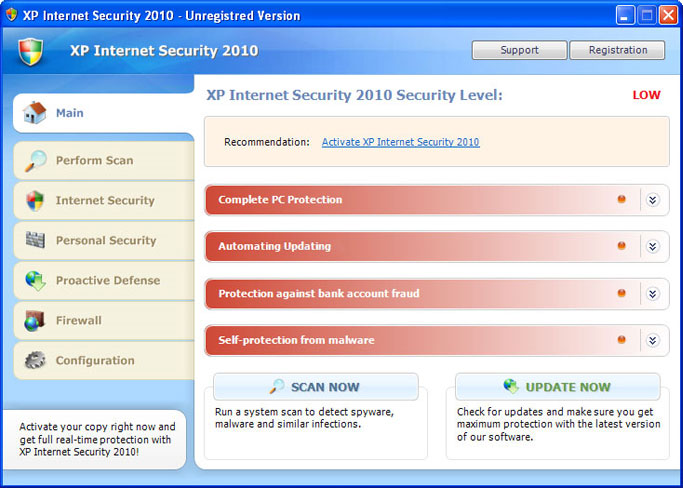
After analyzing an infected machine and having MalwareBytes turn up empty, I used Process Monitor to get a handle of what was going on behind the scenes. It led me to a suspicious executable that was only a couple hundred kilobytes, but was the culprit for the XP Internet Security 2010 process. The executable was named MSASCui.exe and has this profile at VirusTotal. The .exe along with a related file named with random characters was found in the C:Documents and Settings[username]Local SettingsApplication Data directory and was only visible by unchecking the Hide protected operating system files (Recommended) setting in Tools, Folder Options.
If you kill the MSASCui.exe process through the Task Manager, you’ll be able to delete the file and its related gibberish-named log. That will stop the Fake AV from popping up and getting in the way of further clean up. There is likely something that is starting this process up again if it were to be closed, so Registry keys and services would need to be analyzed as well. There’s also the possibility of a rootkit running in the background.
For those interested, read this news article on how malware might get on your computer while you’re just browsing around. There’s also this more technical blog article discussing PDF obfuscation. Based on my analysis, this is how you get infected:

The above picture shows the malicious executable, MSASCui.exe and its random-named counterpart in the above noted directory, the properties of the file, and the user’s browsing history. The malicious file was created at 3:18 PM, almost as soon as the user stopped doing work and went on to find more “interesting” things with Celebuzz. Interesting…
You may have to use the previously mentioned .exe fix after this infection if you are getting a message asking what do you want to use to open the .exe file.
That’s all I’ve got for now and am open to suggestions. I’m waiting for the anti-malware tools to catch up so they’ll blow these infections away and I’m hoping I’ll get to do something besides clean up infections tomorrow at work.