wordmodification There are three possible causes to this problem:
  1. The document is marked as final.
  2. The document is protected.
  3. You are using a trial of Office 2007.
" />

Home » Software »Tech Solutions » Currently Reading:

Microsoft Word: “This modification is not allowed because the selection is locked.”

January 13, 2009 Software, Tech Solutions 97 Comments

If you’re getting a message at the bottom of Word 2007, Word 2010, or other products in the Office suite whenever you try to change the document saying “This modifications is not allowed because the selection is locked.”, this article should answer your question ‘why’ and tell you how to make your document editable again.

wordmodification

There are four possible causes to this problem:

  1. The document is marked as final.
  2. The document is protected.
  3. You are using a trial of Office 2007.
  4. Office 2007 has not yet been activated.

Document is Marked as Final

You will also be unable to paste into the document. If you hover over the Paste button under the Home tab, you’ll get this error message: “This command is currently disabled. This command is not available because the document is marked as final.”

wordmodification1_2

The rest of that error message also points us in the right direction.

Click on the Office button (the circle with the office logo on it in the top-left corner) and go down to the Prepare sub-menu. In this sub-menu, you’ll see an icon next to ‘Mark as Final’ highlighted in orange. This means that it is enabled and the document is “finalized.” It won’t allow any changes to the document. It would be best practice to mark your document as final before you send it off to others for professional evaluation. This also makes the red (spelling) and green (grammar) squiggles under words go away as well as any marked changes throughout the document.

wordmodification2

Besides the ‘Mark as Final’ icon being highlighted in the Prepare sub-menu you will also notice a small version of the same icon at the bottom of Word 2007 in the status bar.

wordmodification2_2

In order to make changes, the document just needs to be “un-finalized.” Go back to the Office button -> Prepare menu and click “Mark as Final” to toggle it off. After that, the icon will now appear unhighlighted and the icon will be gone from the status bar.

wordmodification3

Document is Protected

If you are still not able to edit the document, it may be protected. Switch to the Review tab and then hit the Protect Document button to bring up a small menu.
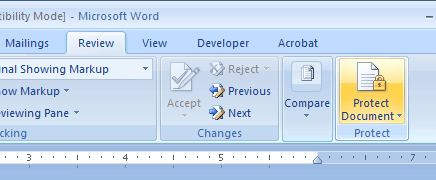
wordmodification4

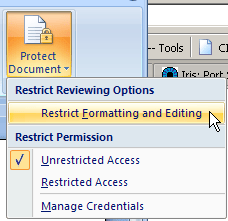
From that menu, choose Restrict Formatting and Editing.

wordmodification5

Next to the document, a little window should pop up. If at the bottom, you have a Stop Protection button, click that. If you don’t see that button but instead see a ‘Start protection‘ button, you can close this little window. This setting is not the one locking your document. You may have to enter a password in order to modify the document. You’ll need to know the password in order to stop this protection.
wordmodification6

Your trial of Office 2007 has expired.

If you’re using Office 2007 that came with your computer, likely it was only a trial and has expired. Try opening your document in the free Open Office or purchase a full version of Microsoft Office 2007. “If you have the Office Home and Student 2007 Trial preloaded on your computer, you can purchase the disc version and use the product-key to unlock and activate the preloaded trial.”

Here’s Microsoft Office 2010 Home and Student through Amazon:

From the Microsoft Office Help:

Grace period Before you enter a valid Product Key, you can run the software 25 times, which is the grace period. During the grace period, certain features or programs might be enabled that are not included in the product you have purchased. After you enter a valid Product Key, you will see only the programs and features that you have purchased.

Reduced Functionality mode After the grace period, if you have not entered a valid Product Key, the software goes into Reduced Functionality mode. In Reduced Functionality mode, your software behaves similarly to a viewer. You cannot save modifications to documents or create new documents, and functionality might be reduced. No existing files or documents are harmed in Reduced Functionality mode. After you enter your Product Key and activate your software, you will have full functionality for the programs and features that you purchased.

Office 2007 has not yet been activated.

If you’re seeing the problem in both Word and Excel, the problem is obviously Office-wide. Office 2007 may not have been activated.While you’re connected to the Internet, go to the Office button in the top-left corner and choose Word Options from the bottom of the menu.

From the new window that pops up, choose Resources on the left-hand side and then click the Activate button. This should either activate Word, say it’s already Activated (meaning this isn’t the cause of your problems), or provide more information about why it isn’t and can’t be activated.

You can also click the ‘About’ button to see the currently entered licensing information for Office 2007.


Related posts:

  1. Setting defaults in Word 2007
  2. Tab Key Does Not Change List Level in Microsoft Word
  3. Extracting Images from Microsoft Word Documents
  • Celia

    It wont allow me to select the Prepare sub-menu!!!! Wot should I do??!

  • http://www.404techsupport.com 404 Tech Support

    Hmm… I can’t seem to do anything that results in similar symptoms. If you can upload the file somewhere and send me a link, I’ll take a look at it for you.

  • Celia

    Ok…But, how do I do that?? (Sorry…)

  • http://www.404techsupport.com 404 Tech Support

    Not a problem. If you want to send it as an attachment in an e-mail I’ll take a look at it.

  • Celia

    Many thanks, I´ll do that….Where r u located??

  • http://www.404techsupport.com 404 Tech Support

    Illinois, USA.

  • Neethu

    It is not working in my system all the option in office button exept open is inactive inmy word 2007

  • http://www.404techsupport.com 404 Tech Support

    By any chance, do you have a trial of Word 2007? The trial may have expired.

  • http://www.md-training.ch Jael De Nardo

    Hi,
    My Word 2007 is a genuine version – no trial, no protection is active, no command MARK AS FINAL on … but I also get the “no modification allowed …” when I try to remove a combo box content control. If I click on the Design Mode I can delete the control but when I insert it back in the form and try to see if now I could delete it : message is back again ….
    that sounds like a real … bug to me !
    Jael

  • http://www.404techsupport.com 404 Tech Support

    Would you be willing to send the document to me and I’ll take a look at it in my Office 2007? I’ll see if I can’t figure something out or confirm it for you.

    You can send it as an attachment to [email removed]

  • Elizabeth

    The prepare button in the office menu isn’t usable, so I can’t un-finalize the paper. I also can’t use any new word documents I open, it says they’re all locked. Do you know what’s going on?

  • http://www.404techsupport.com 404 Tech Support

    Sounds like you might have the trial or an unactivated copy of Word 2007. Do you have the full version of Office 2007? Is it licensed and activated?
    http://office.microsoft.com/client/helppreview.aspx?AssetID=HA101733401033&ns=WINWORD&lcid=1033

  • Georgina Harris

    hello
    I have tried too do the steps you mentioned above but am having no luck with clicking on prepare it wont let me access
    is there any thing else i can do as this document is very important
    many thanks

  • http://www.404techsupport.com 404 Tech Support

    Georgina,

    What is the file extension for this document, .doc or .docx?
    If it is .doc, you might try opening the document in Google Docs or OpenOffice.
    AbiWord can handle .docx files: http://www.abisource.com/
    You can convert .docx files to be opened with OpenOffice.

    Try one of these other applications to see if you can open and alter your document. Perhaps, it is just something Microsoft Word is getting hung up on?

    -Jason
    http://www.404techsupport.com

  • Denise

    I need to unlock this word document and it won’t let me and my paper is due in two hours.

  • alexa

    Hi. The prepare button in the office menu isn't usable, so I can't un-finalize the paper. I also can't use any new word documents I open, it says they're all locked. I send it as an attachment to [email removed].
    Please help me!!

  • http://www.intensedebate.com/people/404techsupport 404techsupport

    Alexa,

    I was able to open the file you sent me just fine with Microsoft Word 2007. I was able to access the Prepare button, but the document was not marked as final. I was able to make edits and changes with no problem. I suspect that your trial version of Office 2007 (ships with a lot of new computers) has expired. I saved the file as a .doc (instead of the .docx) format and am sending it back to you. Try opening it again in Office and see if you are able to edit it. If not, I recommend using Open Office, a free office suite comparable to Microsoft Office. http://www.openoffice.org/

    Best of luck,
    -Jason

  • miguel

    omg!! same for me i cant access the prepare tab>> please help

  • arun

    Could you please tell me why these is coming>? how to sort it out?

    “Microsoft Word: “This modification is not allowed because the selection is locked.””

  • http://www.404techsupport.com Jason

    Are you sure you have a full, licensed, activated copy of Word 2007? Do you have this problem on any other computer with this same document? Have you tried opening this document with the free OpenOffice Writer program?

  • Sonia

    I’m also getting the same:

    “Microsoft Word: “This modification is not allowed because the selection is locked.””

    I could use these documents a few days ago, and now suddenly today, I’m not able to edit any of them. Can somebody help me please ?

  • http://www.404techsupport.com Jason

    Most likely your trial of Microsoft Word expired. Did you install Microsoft Office or did it come with your computer?

    Did you possibly save your document with the Mark as Final button as shown in the article above?

  • Jenifer

    Not one of those posts helped me at all, I need help my microsoft excel and microsoft word is saying “the modification is not allowed because the selection is locked”, someone give me an answer. It is not a trial so don’t email be back asking if it is because it’s not. Someone give me a straight answer please, this is very important, I need to type out my evaluations.

    • http://www.404techsupport.com/ Jason

      Download Open Office and try that or post your document so I can download it and I’ll see if it isn’t a setting in the file.

      With Word open. Go to the Office button and choose Word options… Go to resources and try to activate the product. If it says it’s already activated you should be good, otherwise your Office suite hasn’t been activated. Since it’s happening in Excel and Word, it’s likely that your Office suite just hasn’t been activated.

  • Debra

    For those of you having issues Jason’s response worked!!! Go to “word options” “resources” and “activate.” May not work for everyone but worked for me. Thanks Jason! You’re a lifesaver!

  • http://www.404techsupport.com/ Jason

    Thanks for the confirmation, Debra. I’ve added the tidbit from my comment into the full article.

    Have a good day!

  • Hids

    Hello there, my Ms. Word says ‘The modification is not allowed becase the selection is locked’. I don’t know what to do, and i have Ms. Word in my netbook, already in it when i bought it. I dont have the box anymore, and i don’t know what to do. Help me!

  • Hids

    But i’ve been using my Ms. Word for more than 6o days, i bought my laptop last year, and started using it eversince.

    • http://www.404techsupport.com/ Jason

      The demo is for 60 days or 25 uses. Perhaps you hadn’t used it more than 25 times.

  • http://www.404techsupport.com/ Jason

    Try activating your Word following the last method listed above. Perhaps your temporary license has been deactivated or maybe a Windows/Office Update changed it.

  • derek jostonade

    My Ms. seems like it froze. What are the signs that it expired? Can I do something to prevent it?

    • http://www.404techsupport.com/ Jason

      Freezing would be different than expiring. You can make sure your Microsoft Office is valid by opening Word and clicking the Office button. Then go to Word Options and click the ‘About’ button to see the currently entered licensing information for Office 2007.
      You only need to activate Office once, so you don’t need to do anything to prevent it from happening again.
      Adding more RAM to your computer or trying OpenOffice instead of the (getting bloated) Office 2007 might be more akin to your computer’s capabilities.
      You might try to Repair the installation by going to the Control Panel, Add/Remove Programs. Select Office, then go to Modify, and select repair. This would fix the problem if it were with the files or configuration.

  • city

    Awesome Help.two big thumbs up

  • DAN

    i tried to down load again and install the Trail version or office 2007 since the older one experies. It asks to put 25 charcater and it did accept and it says finally ‘is successfully installed’ .But when i open in my start menu word 2007 ,still i get this modification is not allowed because th selection is locked? is not that possible to use trial version many times ?

  • http://www.404techsupport.com/ Jason

    Dan,

    No, typically it is not possible to just uninstall and reinstall a trial to make it work for another 60 days. Programs typically leave information behind in the registry to prevent this.

  • Erin

    I tried wour advice but nothing works. I’ve entered my product key but it says ” the key is incorect. varifie you have the correct key, and then retype it.” I’ve doubble and tripple checked I’m typeing in the correct code but it still wont work!

  • http://www.404techsupport.com/ Jason

    Is your key the full license or the trial key? You may have to uninstall and reinstall with the full software and use your license key.

    Otherwise, I would recommend contacting Microsoft about your key issue. You can e-mail, chat, or call them from this support page:
    https://support.microsoft.com/oas/default.aspx?gprid=8753&st=1&wfxredirect=1

  • casey

    ok, so i enter a key number. Word accepted the key number yet i am still not allowed to make any modications to my word documents…what do i do know?

  • http://www.404techsupport.com/ Jason

    Is it the full key number or the trial key that came with your computer?

    If it’s a key from the software you just purchased, I would recommend uninstalling the trial software and then install the Office products you just bought using that license.

  • maria

    i tried using the word options button.. it asks for a 25-letter word password.. i have not been opening word with a password previously.. wat should i do..

  • http://www.404techsupport.com/ Jason

    The 25-letter password is actually the license key or CD key. The key is found on the case for the Office 2007 installation CD. If you don’t have the CD, most likely you have the trial that came pre-installed on your computer when you bought it.

  • Turkish

    you are the best.
    thank you very much.

  • Anya

    THANK YOU THANK YOU THANK YOU!!!!

  • Dadir

    i have this problem, i can write something on my word, but when i save it, i cant re-edit; it says “This modifications is not allowed because the selection is locked”, i tried following your guide, but nothing seems to work!and my word option is stuck on resources

  • http://www.404techsupport.com/ Jason

    Dadir,
    That seems pretty conclusive that you have the trial version of the software and the time has expired. You can either download and use the free OpenOffice or purchase Office 2007.

    Both links are above and will return your ability to edit Word documents.

  • Lisa Weightman

    Hi,
    I recently got the new Microsoft Office and it was working for over a month. Now it’s not letting me type anything on the page or click any buttons, and it comes up with “this modification is not allowed because the selection is locked”.
    I don’t believe it has expired and it’s not a trial version..

  • http://www.404techsupport.com/ Jason

    Hi Lisa,
    Your case sounds exactly like Office 2007 hasn’t been activated yet. Try following the last steps listed in the article above.

  • Hossam

    Hey I tried but …:(:(…..can i send it to u and see>>!!?

  • http://www.404techsupport.com/ Jason

    Sure, send me the document that you’re having problems with by e-mailing it as an attachment to [email removed].

  • Sophia

    i did the activation, and mine won’t let me even write on blank documents

  • maisie

    Hi I have just activated my 60 day trial today. im unable to access my doc. says it is locked. Read the previous suggestions and went to word options. When trying to activate it Im only installing for a couple of sseconds before interupted by….tempory maintenance offline try again in a few seconds or that Im not connected to the internet (but I am). I have been trying to activate it all day with out any luck. What can i do?

  • Frank

    That really helps, but when I try to activate my Microsoft Word, this message appears:

    Your product cannot be activated because the Product key used to install the software is not valid. Please uninstall and reinstall it using a valid Product key.”

    What’s a Product Key?

  • http://www.404techsupport.com/ Jason

    @Maisie
    It has likely been 60 days since the trial was installed. The counter depends on when it was installed not when it was activated. If it hasn’t been 60 days and the trial hasn’t been installed on that computer before, you should be able to call Microsoft.

    @Frank
    A product key is, in this case, a 25 character key that usually comes with a CD for the trial. You can get the key when you download the trial. Check here: http://us20.trymicrosoftoffice.com/product.aspx?sku=3203819&culture=en-us

  • Drew

    Found my trial is to run out on July 31st :) That was the reason for the lock.
    Thanks for the support.

  • Kevin

    Hi. I originally bought Word 2003, but for some reason I just got switched to Word 2007 recently, and since, I haven’t been able to do anything on word. I’m getting that message “This modifications is not allowed because the selection is locked.” But nothing on this page is working. Do you have any idea what might be wrong?

  • http://www.404techsupport.com/ Jason

    Can you elaborate on how you got switched to Word 2007? You might have to uninstall your Office 2007 and re-install your Word 2003 with its license key to get it fully functioning again as you’re used to.

    Otherwise, Office 2010 just came out so you might consider upgrading to that: http://amzn.to/a4wvLx
    It looks like Office 2007 but with lots of feedback taken into account to make it a bit closer to Office 2003.

  • http://microsoftoffice2007 pomai

    it wont let me open the protect what other option is there?

  • http://www.404techsupport.com/ Jason

    Everything listed above.

  • Nicole

    I want to paste from internet explorer into an existing word doc and keep getting “this is not a valid selection”, my 2007 is activated, access is unrestricted, what is the problem, yet if I open a new word doc and past it works fine, how do I change the setting to work in existing documents? Help Please

    • http://www.404techsupport.com/ Jason

      Existing Word docs might have been Marked as Final, meaning no final edits. You can check to see if it’s finalized under the Office button menu and Publish.

  • http://www.TheWorldFrenzy.com Jason

    Thanks for the tip. Mine expired.

    http://TechReview.LIEconomy.com

  • Andre

    is there a way i can copy the stuff i had from the trial to my computer without buying microsoft word please help i had important files

    • http://www.404techsupport.com/ Jason

      It’s your installation of Office that is locked, not your individual files. Just open them on any computer with Office installed, try your local library.
      You can also try opening the files in Google Docs or installing OpenOffice to open those files.

  • ierda

    i cant get rid of that problem. i have tried out all your ways but it failed. i had clicked on activate button but nothing was happened. fyi, i used microsoft word 2007 and i hacked it. i changed some codes in proof.xml and since then, no activation keys notification prompted out again.what’s wrong with my Word?

  • Maggie

    hi,
    I bought a new computer at the beggining of September and it came with trial version of the Office 2007, it worked fine until today now all documents are locked, as I think my trial period is 60 days it might be something to do with the activation but the problem is that I don’t have the product key to complete the activation, where can I find this?

    • http://www.404techsupport.com/ Jason

      Maggie,

      You’ll have to buy a product key in order to use it. I would recommend getting the Office 2010 Home and Student package from Amazon. It’s the cheapest option and the latest version that will allow you to access all your documents again.

      Here’s a link to it on Amazon: http://404ts.com/office2010

  • Ben

    The cd we hav is not a trial. We have used it to successfully install Microsoft word 2007 on 2 other computers. It has worked fine for them. However, on this particular computer, it is not working and keeps insisting that the key we have for it is incorrect. We have checked, double-checked, and triple-checked it. We can’t figure out why it worked on the other computers, but not this one. Do you know what could be wrong?

  • xx-harry-xx

    hey dude my product key for microsoft office 07 isnt working and ive followed all of your steps can you suggest anything else??? it keeps saying that the key is incorrect…. and i have checked several times i dont know what to do and i need it for my assignments D’:

  • xx-harry-xx

    hey @ ben put in the cd and reinstall the whole microsoft office then your code should work i just tried it now and it accepted the product key

  • Jade

    Okay, Most of the things in the Office key are unable to click. I remember clicking somthing in a seprate window when my microsoft froze. It’s on somthing like ‘Read’? I need help!

  • Davidnotgoliath

    I only get this error message in the vertical comments bar that appears when I am looking in the “Final” version of the document (document not marked as final, just in the reviewing pane). I don’t think that the solutions apply. Any suggestions anyone.

    David

    • http://www.404techsupport.com/ Jason

      Can you provide a screenshot? You can upload the image to http://imgur.com and post the link here.

  • Piglet

    Help … I’m on a Netbook, and i’m trying to activate my Word … however, it won’t let me type in certain numbers/letters when I try! Help?!?

  • magnehelic gauge

    I have office 2010 now and I had this problem once when I tried opening a file I downloaded from the net. But lucky, office 2010 was smart enough to popup and ask “do you want to enable editing?” :D

  • Court

    k so i had a trial version that i got from school, a long time ago and now i think the trial is up. i’ve tried using a new product key and they say that they work but when i try to open a document it opens it, but i can’t do anything to it. i can’t edit it or anything. how do i get this to work without paying $150 for the program?

    • http://www.404techsupport.com/ Jason

      In order for the new product key to take effect, you may have to uninstall your current Microsoft Office suite and reinstall it. When prompted for the product key, enter your new product key.

      That’s what I would try first.

      Otherwise, you can get the Microsoft Office 2010 Home and Student edition for $117 from Amazon.

  • Ram parso

    I tried everything for unlocking this stupid modification but it freezes

  • kyle yaroch

    I don’t have an office button and I have a 2003 version of word…What do I do

  • kyle yaroch

    sorry never mind i just activated office and it works fine

  • Shelbie

    i have a problem. my microsoft word has been activated, it hasnt expired, and i dont know what else to do. it still says whatever selection i open up is locked.

  • Amanda

    im downloading free office i hope it works

  • connor

    hey ive tried all of ur stuff however it keeps insisting on saying that and it wont let me type or click on anythin and i have a project due tomorrow. please help fast!!!!!!!!!!!!!

  • cosmin

    This solved my problem. Clicking the Mark as Final to remove the write protection did the job.
    Thanks!

  • kankan

    i dont want to buy office..but modifications have frozen…n i cnt do anyting with my documents…..i have a key,which they asked during installation..it worked fine dan..but whe i tried to activate it,it says product key invalid..what should i do?

  • Ella

    hi how should i do my product i cant not aceptted why your so bobo i can get ir..sorry im tired na kasi ako eh..i using tagalog u understand plz give the product key on me answer meeeeeeeeeeeeeeeeeeee..plz lang bigay mo na plz//..shut shut shut tae tae..plz im sorry im tired alredy

  • http://www.bestwebhostingcnet.com owen

    i cant edit and copy using MS word….any method to activate it ??

  • Jane

    I’m getting the same problem, only none of the above criteria are true. Fully licensed and activated versions of Office 2007 with the latest service pack, and not marked final or in a protected document. The problem is happening in an unprotected section of a form, which ostensibly allows any sort of edits. The error is occurring when we try to change styles in the unprotected section only.

    Interestingly enough, when the template is opened in Word 2010, the problem does not exist. I am curious as to an answer, as my client does not work in Word 2010, and they aren’t upgrading in the near future.

  • suraj

    sorry never mind i just activated office and it works fine

  • ugwancy

    thanks for this info, it resolved the problem with my word 2007. Many Thanks!

  • tingyu

    i can’t find my microsoft office student 2007 case i only have the disc now so i don’t have product key to activate pls help what can i do it’s full version.

  • http://www.cuocsongonline.com Kien Hoang

    Great article! Very self-explanatory – really helped me out. Thank you.

  • Melanie Hicks

    MS Office is a JOKE. I bought it for school. The school sent it to me along with a laptop they furnished. I paid for the MS Office 2007out of my own pocket. I ended up having to send 3 laptops back into them because of malfunctions and they replaced each one….HOWEVER, when I go to use MS Word on this new computer….I CANT because of some f*cked up user agreement only allowing it on so many computers? WTF? Theyre telling me I need to buy ANOTHER copy of MS Word, or another “package???” SCREW THEM…this cost me enough as it is and it wasnt even my fault it had to be reinstalled on every new computer the school sent me. RIDICULOUS….AS IF BILL GATES ISNT ROLLING IN DOUGH, HE HAS TO CHARGE MORE?????? GREED IS A NASTY NASTY quality to possess. What comes around goes around…karma Mr. Gates…KARMA!!!

  • Parth

    I got a comment that “selection is locked” in my microsoft word 2007

  • Micki

    Thanks you so much, have been on this issue for ages.

  • Neil Conniff

    Save it as an Word 2003 doc. Then open it back up again in 2007 and you should be able to edit and save it as normal.

  • http://www.facebook.com/profile.php?id=528536806 Somayeh Kashi

    I tried the activation button but nothing happens!

Comment on this Article:


Sponsors

Keytech Managed Services
Keytech provide Managed IT services to ensure your valuable data and network are protected and running to an optimal level.

Dedicated Server Hosting
BODHost.com offers a wide range of managed dedicated servers with 100% uptime and 24x7 dedicated support.

Do It Smarter Managed IT Services
Do-It-Smarter Managed IT Services - Managed backup, hosted email, systems management, network audits, managed security & disaster recovery.