• Home
  • About 404TS
  • Contact

404 Tech Support

Where IT Help is Found

  • Articles
    • Code
    • Entertainment
    • Going Green
    • Hardware, Gadgets, and Products
    • Management
    • Network
    • News
    • Operating Systems
    • Security and Privacy
    • Software
    • System Administration
    • Talking Points
    • Tech Solutions
    • Web
    • Webmaster
  • Reviews
  • Media
    • Infographics
    • Videos
  • Tech Events
  • Tools
    • How do I find my IP address?
    • Browser and plugin tests
  • Get a Technical Consultation
You are here: Home / Media / Power Search Gmail With Advanced Operators

Power Search Gmail With Advanced Operators

2011-04-08 by Jason

Along with its large e-mail quota and clean interface, one of Gmail’s primary strengths is its search abilities. With this tool built-in, it makes organizing your inbox an easier problem to solve. You can use the power of search at any time to find a message you’re looking for or as part of a filter to automate some tasks. I was hoping to be able to forward some e-mails from my personal Gmail into my newer Google Apps account but Gmail won’t forward old e-mails.

The thing that really matters is getting the syntax of the search right. Once you have it correct, you can create a filter or just perform a search from the top of the Gmail. Click the Create Filter link at the top, next to search.

To search by label, put this query in the box  label:LabelName or if the label has multiple words put a dash between words like label:Label-Name. You can also search by a message’s status with is:starred. You can search for phrases in an e-mail with quotes, whether an e-mail has an attachment, or even a specific filename. The location can be important to search by as well which you use in:inbox, in:trash, or in:anywhere. To view all the unread messages in your inbox, you can target those messages with the query label:unread label:inbox.

You can also use the hyphen before one of these operators to exclude items that match that from the search results.  For example, searching for -label:inbox will give you all mail except that which is in the Inbox.

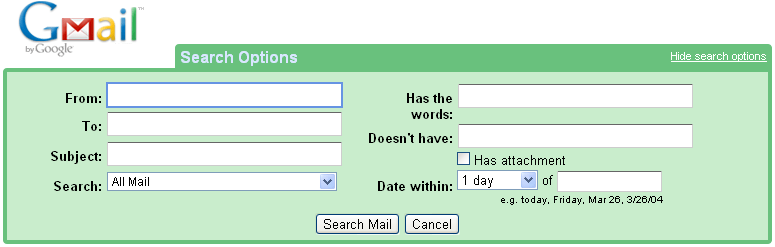
If you click the “Show Search Options” link next to the search box, it gives you an advanced search so you don’t have to memorize the operators. If you use the Search Options, you can search for labels by putting the query label:LabelName in the “Has the words:” field.
You can find all of the other operators Gmail search understands, their definitions, and examples, on the Gmail Help Page for Using Advanced Search.

Filed Under: Media

Trending

  • Make Your Firefox Search Engine use Google’s SSL (https) Search for Security Reasons
    In Media, Security and Privacy, Software
  • Product Review: WD TV Live Hub
    In Entertainment, Hardware, Gadgets, and Products, Reviews
  • HP’s Martin Fink updates The Machine
    In Hardware, Gadgets, and Products, News

Latest Media Posts

Find Out Where To Download SNES ROMs

Find Out Where To Download SNES ROMs

Multifunctional Video Conversion Tools – Wondershare Video Converter

Multifunctional Video Conversion Tools – Wondershare Video Converter

  • Popular
  • Latest
  • Today Week Month All
  • Access to the resource [servershare] has been disallowed Access to the resource [servershare] has been disallowed
  • Windows Server 2012: Installing Active Directory Users and Computers and Group Policy Management Console Windows Server 2012: Installing Active Directory Users and Computers and Group Policy Management Console
  • Setup your DFS namespace with DNS for compatibility in a mixed environment Setup your DFS namespace with DNS for compatibility in a mixed environment
  • How to ‘Unblock’ multiple files at a time with PowerShell How to 'Unblock' multiple files at a time with PowerShell
  • Read the Event Logs on Windows Server Core Read the Event Logs on Windows Server Core
  • How Virtual Reality Supports Mental Health Therapy How Virtual Reality Supports Mental Health Therapy
  • Key Strategies of Successful Coin Listing on Exchange Key Strategies of Successful Coin Listing on Exchange
  • Keeping Your Mac Healthy: A Comprehensive Guide to Maintenance and Troubleshooting Keeping Your Mac Healthy: A Comprehensive Guide to Maintenance and Troubleshooting
  • Making Distributed Software Development Work: Strategies and Best Practices for Managing Remote Teams Making Distributed Software Development Work: Strategies and Best Practices for Managing Remote Teams
  • customer contactless payment for drink with mobile phon at cafe counter bar,seller coffee shop accept payment by mobile.new normal lifestyle concept The Latest Innovations In Payment Technology
Ajax spinner

Elevator Pitch

404 Tech Support documents solutions to IT problems, shares worthwhile software and websites, and reviews hardware, consumer electronics, and technology-related books.

Subscribe to 404TS articles by email.

Recent Posts

  • How Virtual Reality Supports Mental Health Therapy
  • Key Strategies of Successful Coin Listing on Exchange
  • Keeping Your Mac Healthy: A Comprehensive Guide to Maintenance and Troubleshooting

Search

FTC Disclaimer

404TechSupport is an Amazon.com affiliate; when you click on an Amazon link from 404TS, the site gets a cut of the proceeds from whatever you buy. This site also uses Skimlinks for smart monetization of other affiliate links.
Use of this site requires displaying and viewing ads as they are presented.

Copyright © 2026 · Magazine Pro Theme on Genesis Framework · WordPress · Log in