• Home
  • About 404TS
  • Contact

404 Tech Support

Where IT Help is Found

  • Articles
    • Code
    • Entertainment
    • Going Green
    • Hardware, Gadgets, and Products
    • Management
    • Network
    • News
    • Operating Systems
    • Security and Privacy
    • Software
    • System Administration
    • Talking Points
    • Tech Solutions
    • Web
    • Webmaster
  • Reviews
  • Media
    • Infographics
    • Videos
  • Tech Events
  • Tools
    • How do I find my IP address?
    • Browser and plugin tests
  • Get a Technical Consultation
You are here: Home / Media / Bing’s Webmaster Tools

Bing’s Webmaster Tools

2010-07-21 by Jason

Bing has announced on the Bing blog (and it’s corroborated on the Yahoo! Search blog yesterday) today that the testing with Yahoo! implementing Bing search results is underway. Of greater importance to webmasters and SEO experts, Bing is warning/encouraging webmasters to investigate how their site is showing up in search results using the newly updated Bing Webmaster Tools, also announced today.

During this testing phase, it’s important to look at how your site is showing up in search results on Yahoo! and Bing today, so you can assess if there are any tweaks you need to make or feedback you need to share with the team to make sure your site is accurately represented in Bing’s results.

In particular, now is a good time for you to review your crawl policies in your robots.txt and ensure that you have identical polices for the msnbot/Bingbot and Yahoo’s bots.

With a Windows Live account in hand, you can access the updated Bing Webmaster Tools and check your traffic, crawling, and keyword performance. The new tools take advantage of and requires Microsoft Silverlight 4 for charting and graphs before you can get in. You’ll be prompted to install Silverlight if you don’t have it and you’ll have to restart your browser if you install Silverlight.

Once you’ve met the prerequisites, you’ll be able to get in and see the Dashboard. This gives you a quick summary of Pages Crawled, Pages Index, Pages with crawl errors, and impressions and click-throughs from the search results.
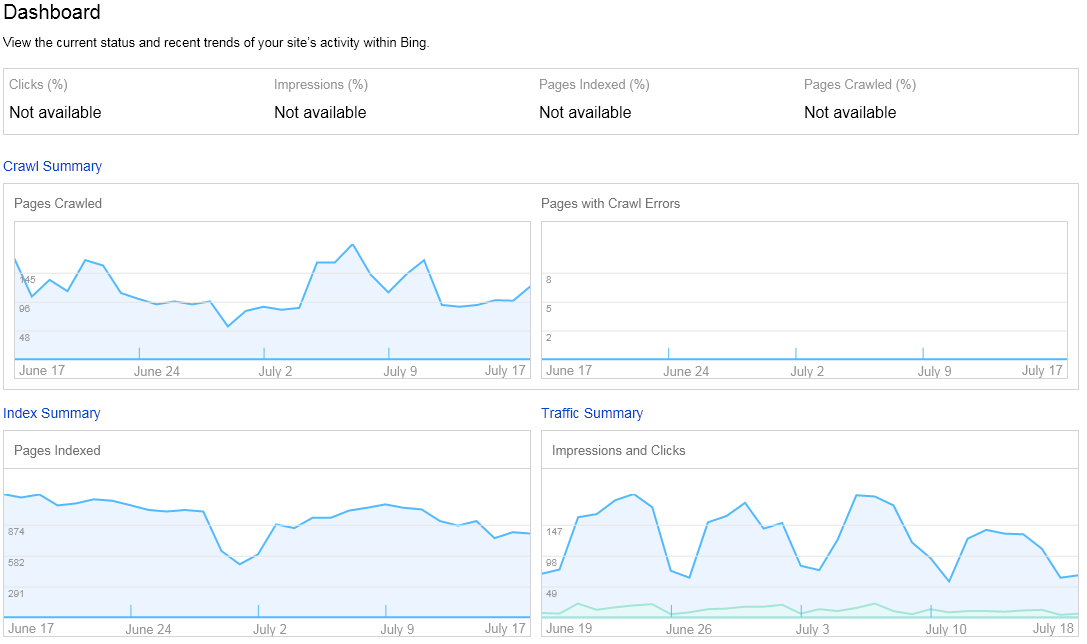
You can then zoom in on each of these areas by using the tabs at the top. Under the Crawl tab, you can submit your Sitemaps and Crawl details. This can reveal any HTTP return codes 400-599, 301 or 302 redirects, malware detections, and files excluded by a robots.txt on your server.
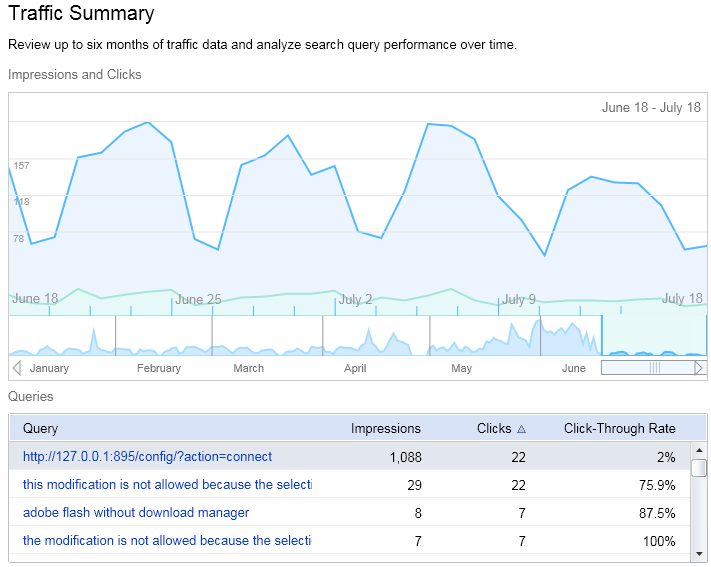
Despite the update, I still find Google’s Webmaster Tools more useful. With the Google XML Sitemaps plugin for WordPress, my sitemap is automatically submitted to Google, Bing, Ask.com, and Yahoo! so I’m not too concerned about trying to drive more traffic to my site using Bing. However, it’s good to verify that Bing was not having any problems crawling 404 Tech Support.

Filed Under: Media, Webmaster

Trending

  • 10 Signs of an IT Noob
    In Talking Points, Tech Solutions
  • Malwarebytes Anti-Malware 2.0 released
    In Security and Privacy, Software
  • Ultimate Ears introduces the UE Roll 2
    In Featured, Hardware, Gadgets, and Products

Latest Media Posts

Find Out Where To Download SNES ROMs

Find Out Where To Download SNES ROMs

Multifunctional Video Conversion Tools – Wondershare Video Converter

Multifunctional Video Conversion Tools – Wondershare Video Converter

  • Popular
  • Latest
  • Today Week Month All
  • Access to the resource [servershare] has been disallowed Access to the resource [servershare] has been disallowed
  • Windows Server 2012: Installing Active Directory Users and Computers and Group Policy Management Console Windows Server 2012: Installing Active Directory Users and Computers and Group Policy Management Console
  • Setup your DFS namespace with DNS for compatibility in a mixed environment Setup your DFS namespace with DNS for compatibility in a mixed environment
  • How to ‘Unblock’ multiple files at a time with PowerShell How to 'Unblock' multiple files at a time with PowerShell
  • Read the Event Logs on Windows Server Core Read the Event Logs on Windows Server Core
  • How Virtual Reality Supports Mental Health Therapy How Virtual Reality Supports Mental Health Therapy
  • Key Strategies of Successful Coin Listing on Exchange Key Strategies of Successful Coin Listing on Exchange
  • Keeping Your Mac Healthy: A Comprehensive Guide to Maintenance and Troubleshooting Keeping Your Mac Healthy: A Comprehensive Guide to Maintenance and Troubleshooting
  • Making Distributed Software Development Work: Strategies and Best Practices for Managing Remote Teams Making Distributed Software Development Work: Strategies and Best Practices for Managing Remote Teams
  • customer contactless payment for drink with mobile phon at cafe counter bar,seller coffee shop accept payment by mobile.new normal lifestyle concept The Latest Innovations In Payment Technology
Ajax spinner

Elevator Pitch

404 Tech Support documents solutions to IT problems, shares worthwhile software and websites, and reviews hardware, consumer electronics, and technology-related books.

Subscribe to 404TS articles by email.

Recent Posts

  • How Virtual Reality Supports Mental Health Therapy
  • Key Strategies of Successful Coin Listing on Exchange
  • Keeping Your Mac Healthy: A Comprehensive Guide to Maintenance and Troubleshooting

Search

FTC Disclaimer

404TechSupport is an Amazon.com affiliate; when you click on an Amazon link from 404TS, the site gets a cut of the proceeds from whatever you buy. This site also uses Skimlinks for smart monetization of other affiliate links.
Use of this site requires displaying and viewing ads as they are presented.

Copyright © 2026 · Magazine Pro Theme on Genesis Framework · WordPress · Log in