GetPlus is a download manager that a lot of people using Firefox may have encountered when installing Adobe Reader. GetPlus acts as a plug-in for your browser to download and install software and updates to that same software.
From their webpage:
Our getPlus Download-, Upload- and Installation Manager and igetPlus (for Mac OS) are sophisticated tools for an efficient distribution of digital goods.Download transactions should always be user-friendly, short and secure. Due to its unique features, getPlus fulfills these requirements of a successful electronic distribution of digital goods.
While some might sing its praises, I (and the commenters on that post) strongly disagree with errors abounding from the experience. It seems to fail the ‘user-friendly’ part of its description from my experience.
A user reported that they were getting a ‘Run As…’ prompt frequently while they were on the computer. Through asking them about the problem, I slowly deduced that it was only occuring as a result of browsing the web and more specifically, using Mozilla Firefox. It seems these prompts popped up each time Firefox was opened or even when a new window was opened.
Fearing something malicious, I began the investigation for anything suspicious. All I had to do was open a new window in Firefox and, seconds after being on the case, I had my first clue.

The most telling thing about this prompt, since nowhere am I told what wants to run as an administrator, is the icon for the Run As window in the task bar.
I started up the trusty Process Explorer. Where I see more information to tie the icon for the Run as prompt to the process causing it and then eventually the culprit.

Hmm… getPlus_Adobe_reg_. getPlus(R) Download. After doing a little searching on the web I found the above explanation about this little piece of code.
From their webpage again:
getPlus® is the most powerful download agent in the market, acting on your customers’ machines on your behalf making possible various automated interactions (e.g. ability to pass parameters, read out information on client side, automated installation of your software, sign-off as proof of delivery after download is completed successfully).
Acting on my machine, on Adobe’s behalf. No thanks.
To disable the process in Firefox, go to Tools, Add-ons and switch to the Plugins “tab”. Scroll down to the getPlus for Adobe 15229 (may vary) and hit the Disable button.
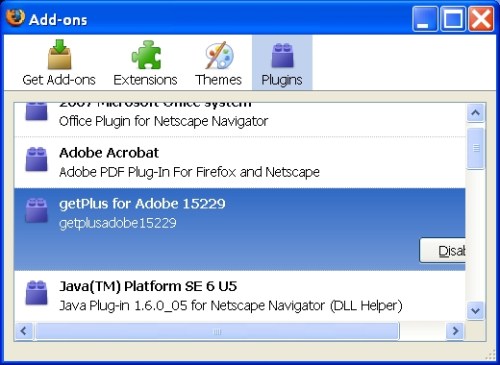
Restart Firefox and the annoying prompts should go away. I’ll stick to downloading and installing software myself. You may have to visit Adobe with other browsers to get the option to download the usual executable (.exe).
Update: A better way of installing Adobe Reader when using Firefox as your browser – When the add-on install prompt for Firefox pops up, cancel from that and click the link on the page for the download that did not work. This will allow you to download the setup executable and install the product like normal. No GetPlus will be involved.
Update 9-10-09: Despite complaints and user problems with GetPlus, Adobe has spread its use to Adobe Flash recently as well.
You should uninstall the GetPlus Add-on from Firefox and click the ‘If it does not start, click here to download’ link to get the original, full executable to install Adobe Flash.
Update 9-11-09: How to get Adobe Flash and Adobe Reader without GetPlus in Mozilla Firefox article.