Home » Media » Currently Reading:

Google Calendar Rolls Out Appointment Slots

June 6, 2011 Media 12 Comments

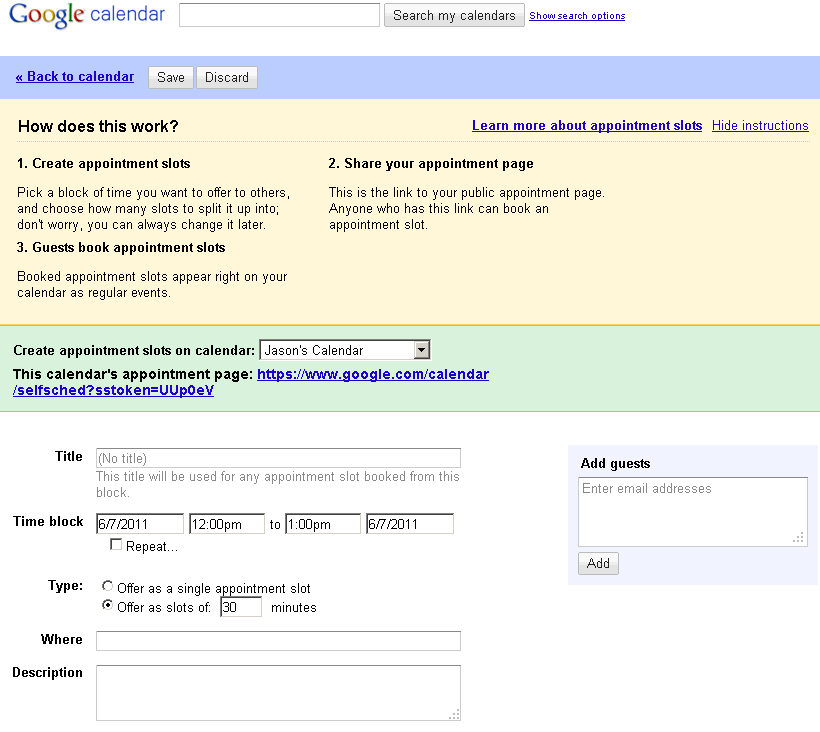
Google Calendar has debuted a new feature this morning that allows others to schedule an appointment on your calendar. You can create an appointment slot on your calendar for a certain amount of time and then decide how many slots it is split into. You can then allow others to book appointments that work for them directly on your calendar.

When you create a new event on the calendar, you have the option to create an event or an appointment slot. If you choose appointment slots and look at the details, you’ll see some options you can configure as to how to divide up the block into appointments. You can also choose which calendar the appointment slot is made on. You’re provided with a long URL for your calendar’s appointment page which you can link to or share with others.
Appointment slots are color coded with diagonal stripes running across them on your calendar.

From your public appointment page, your public events can be seen and your appointment slots have buttons next to them, allowing visitors to book a slot. Clicking the button will also copy the event to their calendar. To cancel an appointment, as the page says, you just delete the event from your calendar.

Appointment slots are an interesting new feature that could be cleverly used a few different ways but it might take a little experimenting to see its true potential. A Google Calendar Help page provides more help on using Appointment Slots in your Google Calendar.

Update: Google has updated the Google Calendar Help page link with content. Appointment slots were also announced on the Gmail blog and Official Google Enterprise blog. Appointment slots are being rolled out to Google Calendar users over the next few days, so don’t be surprised if you don’t see it right away.


Related posts:

  1. Google Calendar Sync – Sync Google Calendar and Outlook
  2. Google Updates Google Calendar’s Look, Adds Scheduling Assistant
  3. Google Gadgets, For Adult Eyes Only?
  • Karen

    The ‘public’ appointment page is not really public yet… I have tried to access it while logged off from my Google account, and it asks me to log in to set the appointment…

    • http://www.404techsupport.com/ Jason

      It requires the person setting an appointment be logged into their Google Calendar so it can set the appointment on both calendars. It’s just how it identifies the scheduler for making the appointment.

      It’s built with the assumption that everybody has a Google Calendar account or if they want to use this feature, they’ll sign up for one.

  • faryal

    My google cal. isn’t giving me an option for the new appointment slot feature. It was showing this morning but now it’s not there. What happened?

    • http://www.404techsupport.com/ Jason

      You’ve got me. My ability to use Appointment Slots has also been removed. Perhaps its part of the gradual roll-out or maybe a bug was found that they’ve had to roll-back to correct. So far, there’s no news of the roll-back on the official Google blogs.

  • http://www.appogee.co.uk Tom at Appogee

    Just experimenting with this today. Does my calendar need any share settings? Whenever I give someone the link to the webpage it generate it takes them to the Google.com page. Despite them being in my domain or now.

    • http://www.404techsupport.com/ Jason

      I have my calendar shared with a few people but it is not public, so you shouldn’t have to change your share settings.

      As Faryal and I commented earlier, Google has removed our access to appointment slots, so perhaps that explains why your appointment page is redirecting currently.

  • http://www.michaeljsonntag.com Michael J. Sonntag

    Mine is not working for my apps account yet, but it’s still there for my regular Gmail account. The one thing is was surprised to see is that if you put in large blocks of time, the events that overlap those appointment slots don’t really block out the time on the public appointment slots calendar (ala Tungle) – so it would require a lot of manual adjust for each appointment that you put on your calendar that might conflict with the appointment slots. It’d be better if they allowed you to pick which calendar(s) could block out times.

  • Dave Dalgliesh

    Another waste of time with google Apps. When will google roll out a service that works. The appointment slot link has disappeared. What a joke.

    • http://www.404techsupport.com/ Jason

      Hmm… the appointment slots have actually returned for both my Google and Google Apps accounts. I’m not sure where the feature went but it appears to be getting rolled out again.

  • http://ResonanceHealing.blogspot.com RA

    I have tried everything I have read to keep my private calendar from bleeding over to the public appointment calendar for my business – no luck! I even set up a completely new account and it still bled over to and from my private calendar, even when I was signed out of my private calendar! Google really shouldn’t say it will keep private info private when it doesn’t!

  • Leigh

    I do not get the appointment slots feature in the pop-up window. I am an instructional technology specialist and would really like to start using this feature. My district is a Google Apps school and my coworkers have the feature, but I do not. I am sad. :(

  • M

    The ‘marketing’ on this is rather obscure. It’s promoted as a way of allowing public access to appointment slots (“incorporate it on your website”, “your hairdresser could publish appointment slots”) but, erm, it doesn’t seem to work unless you have a Google Account.
    Odd.
    Limited use.

Comment on this Article:


Sponsors

Keytech Managed Services
Keytech provide Managed IT services to ensure your valuable data and network are protected and running to an optimal level.

Dedicated Server Hosting
BODHost.com offers a wide range of managed dedicated servers with 100% uptime and 24x7 dedicated support.

Do It Smarter Managed IT Services
Do-It-Smarter Managed IT Services - Managed backup, hosted email, systems management, network audits, managed security & disaster recovery.